FilterControl.ShowOperandTypeIcon Property
Gets or sets whether a user can swap the second operand’s type (between the Value box and Field list). The Field list allows users to compare the first operand (field) with another field.
Namespace: DevExpress.XtraEditors
Assembly: DevExpress.XtraEditors.v25.2.dll
NuGet Package: DevExpress.Win.Navigation
Declaration
[DefaultValue(false)]
[DXCategory("Appearance")]
public bool ShowOperandTypeIcon { get; set; }Property Value
| Type | Default | Description |
|---|---|---|
| Boolean | false | true, to allow end-users to swap the second operand’s type; otherwise, false. |
Remarks
If the ShowOperandTypeIcon property is set to true,
the Filter Control displays an additional icon ( ). It allows users to switch the second operand’s type between the Value box and Field list.
- Value box - Allows a user to type a value or select a value from a dropdown value list.
- Field list - Displays a dropdown list of available fields. This mode allows users to compare the first operand (field) with values of another field.
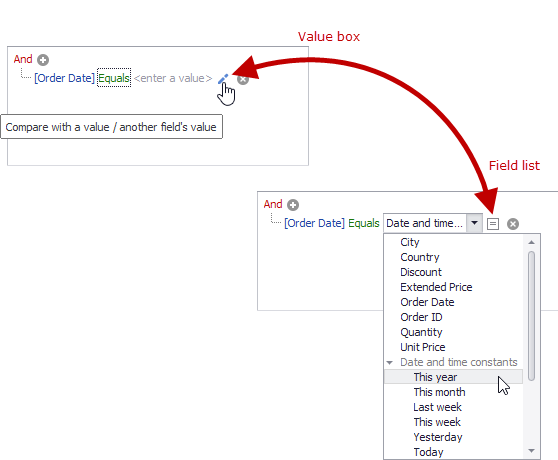
When the first operand is a date-time field, the Field list also displays the Date and time constants sub-menu with a set of predefined date constants (This year, Today, etc.). Users can select a date-time constant to check if the first operand falls into a specific date range. The FilterControl.ShowDateTimeConstants property specifies the availability of these date-time constants.
Users can also switch the second operand’s type with the CTRL+Q shortcut.