DateEdit.DrawItem Event
Fires when a day cell in the drop-down calendar is about to be painted. Handle this event to paint day cells.
Namespace: DevExpress.XtraEditors
Assembly: DevExpress.XtraEditors.v26.1.dll
NuGet Package: DevExpress.Win.Navigation
Declaration
Event Data
The DrawItem event's data class is CustomDrawDayNumberCellEventArgs. The following properties provide information specific to this event:
| Property | Description |
|---|---|
| BackgroundElementInfo | Gets or sets the skin element that is used to paint the background of the currently processed cell. |
| Bounds | Gets the painted element’s bounding rectangle. |
| ContentBounds | Gets the bounds of the cell’s content (text). |
| Date | Gets the painted cell’s value. This property is obsolete. Use the DateTime property instead. |
| DateOnly | Gets the painted cell’s DateOnly value. |
| DateTime | Gets the painted cell’s DateTime value. |
| Disabled | Gets whether the painted cell is disabled. |
| Highlighted | Gets whether the currently processed cell is under the mouse cursor. |
| Holiday | Gets whether the painted cell corresponds to Saturday or Sunday. |
| Inactive | Gets whether the painted cell belongs to the previous or next month. |
| IsPressed | Gets whether the cell is currently pressed. |
| IsSpecial | Gets whether the cell corresponds to a “special” date. |
| Selected | Gets a value indicating whether the processed day number cell is selected. |
| State | Gets the current cell’s state. |
| Style | Gets the painted date cell’s appearance settings. |
| Today | Gets whether the painted cell corresponds to Today’s date. |
| View | Gets or sets the current View of data in the dropdown window. |
| ViewInfo | Contains information used for painting the current cell. |
Remarks
Handle the DrawItem event to customize the appearance of individual day cells (for example, to highlight specific dates or display custom icons).
Event parameters include:
e.DateTime/e.DateOnly— the date being renderede.Cache/e.Style— DevExpress painting helperse.Graphics— the GDI+ graphics object for custom drawing
Set the e.Handled event parameter to true to override the default painting.
Note
If you use methods introduced by e.Cache or e.Style, call the DevExpress.Utils.Paint.XPaint.ForceGDIPlusPaint static method at application startup to ensure correct rendering on all supported operating systems.
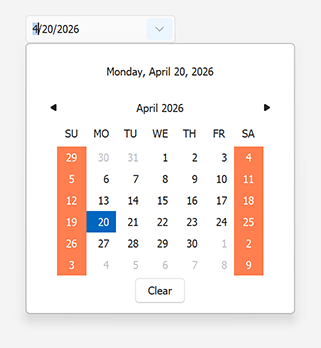
The following code snippet highlights dates that fall on a weekend:
using System.Drawing;
using DevExpress.Utils;

dateEdit.DrawItem += (sender, e) => {
    if (e.Date.DayOfWeek == DayOfWeek.Saturday || e.Date.DayOfWeek == DayOfWeek.Sunday) {
        e.Cache.FillRectangle(Brushes.Coral, e.Bounds);
        e.Cache.DrawString(
            e.Date.Day.ToString(),
            e.Style.Font,
            Brushes.White,
            e.ContentBounds,
            new StringFormatInfo(
                new StringFormat() {
                    Alignment = StringAlignment.Center,
                    LineAlignment = StringAlignment.Center }));
        e.Handled = true;
    }
};
The following screenshot illustrates the result:
The DrawItem event is equivalent to RepositoryItemDateEdit.DrawItem.