Measurements.CreateRuler(RulerType, IList<CoordPoint>, MapRulerStyle) Method
Creates a ruler with the specified style and type to measure the distance or the area between coordinate points passed as the second parameter.
Namespace: DevExpress.XtraMap
Assembly: DevExpress.XtraMap.v26.1.dll
NuGet Package: DevExpress.Win.Map
Declaration
public MapRuler CreateRuler(
    RulerType rulerType,
    IList<CoordPoint> points,
    MapRulerStyle style
)Parameters
| Name | Type | Description |
|---|---|---|
| rulerType | RulerType | The type of the created ruler. |
| points | IList<CoordPoint> | Coordinate points between which the ruler measures the distance or area. |
| style | MapRulerStyle | The ruler style. |
Returns
| Type | Description |
|---|---|
| MapRuler | The created ruler. |
Remarks
Use an instance of the MapRulerStyle class to define style options.
The following example creates a distance ruler with the specified style:
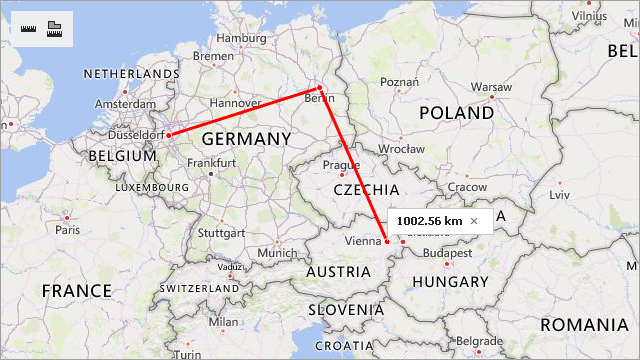
MapRulerStyle style = new MapRulerStyle();
style.Stroke = Color.Red;
style.StrokeWidth = 3;
MapRuler ruler1 = mapControl1.Measurements.CreateRuler(RulerType.Distance,
                                                      new List<CoordPoint>() {
                                                          new GeoPoint(51.2217200, 6.7761600), // Dusseldorf
                                                          new GeoPoint(52.520008, 13.404954),  // Berlin
                                                          new GeoPoint(48.20849, 16.37208)   // Vienna
                                                      }, style);
Related API members:
Name | Description |
|---|---|
| Creates a ruler with the specified style. |
Contains ruler style options. | |
Gets or sets the ruler’s outline color. | |
Gets or sets the ruler’s outline width. |