TabForm.TabFormControl Property
Gets or sets the TabFormControl integrated in the TabForm.
Namespace: DevExpress.XtraBars
Assembly: DevExpress.XtraBars.v26.1.dll
NuGet Package: DevExpress.Win.Navigation
Declaration
[Browsable(false)]
[DefaultValue(null)]
public TabFormControl TabFormControl { get; set; }Property Value
| Type | Default | Description |
|---|---|---|
| TabFormControl | null | A TabFormControl integrated with the form. |
Remarks
The TabFormControl property accesses the TabFormControl associated with the current TabForm.
A TabFormControl defines the visual and functional structure of a tabbed form. It hosts tab pages and custom buttons.
Example
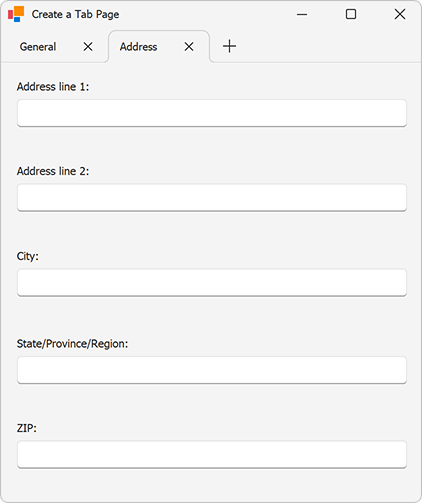
The following code snippet uses the TabFormControl property to manage tabs in a TabForm. The TabForm and the XtraUserControl are created at design time.
- Accesses the
TabFormControlintegrated with the form and adds a new TabFormPage to itsPagescollection. - Assigns a
TabFormContentContainerto the page and displays a custom user control inside the tab. - Uses the
TabFormControl.SelectedPageproperty to activate the page at runtime.
using DevExpress.XtraBars;
using System.Windows.Forms;

namespace DXApplication
{
    public partial class Form1 : TabForm
    {
        TabFormPage page;
        TabFormContentContainer container;
        public Form1()
        {
            InitializeComponent();

            // Initialize a container for the page content.
            container = new TabFormContentContainer()
            {
                Dock = DockStyle.Fill
            };

            // Add a user control to the content container.
            container.Controls.Add(new XtraUserControl1() { Dock = DockStyle.Fill });

            // Create a tab page and associate it with the content container.
            page = new TabFormPage()
            {
                Text = "Address",
                ContentContainer = container
            };

            // Add the page to the TabFormControl.
            this.TabFormControl.Pages.Add(page);

            // Activate the page when the form loads.
            this.TabFormControl.SelectedPage = page;
        }
    }
}
The following screenshot illustrates the result:
See Also