DateEditTimePickerStyleSettings Class
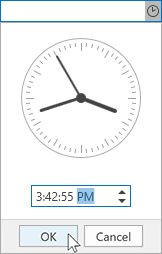
Defines the appearance and behavior of a date editor with a time picker in the editor’s drop down.
Namespace: DevExpress.Xpf.Editors
Assembly: DevExpress.Xpf.Core.v26.1.dll
NuGet Package: DevExpress.Wpf.Core
Declaration
Remarks
A DateEditTimePickerStyleSettings object defines the time editor operation mode. In this mode, the DateEdit‘s drop down displays a time picker.
Tip
For the complete list of the DateEdit control operation modes, see DateEdit operation modes.
Example
<dxe:DateEdit
    Mask="T"
    MaskUseAsDisplayFormat="True"
    MinValue="02/28/2019"
    MaxValue="02/20/2020">
    <dxe:DateEdit.StyleSettings>
        <dxe:DateEditTimePickerStyleSettings />
    </dxe:DateEdit.StyleSettings>
</dxe:DateEdit>
Related GitHub Examples
The following code snippet (auto-collected from DevExpress Examples) contains a reference to the DateEditTimePickerStyleSettings class.
Note
The algorithm used to collect these code examples remains a work in progress. Accordingly, the links and snippets below may produce inaccurate results. If you encounter an issue with code examples below, please use the feedback form on this page to report the issue.