FilterControlOperationVisibilityEventArgs.FunctionType Property
Gets a function-based comparison operator type.
Namespace: DevExpress.Web
Assembly: DevExpress.Web.v26.1.dll
NuGet Package: DevExpress.Web
Declaration
Property Value
| Type | Description |
|---|---|
| FunctionOperatorType | An enumeration value. |
Available values:
| Name | Description |
|---|---|
| None | The function type is not specified. |
| Custom | Identifies a custom operation. This operation is executed on the client side if its operands are constants. A custom operation is executed on the server side only if its operands cannot be evaluated locally. For more information on how to implement custom operators, review the following help topic: How to: Implement a Custom Criteria Language Function Operator. The eXpress Persistent Objects framework provides two custom function operators - |
| CustomNonDeterministic | Identifies a custom nondeterministic operation. Unlike a standard custom operation, a custom nondeterministic operation is always executed on the server side, regardless of whether its operands are constants. For more information on how to implement custom operators, review the following help topic: How to: Implement a Custom Criteria Language Function Operator. |
| Iif | Returns one of the specified values depending upon the values of logical expressions. The function can take 2N+1 arguments (where N is the number of specified logical expressions):
Examples:
|
| IsNull | Compares the first operand with the NULL value. This function requires one or two operands of the CriteriaOperator class. The returned value depends on the number of arguments (one or two arguments).
|
| IsNullOrEmpty | Returns |
| Trim | Returns a string that is a copy of the specified string with all white-space characters removed from the start and end of the specified string. |
| Len | Returns the length of the string specified by an operand. To create the Len operator using the CriteriaOperator.Parse method, use the following syntax: |
| Substring | Returns a substring from the specified string. This function requires two or three operands. If two operands are passed, the substring starts from the beginning of the specified string. The operands are: 1 - the source string. 2 - an integer that specifies the zero-based position at which the substring starts. If three operands are passed, a substring starts from the specified position in the source string. The operands are: 1 - the source string. 2 - an integer that specifies the zero-based position at which the substring starts. 3 - an integer that specifies the length of the substring. |
| Upper | Converts all characters in a string operand to uppercase in an invariant culture. |
| Lower | Converts all characters in a string operand to lowercase in an invariant culture. |
| Concat | Concatenates the specified strings. |
| Ascii | Returns the ASCII code of the first character in a string operand. If the argument is an empty string, the |
| Char | Converts a numeric operand to a Unicode character. If the specified operand is not numeric, the NotSupportedException is thrown. |
| ToStr | Returns a string representation of the specified value or property. If the operand cannot be converted to a string, the NotSupportedException is thrown. |
| Replace | Returns a new string in which all occurrences of one specified string (string1) in another string (string2) are replaced with the specified string (string3). The operands are: 1 - the string in which replacements are made. 2 - the string to be replaced. 3 - the string to replace all occurrences of the specified string. |
| Reverse | Returns a string in which the character order of a specified string is reversed. |
| Insert | Returns a new string in which a specified string is inserted at a specified index position into another specified string. The operands are: 1 - the string into which another string should be inserted. 2 - the zero-based index position of the insertion. 3 - the string to insert. |
| CharIndex | Returns the index of the first occurrence of a specified string within another string. The operands are: 1 - a string that you want to find in another string. 2 - a string that contains the string you are searching for. 3 - (optional) an integer that specifies the zero-based index at which the search starts. If this operand is not specified, the search begins from the start of the string. 4 - (optional) an integer that specifies the number of characters to examine, starting from the specified position. If this operand is not specified, the search continues until the end of the string. This function performs a word search using the current culture. If a specified substring is found, the function returns its index. Otherwise, -1 is returned. |
| Remove | Returns a new string with the specified number of characters in the specified string removed, starting at the specified position. The operands are: 1 - the string that needs to be shortened. 2 - the zero-based index at which character removal starts. 3 - (optional) an integer that specifies the number of characters to remove, starting at the specified position. If this operand is not specified, all characters between the starting position and the end of the string are removed. |
| Abs | Returns the absolute value of a numeric operand. If the operand is not numeric, the NotSupportedException is thrown. |
| Sqr | Returns the square root of a specified numeric operand. If the operand cannot be converted to Double, the NotSupportedException is thrown. |
| Cos | Returns the cosine of the numeric operand, in radians. If the operand cannot be converted to Double, the NotSupportedException is thrown. |
| Sin | Returns the sine of the numeric operand, in radians. If the operand cannot be converted to Double, the NotSupportedException is thrown. |
| Atn | Returns the arctangent (the inverse tangent function) of the numeric operand. The arctangent is the angle in the range -π/2 to π/2 radians, whose tangent is the numeric operand. If the operand cannot be converted to Double, the NotSupportedException is thrown. |
| Exp | Returns the number e raised to the power specified by a numeric operand. If the specified operand cannot be converted to Double, the NotSupportedException is thrown. The Exp function reverses the FunctionOperatorType.Log function. Use the FunctionOperatorType.Power operand to calculate powers of other bases. |
| Log | Returns the logarithm of the specified numeric operand. The return value depends upon the number of operands. If one operand is passed, the function returns the natural (base e) logarithm of a specified operand. If two operands are passed, the function returns the logarithm of the specified operand to the specified base. The operands are: 1 - a number whose logarithm is to be calculated. 2 - the base of the logarithm. If the operand cannot be converted to Double, the NotSupportedException is thrown. The Log function reverses the FunctionOperatorType.Exp function. To calculate the base-10 logarithm, use the FunctionOperatorType.Log10 function. |
| Rnd | Returns a random number greater than or equal to 0.0, and less than 1.0. |
| Tan | Returns the tangent of the specified numeric operand that is an angle in radians. If the operand cannot be converted to Double, the NotSupportedException is thrown. |
| Power | Returns a specified numeric operand raised to a specified power. The operands are: 1 - the base number. 2 - the exponent to which the base number is raised. If the operand cannot be converted to Double, the NotSupportedException is thrown. The Power function reverses the FunctionOperatorType.Log or FunctionOperatorType.Log10 function. Use the FunctionOperatorType.Exp operand to calculate powers of the number e. |
| Sign | Returns an integer that indicates the sign of a number. The function returns 1 for positive numbers, -1 for negative numbers, and 0 (zero) if a number is equal to zero. If a specified operand is not numeric, the NotSupportedException is thrown. |
| Round | Rounds a specified numeric operand to the nearest integer or to a specified number of fractional digits. The operands are: 1 - a value to round. 2 - (optional) the number of decimal places to which to round. 0 indicates that the first operand is rounded to the nearest integer. |
| Ceiling | Returns the smallest integral value greater than or equal to the specified numeric operand. If the specified operand is not numeric, the NotSupportedException is thrown. |
| Floor | Returns the largest integral value less than or equal to the specified numeric operand. If the specified operand is not numeric, the NotSupportedException is thrown. |
| Max | Returns the larger of two numeric values. |
| Min | Returns the smaller of two numeric values. |
| Acos | Returns the arccosine of the numeric operand. The arccosine is the angle in the range 0 (zero) to π radians, whose cosine is the numeric operand. If the operand cannot be converted to Double, the NotSupportedException is thrown. |
| Asin | Returns the arcsine of the numeric operand. The arcsine is the angle in the range -π/2 to π/2 radians, whose sine is the numeric operand. If the specified operand cannot be converted to Double, the NotSupportedException is thrown. |
| Atn2 | Returns the arctangent (the inverse tangent function) of the quotient of the two specified numeric operands. The arctangent is the angle in the range -π/2 to π/2 radians. The operands are: 1 - the y coordinate of a point in Cartesian coordinates (x, y). 2 - the x coordinate of a point in Cartesian coordinates (x, y). If the specified operands cannot be converted to Double, the NotSupportedException is thrown. |
| BigMul | Calculates the full product of two integer operands. If the specified operands cannot be converted to Int32, the NotSupportedException is thrown. |
| Cosh | Returns the hyperbolic cosine of the numeric operand, in radians. If the operand cannot be converted to Double, the NotSupportedException is thrown. |
| Log10 | Returns the base 10 logarithm of the specified numeric operand. If the operand cannot be converted to Double, the NotSupportedException is thrown. The Log10 function reverses the FunctionOperatorType.Power function. Use the FunctionOperatorType.Log operand to calculate the logarithm of other bases. |
| Sinh | Returns the hyperbolic sine of the numeric operand, in radians. If the operand cannot be converted to Double, the NotSupportedException is thrown. |
| Tanh | Returns the hyperbolic tangent of a specified numeric operand that is an angle in radians. If the specified operands cannot be converted to Double, the NotSupportedException is thrown. |
| PadLeft | Returns a new string that pads the character in the specified string on the left with a specified Unicode character, for a specified total length. The operands are: 1 - a string to be padded. 2 - the total number of characters in the resulting string, including padding characters. 3 - (optional) a Unicode padding character. If not specified, the space character is used for padding. If a string is passed as this operand, its first character is used for padding. |
| PadRight | Returns a new string of a specified length in which the end of a specified string is padded with spaces or with a specified Unicode character. The operands are: 1 - a string to be padded. 2 - the total number of characters in the resulting string, including padding characters. 3 - (optional) a Unicode padding character. If not specified, the space character is used for padding. If a string is passed as this operand, its first character is used for padding. |
| StartsWith | Returns The operands are: 1 - a string to test. 2 - a string to match the beginning of another string. |
| EndsWith | Returns The operands are: 1 - a string that contains the string you are searching for. 2 - a string to compare to the substring at the end of another string. To create the EndsWith operator using the CriteriaOperator.Parse method, use the following syntax: |
| Contains | Returns The operands are: 1 - a string that contains the string you are searching for. 2 - a string that you want to find in another string. |
| ToInt | Converts a numeric operand to an integer value. |
| ToLong | Converts a numeric operand to a long integer value. |
| ToFloat | Converts a numeric operand to a floating-point value. |
| ToDouble | Converts a numeric operand to a double value. |
| ToDecimal | Converts a numeric operand to a decimal value. |
| ToDateTime | Converts the specified value to a DateTime value. Client mode operands:
Server mode operands (EF Core + SQL Server):
|
| ConvertToTimeZone | Converts an input DateTimeOffset value to the corresponding DateTimeOffset value in the target time zone. The operands are: 1 - The DateTimeOffset value to convert. 2 - A string value specifying the target time zone ID (for example, Server mode (EF Core + SQL Server): Supported. Not supported in old EF 6.x. |
| LocalDateTimeThisYear | Returns the DateTime value with the date part that is the first day of the current year, and the time part of 00:00:00. |
| LocalDateTimeThisMonth | Returns the DateTime value with the date part that is the first day of the current month, and the time part of 00:00:00. |
| LocalDateTimeLastWeek | Returns the DateTime value that has the date part that is 7 days before the start of the current week, and the time part of 00:00:00. |
| LocalDateTimeThisWeek | Returns the DateTime value with the date part that is the first day of the current week, and the time part of 00:00:00. |
| LocalDateTimeYesterday | Returns the DateTime value with the date part that is the previous day, and the time part of 00:00:00. |
| LocalDateTimeToday | Returns the DateTime value with the date part that is the start of the current day, and the time part of 00:00:00. |
| LocalDateTimeNow | Returns the DateTime value that is the current moment in time. |
| LocalDateTimeTomorrow | Returns the DateTime value with the date part that is the next day, and the time part of 00:00:00. |
| LocalDateTimeDayAfterTomorrow | Returns the DateTime value that has the date part that is two days after the current date, and the time part of 00:00:00. |
| LocalDateTimeNextWeek | Returns the DateTime value that has the date part that is 7 days after the start of the current week, and the time part of 00:00:00. |
| LocalDateTimeTwoWeeksAway | Returns the DateTime value with the date part that is the first day of the week after the next week, and the time part of 00:00:00. |
| LocalDateTimeNextMonth | Returns the DateTime value that has the date part that is the first day of the next month, and the time part of 00:00:00. |
| LocalDateTimeNextYear | Returns the DateTime value with the date part that corresponds to the first day of the next year, and the time part of 00:00:00. |
| LocalDateTimeTwoMonthsAway | Returns the DateTime value with the date part that is the first day of the month after the next month, and the time part of 00:00:00. |
| LocalDateTimeTwoYearsAway | Returns the DateTime value with the date part that is the first day of the year after the next year, and the time part of 00:00:00. |
| LocalDateTimeLastMonth | Returns the DateTime value that has the date part that is one month before the current date, and the time part of 00:00:00. |
| LocalDateTimeLastYear | Returns the DateTime value that has the date part that is the first day of the previous year, and the time part of 00:00:00. |
| LocalDateTimeYearBeforeToday | Returns the DateTime value with the date part that is the date one year ago, and the time part of 00:00:00. |
| LocalDateTimeOffsetThisYear | Returns a DateTimeOffset value corresponding to the first day of the current year with the time part set to 00:00:00 in the current time zone. Always returns a DateTimeOffset type. Server mode: The value is computed on the client machine and passed to the server as a constant. |
| LocalDateTimeOffsetThisMonth | Returns a DateTimeOffset value corresponding to the first day of the current month with the time part set to 00:00:00 in the current time zone. Always returns a DateTimeOffset type. Server mode: The value is computed on the client machine and passed to the server as a constant. |
| LocalDateTimeOffsetLastWeek | Returns a DateTimeOffset value corresponding to the first day of the previous week with the time part set to 00:00:00 in the current time zone. Always returns a DateTimeOffset type. Server mode: The value is computed on the client machine and passed to the server as a constant. |
| LocalDateTimeOffsetThisWeek | Returns a DateTimeOffset value corresponding to the first day of the current week with the time part set to 00:00:00 in the current time zone. Always returns a DateTimeOffset type. Server mode: The value is computed on the client machine and passed to the server as a constant. |
| LocalDateTimeOffsetYesterday | Returns a DateTimeOffset value corresponding to yesterday with the time part set to 00:00:00 in the current time zone. Always returns a DateTimeOffset type. Server mode: The value is computed on the client machine and passed to the server as a constant. |
| LocalDateTimeOffsetToday | Returns a DateTimeOffset value corresponding to today with the time part set to 00:00:00 in the current time zone. Always returns a DateTimeOffset type. Server mode: The value is computed on the client machine and passed to the server as a constant. |
| LocalDateTimeOffsetNow | Returns a DateTimeOffset value corresponding to the current date and time in the current time zone. Always returns a DateTimeOffset type. Server mode: The value is computed on the client machine and passed to the server as a constant. |
| LocalDateTimeOffsetTomorrow | Returns a DateTimeOffset value corresponding to tomorrow with the time part set to 00:00:00 in the current time zone. Always returns a DateTimeOffset type. Server mode: The value is computed on the client machine and passed to the server as a constant. |
| LocalDateTimeOffsetDayAfterTomorrow | Returns the DateTimeOffset value with the date part set to the date two days from now and the time part set to 00:00:00. Always returns a DateTimeOffset value. |
| LocalDateTimeOffsetNextWeek | Returns a DateTimeOffset value corresponding to the first day of the next week with the time part set to 00:00:00 in the current time zone. Always returns a DateTimeOffset type. Server mode: The value is computed on the client machine and passed to the server as a constant. |
| LocalDateTimeOffsetTwoWeeksAway | Returns a DateTimeOffset value corresponding to the first day of the week two weeks from now with the time part set to 00:00:00 in the current time zone. Always returns a DateTimeOffset type. Server mode: The value is computed on the client machine and passed to the server as a constant. |
| LocalDateTimeOffsetNextMonth | Returns a DateTimeOffset value corresponding to the first day of the next month with the time part set to 00:00:00 in the current time zone. Always returns a DateTimeOffset type. Server mode: The value is computed on the client machine and passed to the server as a constant. |
| LocalDateTimeOffsetNextYear | Returns a DateTimeOffset value corresponding to the first day of the next year with the time part set to 00:00:00 in the current time zone. Always returns a DateTimeOffset type. Server mode: The value is computed on the client machine and passed to the server as a constant. |
| LocalDateTimeOffsetTwoMonthsAway | Returns a DateTimeOffset value corresponding to the first day of the month two months from now with the time part set to 00:00:00 in the current time zone. Always returns a DateTimeOffset type. Server mode: The value is computed on the client machine and passed to the server as a constant. |
| LocalDateTimeOffsetTwoYearsAway | Returns a DateTimeOffset value corresponding to the first day of the year two years from now with the time part set to 00:00:00 in the current time zone. Always returns a DateTimeOffset type. Server mode: The value is computed on the client machine and passed to the server as a constant. |
| LocalDateTimeOffsetLastMonth | Returns a DateTimeOffset value corresponding to the first day of the previous month with the time part set to 00:00:00 in the current time zone. Always returns a DateTimeOffset type. Server mode: The value is computed on the client machine and passed to the server as a constant. |
| LocalDateTimeOffsetLastYear | Returns a DateTimeOffset value corresponding to the first day of the previous year with the time part set to 00:00:00 in the current time zone. Always returns a DateTimeOffset type. Server mode: The value is computed on the client machine and passed to the server as a constant. |
| LocalDateTimeOffsetYearBeforeToday | Returns a DateTimeOffset value corresponding to one year ago today with the time part set to 00:00:00 in the current time zone. Always returns a DateTimeOffset type. Server mode: The value is computed on the client machine and passed to the server as a constant. |
| IsOutlookIntervalBeyondThisYear | The Boolean The operator is defined as follows: date >= First Day of Next Year |
| IsOutlookIntervalLaterThisYear | The Boolean The operator is defined as follows: First Day of Next Month <= date < First Day of Next Year |
| IsOutlookIntervalLaterThisMonth | The Boolean The operator is defined as follows: Last Day of Next Week < date < First Day of Next Month |
| IsOutlookIntervalNextWeek | The Boolean The operator is defined as follows: First Day of Next Week <= date <= Last Day of Next Week |
| IsOutlookIntervalLaterThisWeek | The Boolean The operator is defined as follows: Day After Tomorrow <= date < First Day of Next Week |
| IsOutlookIntervalTomorrow | The Boolean |
| IsOutlookIntervalToday | The Boolean |
| IsOutlookIntervalYesterday | The Boolean |
| IsOutlookIntervalEarlierThisWeek | The Boolean The operator is defined as follows: First Day of This Week <= date < Yesterday |
| IsOutlookIntervalLastWeek | The Boolean The operator is defined as follows: First Day of Last Week <= date < First Day of This Week |
| IsOutlookIntervalEarlierThisMonth | The Boolean The operator is defined as follows: First Day of This Month <= date < First Day of Last Week |
| IsOutlookIntervalEarlierThisYear | The Boolean The operator is defined as follows: First Day of This Year <= date < First Day of This Month |
| IsOutlookIntervalPriorThisYear | The Boolean The operator is defined as follows: date < First Day of This Year |
| IsThisWeek | Returns |
| IsThisMonth | Returns To create the IsThisMonth operator using the CriteriaOperator.Parse method, use the following syntax: CriteriaOperator.Parse(“IsThisMonth(StartDate)”). |
| IsThisYear | Returns |
| IsNextMonth | Returns True if the specified date falls within the next month. |
| IsNextYear | Returns True if the specified date falls within the next year. |
| IsLastMonth | Returns True if the specified date falls within the previous month. |
| IsLastYear | Returns True if the specified date falls within the previous year. |
| IsYearToDate | Returns |
| IsSameDay | Returns To create the IsSameDay operator using the CriteriaOperator.Parse method, use the following syntax: CriteriaOperator.Parse(“IsSameDay(StartDate)”). |
| InRange | Returns The operands are:
|
| InDateRange | Returns The operands are:
For |
| IsJanuary | Returns True if the specified date falls within January. |
| IsFebruary | Returns True if the specified date falls within February. |
| IsMarch | Returns True if the specified date falls within March. |
| IsApril | Returns True if the specified date falls within April. |
| IsMay | Returns True if the specified date falls within May. |
| IsJune | Returns True if the specified date falls within June. |
| IsJuly | Returns True if the specified date falls within July. |
| IsAugust | Returns True if the specified date falls within August. |
| IsSeptember | Returns True if the specified date falls within September. |
| IsOctober | Returns True if the specified date falls within October. |
| IsNovember | Returns True if the specified date falls within November. |
| IsDecember | Returns True if the specified date falls within December. |
| DateDiffTick | Returns the number of tick boundaries between the specified dates. The operands are: 1 - the DateTime value that is the start date. 2 - the DateTime value that is the end date. |
| DateDiffSecond | Returns the number of second boundaries between the specified dates/times. The operands are: |
| DateDiffMilliSecond | Returns the number of millisecond boundaries between the specified dates/times. The operands are: |
| DateDiffMinute | Returns the number of minute boundaries between the specified dates/times. The operands are: |
| DateDiffHour | Returns the number of hour boundaries between the specified dates/times. The operands are: |
| DateDiffDay | Returns the number of day boundaries between the specified dates. The operands are: |
| DateDiffMonth | Returns the number of month boundaries between the specified dates. The operands are: |
| DateDiffYear | Returns the number of year boundaries between the specified dates. The operands are: |
| GetDate | Returns the date part of the specified date/time value with the time part set to 00:00:00 and the offset preserved (for DateTimeOffset only). The operand can be of the following type:
The return value type matches the operand type. |
| GetMilliSecond | Returns the milliseconds value from the specified date/time. The operand can be of the following type:
The return value is an integer in the range 0-999. |
| GetSecond | Returns the seconds value from the specified date/time. The operand can be of the following type:
The return value is an integer in the range 0-59. |
| GetMinute | Returns the minutes value from the specified date/time. The operand can be of the following type:
The return value is an integer in the range 0-59. |
| GetHour | Returns the hours value from the specified date/time. The operand can be of the following type:
The return value is an integer in the range 0-23. |
| GetDay | Returns the day of the month from the specified date/time value. The operand can be of the following type:
The return value is an integer in the range 1-31. |
| GetMonth | Returns the month from the specified date/time value. The operand can be of the following type:
The return value is an integer in the range 1-12. |
| GetYear | Returns the year from the specified date/time value. The operand can be of the following type:
The return value is an integer in the range 1-9999. |
| GetOffset | Returns the time zone offset as an integer value (in minutes). Use one of the following operands:
Server mode (EF Core + SQL Server): Only supports criteria of the form |
| GetDayOfWeek | Returns the day of the week from the specified date/time value as a DayOfWeek enumeration value. The operand can be of the following type:
The return value is an integer representing the DayOfWeek enumeration value (not culture-dependent). Server mode: Not supported in EF Core or old EF 6.x. |
| GetDayOfYear | Returns the day of the year from the specified date/time value. The operand can be of the following type:
The return value is an integer in the range 1-366. Server mode: Not supported in old EF 6.x. |
| GetTimeOfDay | Returns the time component of a date/time value as an Int64 tick count. The operand can be of the following type:
The return value is a Server mode: Not supported in old EF 6.x. In EF Core 9 and earlier, the returned tick count has millisecond precision (sub-millisecond precision is not available). |
| Now | Returns the current date and time in the specified time zone as a DateTimeOffset value. Server mode: Returns the current server time with the server’s time zone offset. |
| UtcNow | Returns the current date and time in Coordinated Universal Time (UTC) with a zero offset as a DateTimeOffset value. Server mode: Returns the current UTC server time. Time zone settings have no effect on |
| Today | Returns the current date with the time part set to 00:00:00 in the specified time zone as a DateTimeOffset value. Server mode: Returns the current server date with the server’s time zone offset. On DST transition days, may return an incorrect time offset by the DST transition interval. |
| TruncateToMinute | Extracts the time part of the specified date/time value as a TimeOnly value truncated to minutes. Seconds and smaller units are excluded. The operand must be of the DateTime or DateTimeOffset type. |
| GetTime | Returns the time part of the specified date or time. The operand must be of the DateTime/ TimeOnly type. The return value is a TimeOnly object. |
| IsSameHour | Returns |
| IsSameTime | Returns |
| InTimeRange | Returns The operands are: |
| OutOfTimeRange | Returns The operands are: |
| BeforeMidday | Returns |
| AfterMidday | Returns |
| IsNight | Returns |
| IsMorning | Returns |
| IsAfternoon | Returns |
| IsEvening | Returns |
| IsLastHour | Returns |
| IsThisHour | Returns |
| IsNextHour | Returns |
| IsWorkTime | Returns |
| IsFreeTime | Returns |
| IsLunchTime | Returns |
| AddTimeSpan | Returns a DateTimeOffset or DateTime value that differs by a specified amount of time from a specified date. The operands are: 1 - A DateTimeOffset or DateTime value that is the start date. 2 - A TimeSpan object representing the time period to add. Server mode (EF Core only): Supported with 1 ms precision. If the second argument is not a constant, only hours, minutes, seconds, and milliseconds are added — the days component is ignored (because SQL has no direct TimeSpan analog; a database |
| AddTicks | Returns a DateTimeOffset or DateTime value that is a specified number of ticks after or before the specified start date. The operands are: 1 - A DateTimeOffset or DateTime value that is the start date. 2 - An integer representing the number of 100-nanosecond ticks (can be negative or positive). Server mode (EF Core only): Supported with 1 ms precision. Sub-millisecond ticks are discarded since EF Core does not translate |
| AddMilliSeconds | Returns a DateTime/TimeOnly value that is the specified number of milliseconds before or after a specified start date/time. The operands are: 1 - the DateTime/TimeOnly value that is the start date. 2 - the Double value that is the number of milliseconds before or after the start date. This number can be negative or positive. Its decimal part is a fraction of a millisecond. |
| AddSeconds | Returns a DateTime/TimeOnly value that is the specified number of seconds before or after a specified start date/time. The operands are: 1 - the DateTime/TimeOnly value that is the start date. 2 - the Double value that is the number of seconds before or after the start date. This number can be negative or positive. Its decimal part is a fraction of a second. |
| AddMinutes | Returns a DateTime/TimeOnly value that is the specified number of minutes before or after a specified start date/time. The operands are: 1 - the DateTime/TimeOnly value that is the start date. 2 - the Double value that is the number of minutes before or after the start date. This number can be negative or positive. Its decimal part is a fraction of a minute. |
| AddHours | Returns a DateTime/TimeOnly value that is the specified number of hours before or after a specified start date/time. The operands are: 1 - the DateTime/TimeOnly value that is the start date. 2 - the Double value that is the number of hours before or after the start date. This number can be negative or positive. Its decimal part is a fraction of an hour. |
| AddDays | Returns a DateTime/DateOnly value that is the specified number of days before or after a specified start date. The operands are: 1 - the DateTime/DateOnly value that is the start date. 2 - the Double value that is the number of days before or after the start date. This number can be negative or positive. Its decimal part is a fraction of a day. |
| AddMonths | Returns a DateTime/DateOnly value that is the specified number of months before or after a specified start date. The operands are: 1 - the DateTime/DateOnly value that is the start date. 2 - the integer value that is the number of months before or after the start date. This number can be negative or positive. |
| AddYears | Returns a DateTime/DateOnly value that is the specified number of years before or after a specified start date. The operands are: 1 - the DateTime/DateOnly value that is the start date. 2 - the integer value that is the number of years before or after the start date. This number can be negative or positive. |
| SwitchOffset | Returns a DateTimeOffset value with the time zone offset changed to the specified value. The first operand is a DateTimeOffset value. The second operand specifies the new offset and can be one of the following:
Server mode (EF Core + SQL Server): Supports all forms. Not supported in old EF 6.x. |
| GetOffsetTimeSpan | Returns the time zone offset of the specified DateTimeOffset value as a TimeSpan. |
| DateTimeFromParts | Returns a date value constructed from the specified Year, Month, Day, Hour, Minute, Second, and Millisecond. The operands are: 1 - (Required) - an integer value that is the full year value (four digits, century included). 2 - (Required) - an integer value that is the month number (1-12). 3 - (Required) - an integer value that is the day of the month (1-31). 4 - (Optional) - an hour value in 24-hour format (0-23). 5 - (Optional) - a minute value (0-59). 6 - (Optional) - a second value (0-59). 7 - (Optional) - a millisecond value. |
| DateOnlyFromParts | Returns a DateOnly value constructed from the specified Year, Month, and Day. The operands are: 1 - an integer value that is the full year value (four digits, century included). 2 - an integer value that is the month number (1-12). 3 - an integer value that is the day of the month (1-31). |
| TimeOnlyFromParts | Returns a TimeOnly value constructed from the specified hour, minute, seconds (optional), and milliseconds (optional). |
| DateTimeOffsetFromParts | Returns a DateTimeOffset value constructed from individual date, time, and offset components. Supports two forms: 7-argument form:
8-argument form:
Arguments (all integers for date/time components): 1 - (Required) - Year (four digits). 2 - (Required) - Month (1-12). 3 - (Required) - Day (1-31). 4 - (Required) - Hour (0-23). 5 - (Required) - Minute (0-59). 6 - (Required) - Second (0-59). 7 - (Optional in 8-arg form) - Millisecond (0-999). 8 - (Required, position varies) - Offset as minutes (integer) or TimeSpan. |
Remarks
Filter expressions support predefined and custom function-based comparison operators. To get a function-based operator type, use the FunctionType property. If the FunctionOperatorType enumeration does not contain the current operator type, the FunctionType property value is None.
For a function-based operator, the Operation property gets the Function value.
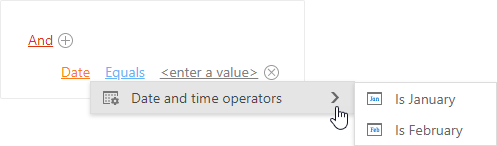
The example below demonstrates how to process FunctionType property values to keep only the “Is January” and “Is February” operators visible.
<dx:ASPxFilterControl ID="filter" runat="server"
    OnOperationVisibility="filter_OperationVisibility">
    <Columns>
        <dx:FilterControlColumn PropertyName="Date" ColumnType="DateTime" />
        <!--...-->
    </Columns>
</dx:ASPxFilterControl>
using DevExpress.Web;
using DevExpress.Data.Filtering;
using DevExpress.Data.Filtering.Helpers;

protected void filter_OperationVisibility(object sender, FilterControlOperationVisibilityEventArgs e)
{
    if (!(e.Operation == ClauseType.Function &&
         (e.FunctionType == FunctionOperatorType.IsJanuary ||
          e.FunctionType == FunctionOperatorType.IsFebruary))) {
        e.Visible = false;
    }
}
Supported Function-Based Operators
A filter control supports any operator type from the FunctionOperatorType enumeration to specify a filter expression in the Text tab or in code.
In the Visual tab, the control displays function-based operators of the following types:
- IsSameDay
- IsThisMonth
- IsThisWeek
- IsThisYear
- IsNextMonth
- IsNextYear
- IsLastMonth
- IsLastYear
- IsYearToDate
- IsJanuary
- IsFebruary
- IsMarch
- IsApril
- IsMay
- IsJune
- IsJuly
- IsAugust
- IsSeptember
- IsOctober
- IsNovember
- IsDecember