GridViewExportMenuItemVisibility Class
Contains settings that affect the visibility of Export submenu items in the row context menu.
Namespace: DevExpress.Web
Assembly: DevExpress.Web.v26.1.dll
NuGet Package: DevExpress.Web
Declaration
Related API Members
The following members return GridViewExportMenuItemVisibility objects:
Remarks
The ASPxGridView context menu implements the Export submenu that contains the following commands: ExportToCsv, ExportToPdf, ExportToRtf, ExportToDocx, ExportToXls, and ExportToXlsx.
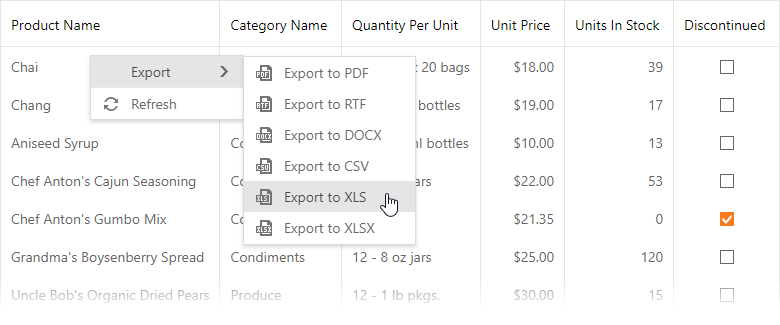
To enable the Export menu, set the Visible property to true. Use the ContextMenuExpandRow and ContextMenuExpandRow properties to specify the item text and image.
<dx:ASPxGridView ID="Grid" runat="server" KeyFieldName="ProductID" DataSourceID="ProductsDataSource">
    <SettingsExport EnableClientSideExportAPI="true"/>
    <SettingsContextMenu Enabled="true">
        <RowMenuItemVisibility ExportMenu-Visible="true" />
    </SettingsContextMenu>
    ...
You can control the visibility of a particular export command in the Export submenu. Set a command’s visibility property to false to hide the corresponding item in the menu.
| Item | Visibility Property |
|---|---|
| Export to PDF | ExportToPdf |
| Export to RTF | ExportToRtf |
| Export to DOCX | ExportToDocx |
| Export to CSV | ExportToCsv |
| Export to XLS | ExportToXls |
| Export to XLSX | ExportToXlsx |
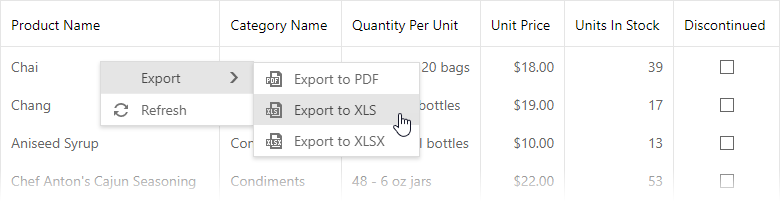
<dx:ASPxGridView ID="Grid" runat="server" KeyFieldName="ProductID" DataSourceID="ProductsDataSource">
    <SettingsExport EnableClientSideExportAPI="true"/>
    <SettingsContextMenu Enabled="true">
        <RowMenuItemVisibility>
            <ExportMenu Visible="true" ExportToCsv="false" ExportToRtf="false" ExportToDocx="false"/>
        </RowMenuItemVisibility>
    </SettingsContextMenu>
    ...