ASPxCardViewBreakpointsLayoutSettings.Breakpoints Property
Provides access to the CardView’s breakpoints collection.
Namespace: DevExpress.Web
Assembly: DevExpress.Web.v26.1.dll
NuGet Package: DevExpress.Web
Declaration
Property Value
| Type | Description |
|---|---|
| BreakpointsLayoutCollection<CardViewBreakpoint> | An BreakpointsLayoutCollection<T><CardViewBreakpoint,> object that represents a collection of breakpoints. |
Property Paths
You can access this nested property as listed below:
| Object Type | Path to Breakpoints |
|---|---|
| ASPxCardViewAdaptivitySettings |
|
Remarks
Use the Breakpoints property to define how many cards the Card View displays in a row if there are no specified breakpoints for a given browser’s width.
The following example illustrates how to implement three different layout scenarios for different browser sizes (Small, Medium, Large):
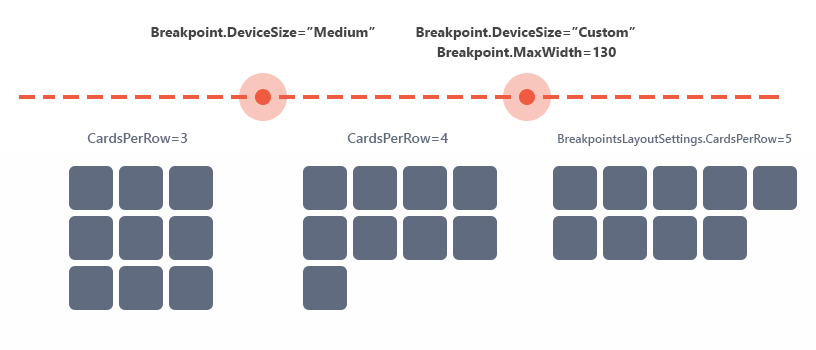
CardView.Settings.LayoutMode = Layout.Breakpoints;
CardView.SettingsAdaptivity.BreakpointsLayoutSettings.CardsPerRow = 5;

CardView.SettingsAdaptivity.BreakpointsLayoutSettings.Breakpoints.AddRange(new List<CardViewBreakpoint>() {
    new CardViewBreakpoint() { DeviceSize = BreakpointsLayoutDeviceSizes.Small, CardsPerRow = 3 },
    new CardViewBreakpoint() { DeviceSize = BreakpointsLayoutDeviceSizes.Custom, MaxWidth = 1300, CardsPerRow = 4 },
});
Concept
Online Demo
See Also