TreeListView.TreeNodeCollapseGlyphTemplate Property
Gets or sets the template used to display the collapse glyph in tree nodes. This is a dependency property.
Namespace: DevExpress.Xpf.Grid
Assembly: DevExpress.Xpf.Grid.v26.1.dll
NuGet Package: DevExpress.Wpf.Grid.Core
Declaration
Property Value
| Type | Description |
|---|---|
| DataTemplate | A DataTemplate that displays the collapse glyph in tree nodes. |
Remarks
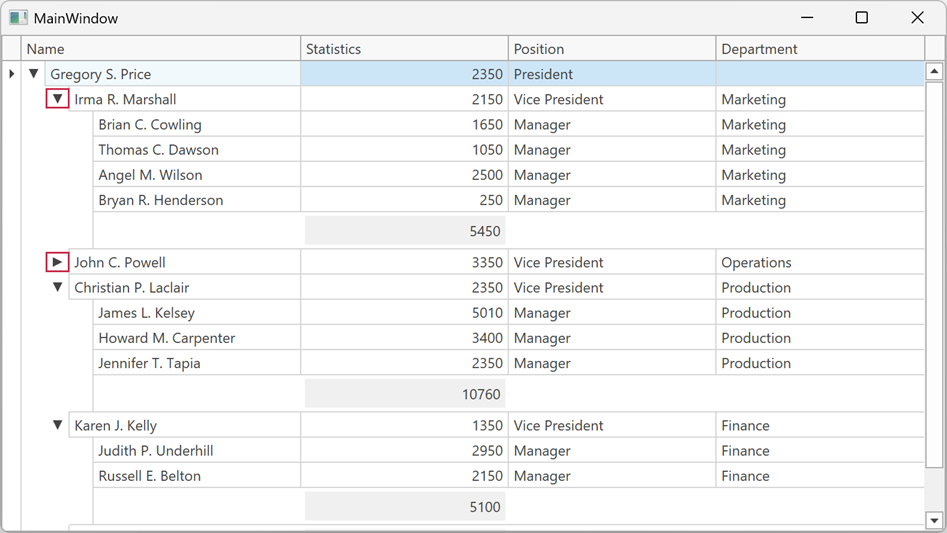
Assign a DataTemplate to the TreeNodeCollapseGlyphTemplate property to replace the icon displayed when a tree node is expanded. To replace the predefined glyph, use the TreeNodeExpandGlyphTemplate property.
Supported Themes
The TreeNodeCollapseGlyphTemplate property supports the following themes:
- Office 2016 SE Themes
- Visual Studio 2017 Themes
- Visual Studio 2019 Themes
- Office 2019 Themes
- Windows 10 Themes
- Windows 11 Themes
Example: Customize Tree Node Expand and Collapse Glyphs
The following example assigns arrow icons as expand and collapse glyphs for tree nodes:
<dx:ThemedWindow xmlns="http://schemas.microsoft.com/winfx/2006/xaml/presentation"
                 xmlns:x="http://schemas.microsoft.com/winfx/2006/xaml"
                 xmlns:dx="http://schemas.devexpress.com/winfx/2008/xaml/core"
                 xmlns:dxg="http://schemas.devexpress.com/winfx/2008/xaml/grid">
    <dx:ThemedWindow.Resources>
        <DataTemplate x:Key="TreeNodeExpandTemplate">
            <Path Data="M 0,0 L 8,4 L 0,8 Z"
                  Fill="{Binding Path=(TextBlock.Foreground), RelativeSource={RelativeSource AncestorType=ContentPresenter}}"
                  HorizontalAlignment="Center" VerticalAlignment="Center"/>
        </DataTemplate>
        <DataTemplate x:Key="TreeNodeCollapseTemplate">
            <Path Data="M 0,0 L 8,0 L 4,8 Z"
                  Fill="{Binding Path=(TextBlock.Foreground), RelativeSource={RelativeSource AncestorType=ContentPresenter}}"
                  HorizontalAlignment="Center" VerticalAlignment="Center"/>
        </DataTemplate>
    </dx:ThemedWindow.Resources>

    <dxg:TreeListControl ItemsSource="{Binding Nodes}" ChildNodesPath="Children">
        <dxg:TreeListControl.View>
            <dxg:TreeListView TreeNodeExpandGlyphTemplate="{StaticResource TreeNodeExpandTemplate}"
                              TreeNodeCollapseGlyphTemplate="{StaticResource TreeNodeCollapseTemplate}"/>
        </dxg:TreeListControl.View>
    </dxg:TreeListControl>
</dx:ThemedWindow>
See Also