TreeListView.ConditionalFormattingAllowCustomExpressions Property
Gets or sets whether to display the Expression Editor button within the pop-up Conditional Formatting Rules Manager dialog. This is a dependency property.
Namespace: DevExpress.Xpf.Grid
Assembly: DevExpress.Xpf.Grid.v26.1.dll
NuGet Package: DevExpress.Wpf.Grid.Core
Declaration
Property Value
| Type | Description |
|---|---|
| Boolean |
|
Remarks
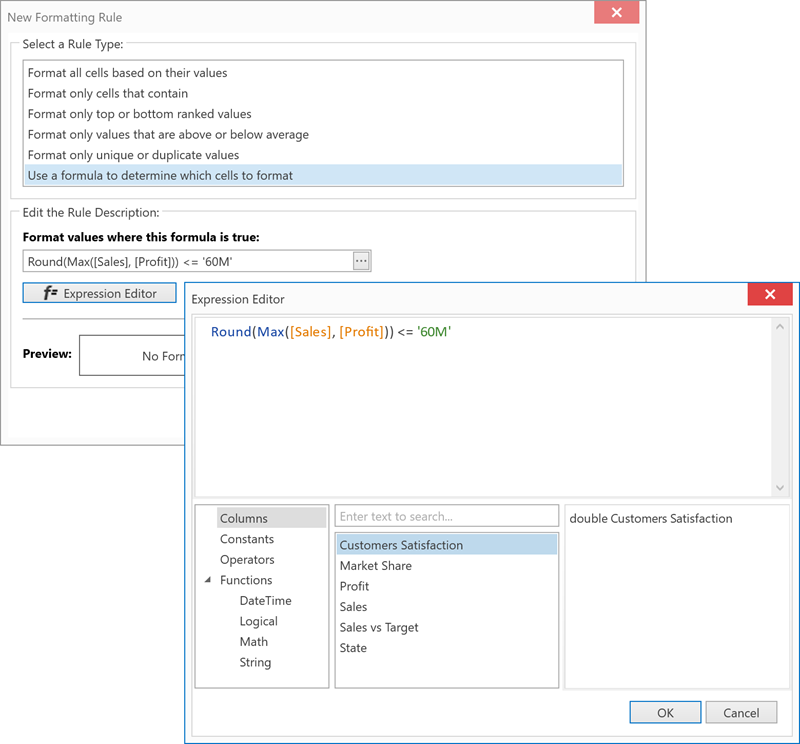
Set the ConditionalFormattingAllowCustomExpressions property to true to display the Expression Editor button when a user selects the Use a formula to determine which cells to format option within the pop-up Conditional Formatting Rules Manager dialog.
Users can click this button to display the Expression Editor pop-up dialog and specify the custom expression.
<dx:ThemedWindow ...
    xmlns="http://schemas.microsoft.com/winfx/2006/xaml/presentation"
    xmlns:dx="http://schemas.devexpress.com/winfx/2008/xaml/core"
    xmlns:x="http://schemas.microsoft.com/winfx/2006/xaml"
    xmlns:dxg="http://schemas.devexpress.com/winfx/2008/xaml/grid" >
    <dxg:GridControl ... >
        <dxg:GridControl.Columns>
            ...
            <dxg:GridColumn FieldName="CreatedDate" Header="Created Date"/>
            ...
        </dxg:GridControl.Columns>
        <dxg:GridControl.View>
            <dxg:TreeListView
                AllowConditionalFormattingMenu="True"
                AllowConditionalFormattingManager="True"
                ConditionalFormattingAllowCustomExpressions="True"/>
        </dxg:GridControl.View>
    </dxg:GridControl>
</dx:ThemedWindow>