TreeViewControl.ShowSelectionRectangle Property
Gets or sets whether to display a selection rectangle when users select multiple nodes. This is a dependency property.
Namespace: DevExpress.Xpf.Grid
Assembly: DevExpress.Xpf.Grid.v26.1.dll
NuGet Package: DevExpress.Wpf.Grid.Core
Declaration
Property Value
| Type | Description |
|---|---|
| Boolean |
|
Remarks
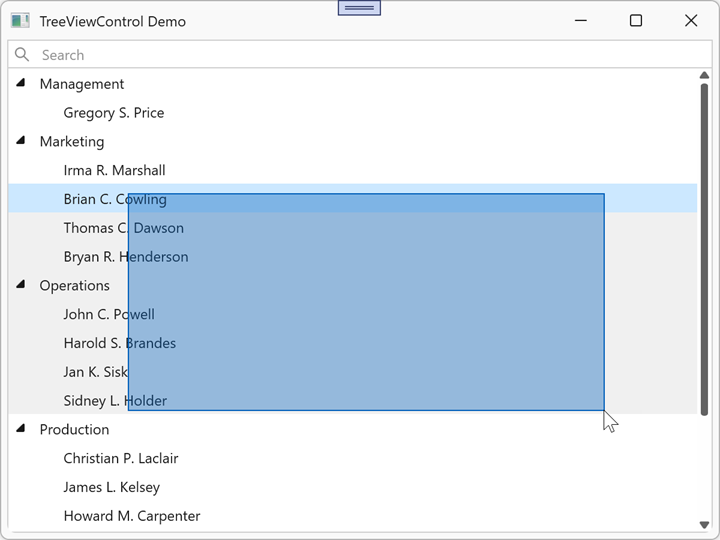
When the ShowSelectionRectangle property is true, users can drag a rectangle to select multiple nodes.
[NOTE] To enable the selection rectangle, set the
ShowSelectionRectangleproperty totrue, and the SelectionMode property toRoworCell. TheShowSelectionRectangleproperty is ignored if the SelectionMode is set toMultipleRow.
Use the SelectionRectangleStyle to customize the appearance of the selection rectangle.
Example: Enable a Selection Rectangle
The following example displays a rectangle when a user selects multiple nodes:
<dx:ThemedWindow x:Class="TreeViewControlApp.MainWindow"
                 xmlns="http://schemas.microsoft.com/winfx/2006/xaml/presentation"
                 xmlns:x="http://schemas.microsoft.com/winfx/2006/xaml"
                 xmlns:dx="http://schemas.devexpress.com/winfx/2008/xaml/core"
                 xmlns:dxg="http://schemas.devexpress.com/winfx/2008/xaml/grid"
                 Title="TreeViewControl Demo" Height="450" Width="600">
        <dxg:TreeViewControl x:Name="tree"
                             ChildNodesPath="Employees"
                             TreeViewFieldName="Name"
                             SelectionMode="Row"
                             ShowSelectionRectangle="True"/>
</dx:ThemedWindow>