TreeViewControl.CellToolTipBinding Property
Gets or sets the binding that associates a node tooltip with a property in the data source. This is a dependency property.
Namespace: DevExpress.Xpf.Grid
Assembly: DevExpress.Xpf.Grid.v26.1.dll
NuGet Package: DevExpress.Wpf.Grid.Core
Declaration
Property Value
| Type | Default | Description |
|---|---|---|
| BindingBase | null | Data binding for the node tooltip. |
Remarks
Use the CellToolTipBinding property to bind a node tooltip to a property in the data source. Specify a CellToolTipTemplate to change tooltip appearance. Implement the INotifyPropertyChanged interface in the data class to refresh tooltips in response to source property changes.
Note
The CellToolTipTemplate is in effect only if the CellToolTipBinding property is explicitly specified.
Example: Display Tooltips for Child Nodes Only
The following example displays custom tooltips for child nodes only:
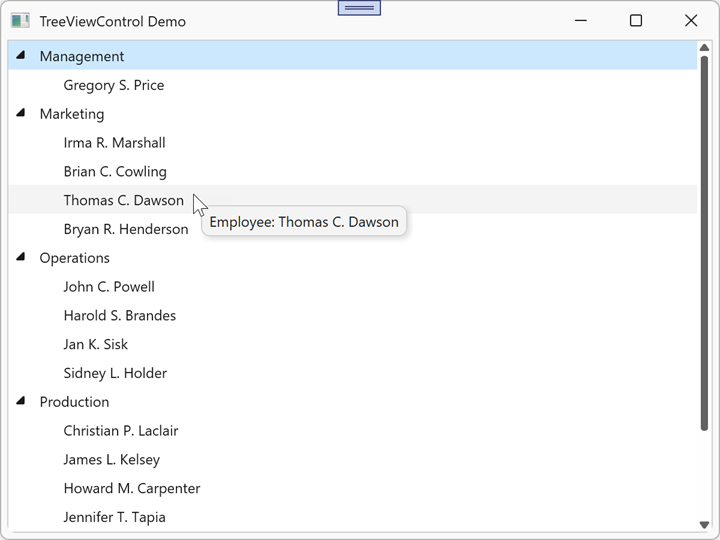
<dx:ThemedWindow x:Class="TreeViewControlApp.MainWindow"
                 xmlns="http://schemas.microsoft.com/winfx/2006/xaml/presentation"
                 xmlns:x="http://schemas.microsoft.com/winfx/2006/xaml"
                 xmlns:dx="http://schemas.devexpress.com/winfx/2008/xaml/core"
                 xmlns:dxg="http://schemas.devexpress.com/winfx/2008/xaml/grid"
                 xmlns:conv="clr-namespace:TreeViewControlApp.Converters"
                 Title="TreeViewControl Demo" Height="450" Width="600">
    <dx:ThemedWindow.Resources>
        <conv:EmployeeToolTipConverter x:Key="EmployeeToolTipConverter"/>
    </dx:ThemedWindow.Resources>
    <dxg:TreeViewControl x:Name="tree"
                         ChildNodesPath="Employees"
                         TreeViewFieldName="Name"
                         CellToolTipBinding="{Binding Converter={StaticResource EmployeeToolTipConverter}}">
        <dxg:TreeViewControl.CellToolTipTemplate>
            <DataTemplate>
                <StackPanel Orientation="Horizontal">
                    <TextBlock Text="Employee: "/>
                    <TextBlock Text="{Binding}"/>
                </StackPanel>
            </DataTemplate>
        </dxg:TreeViewControl.CellToolTipTemplate>
    </dxg:TreeViewControl>
</dx:ThemedWindow>
namespace TreeViewControlApp.Converters
{
    public class EmployeeToolTipConverter : IValueConverter
    {
        public object Convert(object value, Type targetType, object parameter, CultureInfo culture)
        {
            if (value is Employee employee)
                return employee.Name;
            return null;
        }

        public object ConvertBack(object value, Type targetType, object parameter, CultureInfo culture)
            => throw new NotImplementedException();
    }
}
Refer to the following help topic for additional information: Node Tooltips.