TreeViewControl.CellToolTipTemplate Property
Gets or sets the template used to display a node tooltip. This is a dependency property.
Namespace: DevExpress.Xpf.Grid
Assembly: DevExpress.Xpf.Grid.v26.1.dll
NuGet Package: DevExpress.Wpf.Grid.Core
Declaration
Property Value
| Type | Description |
|---|---|
| DataTemplate | A DataTemplate that displays a node tooltip. |
Remarks
Use the CellToolTipTemplate with the CellToolTipBinding property to display custom tooltips for nodes within the TreeViewControl.
Example: Display Tooltips for Child Nodes Only
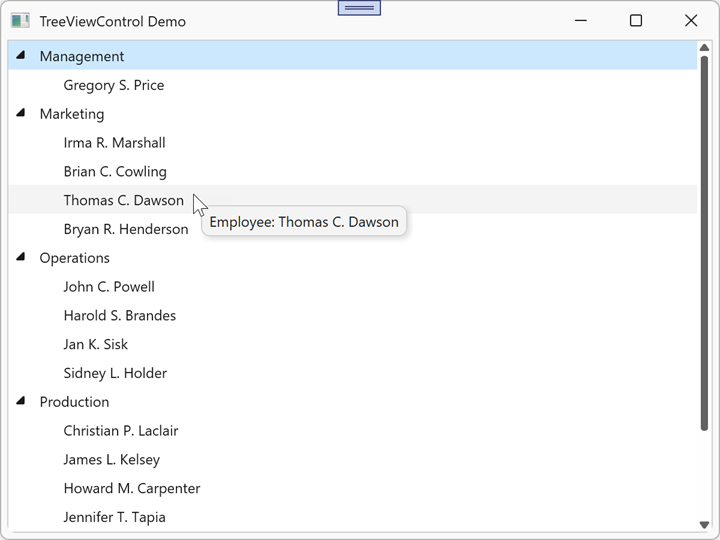
The following example displays custom tooltips for child nodes only:
<dx:ThemedWindow x:Class="TreeViewControlApp.MainWindow"
                 xmlns="http://schemas.microsoft.com/winfx/2006/xaml/presentation"
                 xmlns:x="http://schemas.microsoft.com/winfx/2006/xaml"
                 xmlns:dx="http://schemas.devexpress.com/winfx/2008/xaml/core"
                 xmlns:dxg="http://schemas.devexpress.com/winfx/2008/xaml/grid"
                 xmlns:conv="clr-namespace:TreeViewControlApp.Converters"
                 Title="TreeViewControl Demo" Height="450" Width="600">
    <dx:ThemedWindow.Resources>
        <conv:EmployeeToolTipConverter x:Key="EmployeeToolTipConverter"/>
    </dx:ThemedWindow.Resources>
    <dxg:TreeViewControl x:Name="tree"
                         ChildNodesPath="Employees"
                         TreeViewFieldName="Name"
                         CellToolTipBinding="{Binding Converter={StaticResource EmployeeToolTipConverter}}">
        <dxg:TreeViewControl.CellToolTipTemplate>
            <DataTemplate>
                <StackPanel Orientation="Horizontal">
                    <TextBlock Text="Employee: "/>
                    <TextBlock Text="{Binding}"/>
                </StackPanel>
            </DataTemplate>
        </dxg:TreeViewControl.CellToolTipTemplate>
    </dxg:TreeViewControl>
</dx:ThemedWindow>
namespace TreeViewControlApp.Converters
{
    public class EmployeeToolTipConverter : IValueConverter
    {
        public object Convert(object value, Type targetType, object parameter, CultureInfo culture)
        {
            if (value is Employee employee)
                return employee.Name;
            return null;
        }

        public object ConvertBack(object value, Type targetType, object parameter, CultureInfo culture)
            => throw new NotImplementedException();
    }
}
Refer to the following help topic for additional information: Node Tooltips.
See Also