TdxSplashForm Class
A Splash Form designed to indicate application startup progress.
Declaration
TdxSplashForm = class(
    TdxSplashFormBase
)
Remarks
A Splash Form is a dedicated form type displayed during the app initialization phase. You can also add and display custom splash forms for different purposes (“About” screens, context help, etc.).

Splash Form Management
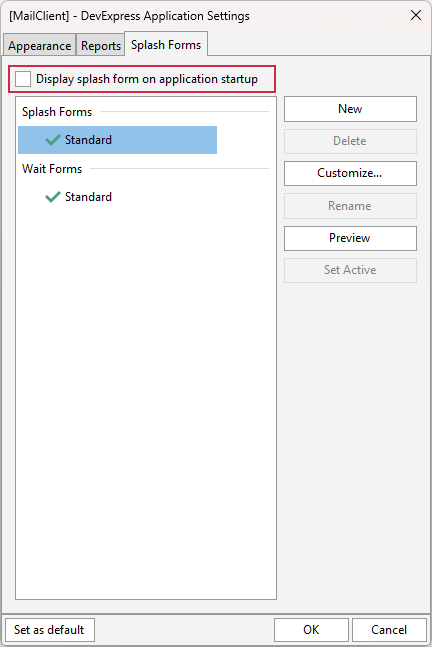
Use the design-time Application Settings dialog to manage Splash Forms in your project (the Splash Forms tab). A DevExpress project always has at least one (predefined) Splash Form accessible using the TdxSplashFormManager.SplashForm class function.
Enable a Splash Form at Startup
Check the Display splash form on application startup option in the Application Settings dialog to display the active/default Splash Form at startup:
Tip
You can also call Preview, Show, and Hide procedures to manually manage Splash Form visibility in your application. For example, you can design and display a Splash Form as a custom information form.
Hide a Splash Form
The active/default Splash Form is hidden automatically once the app initialization phase is complete when the following conditions are met:
- The main application form is derived from the TdxForm class (for example, when using the VCL Template Kit).
- DevExpress skins are enabled at the application level (using the Application Settings dialog or a TdxSkinController component).
Otherwise, you need to call the Hide procedure manually to hide the active splash form when required.
Splash Form Designer
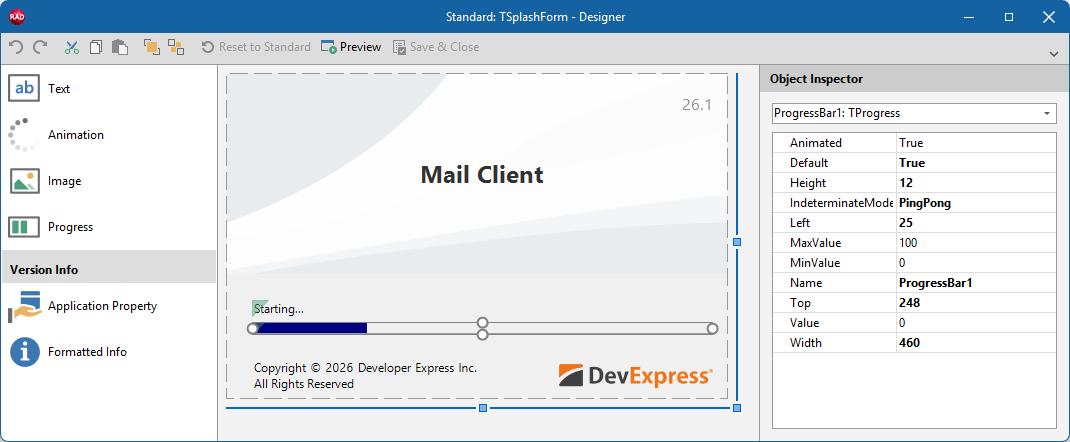
The Splash Form Designer dialog allows you to configure the layout of a predefined or custom Splash Form. Select a Splash Form in the Application Settings dialog and click Customize… to display the Splash Form Designer dialog.
Main API Members
The list below outlines key members of the TdxSplashForm class. You can use these members to hide/display a Splash Form and access/customize existing UI elements.
Size & Position
- BoundsRect | SetBounds
- Specify the form’s bounding rectangle.
- Left | Top
- Specify the form position (in relation to the target control/form).
- Width | Height
- Specify Splash Form dimensions.
Visibility Management
- FadeIn | FadeOut
- Specify if fade in/out effects are enabled while the Splash Form is being displayed or hidden.
- Hide
- Hides the Splash Form if it is visible.
- Preview
- Displays the Splash Form on the target monitor in Preview mode. A subsequent mouse click closes the displayed Splash Form.
- Show
Displays the centered Splash Form on the target monitor.
Users cannot close the Splash Form in this mode. You need to call the Hide procedure explicitly to hide the displayed form.
- Visible
- Indicates if the form is visible.
Splash Form Widgets
Splash and Wait Forms use dedicated Splash Form widgets (derived from the TdxSplashFormBase.TContentItem base class) instead of controls (TControl descendants) to avoid excessive dependencies.
Tip
All API members in this section allow you to access and modify existing widgets placed on the Splash Form. If the target widget is not found, an exception occurs.
Use the Splash Form Designer dialog to add new or remove existing widgets.
- Animation
- Provides access to an Animation/Activity Indicator widget (TdxSplashFormBase.TAnimation) on the form.
- GetItem
- Provides access to any widget on the form (by type and name).
- Image
- Provides access to an Image widget (TdxSplashFormBase.TImage) on the form.
- Progress
- Provides access to a Progress Bar widget (TdxSplashFormBase.TProgress) on the form.
- Text
- Provides access to a Text/Label widget (TdxSplashFormBase.TText) on the form.
General-Purpose API Members
- BeginUpdate | EndUpdate
- Allow you to avoid excessive redraw operations during batch appearance setting changes.
- Color
- Specifies the form background color.
- Default
- Specifies if the Splash Form is used as default in the application.
- Name
- Specifies the Splash Form’s name (used in the Splash Form Manager and Application Settings).
Direct TdxSplashForm Class Reference
The TdxSplashFormManager.SplashForm class function returns a TdxSplashForm object.