TdxSplashFormBase.TProgress Class
A progress bar Splash Form Widget.
Declaration
TProgress = class(
    TCustomText
)
Remarks
The Progress Bar widget is an animated progress bar, similar to the TcxProgressBar editor.

Progress Bar Usage Scenarios
The IndeterminateMode property allows you to switch between two Progress Bar widget modes/usage scenarios.
Progress Bar Mode
You can use the Progress Bar widget to display progress of a time-consuming process (data import, export, etc.) in Progress Bar Mode (default). In this mode, you need to update the progress bar position manually using the Value property.

Indeterminate Mode
Indeterminate Mode allows you to use the Progress Bar widget as an activity indicator (alternative to the dedicated Animation widget). In this mode, the widget plays looped animation while the parent Splash or Wait Form is displayed.

Design Splash Forms & Manage Widgets
To add/remove individual widgets to/from a Splash or Wait Form, select the target form in the Application Settings dialog and click Customize… to display the Splash Form Designer dialog.
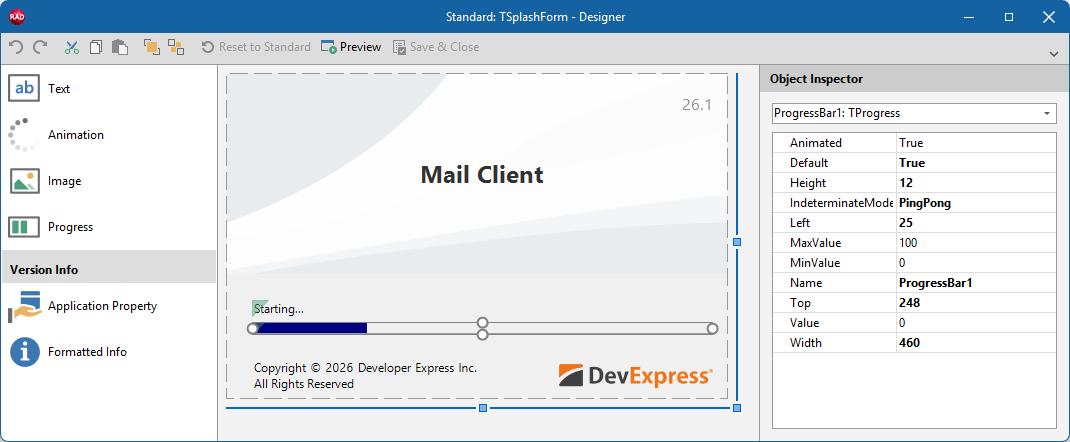
Main API Members
The list below outlines key members of the TdxSplashFormBase.TProgress class. These members allow you to configure progress bar widget settings.
Progress Bar Settings
- Animated
- Specifies if Value change animations are enabled in Progress Bar mode.
- IndeterminateMode
- Allows you to switch between progress bar modes.
- MinValue | MaxValue
- Specify minimum and maximum progress bar scale values.
- Value
- Specifies current progress bar position (within the range between MinValue | MaxValue).
General-Purpose API Members
- Bounds
- Specifies widget dimensions and position within the parent Splash or Wait Form.
- Default
- Specifies if the current widget instance is used as default in the parent Splash or Wait Form. This setting is applicable only if the parent form includes other widgets of the same type.
- Kind
- Returns the widget’s type.
- Name
- Specifies the widget name (used to identify the widget in the parent form).
Direct TdxSplashFormBase.TProgress Class References
The following functions reference a TdxSplashFormBase.TProgress object
- TdxSplashFormBase.GetItem
- Provides access to any widget on the form by type and name. Use the template parameter (
T) to specify the target widget type. - TdxSplashFormBase.Progress
- Provides access to a Progress Bar widget on the form.
Other Splash Form Widgets
- TdxSplashFormBase.TAnimation
- An Animation/Activity Indicator Splash Form widget.
- TdxSplashFormBase.TApplicationProperty
- A static multi-line label widget designed to display an application property in a Splash or Wait Form.
- TdxSplashFormBase.TFormattedApplicationInfo
- A static multi-line label designed to display multiple application properties in a Splash or Wait Form.
- TdxSplashFormBase.TImage
- An image Splash Form Widget.
- TdxSplashFormBase.TText
- A text/label Splash Form widget.