VCL Scheduler
- 3 minutes to read
The DevExpress VCL Scheduler Suite ships with the Scheduler Control and event storage components.
Scheduler Control
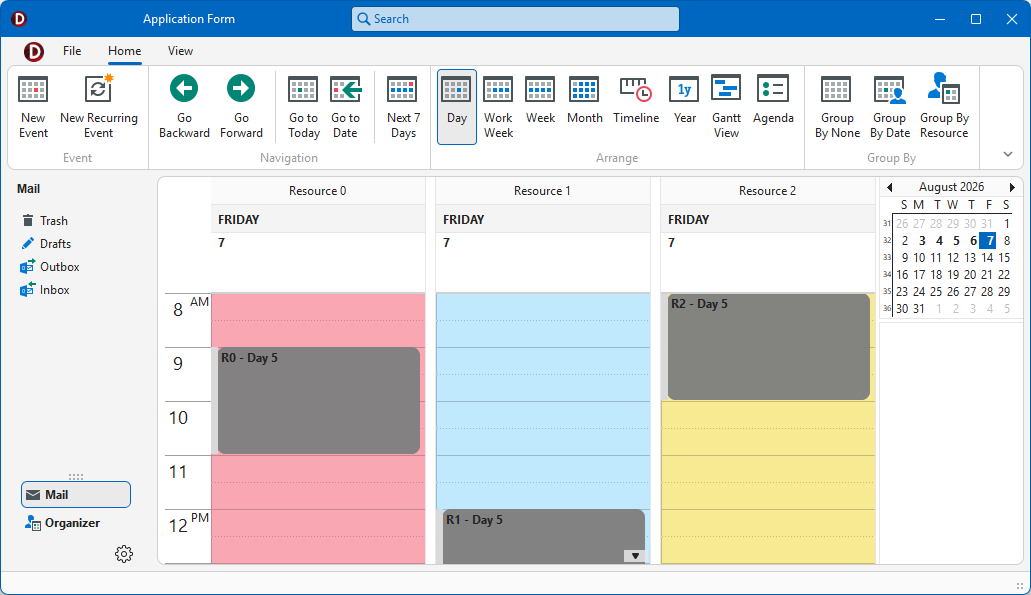
The TcxScheduler control allows users to create, browse, and edit one-time or recurring appointments. You can switch between schedule views designed for different time intervals – from a single day to an entire year.

Refer to the following topics for general information on the Scheduler control and its UI elements:
Getting Started
Review the following sections to get started with the TcxScheduler component:
Scheduler Project and Form Templates
The VCL Template Kit ships with automatically installed Project and Form templates for the TcxScheduler component. These templates are designed to reduce time spent on repetitive project and form setups, as well as improve onboarding for new VCL developers and boost productivity in experienced teams.
Tip
Refer to the following help topic for detailed information: Use Scheduler Project and Form Templates.
Related Compiled Demo
To see the TcxScheduler component in action, run the Calendar and Scheduling demo in the VCL Demo Center installed with compiled DevExpress VCL demos. Click different items in the sidebar on the left to switch between demo features.
Compiled DevExpress demos ship with source code installed in the Public Documents folder (%PUBLIC%) for all users (default). You can find all project and source code files for the Calendar and Scheduling demo in the following folder:
%PUBLIC%\Documents\DevExpress VCL Demos\MegaDemos\Product Demos\ExpressScheduler\
Tip
Project and source code files for all compiled DevExpress VCL Demos are maintained in a public repository hosted on GitHub:
Scheduler Views
The VCL Scheduler can display appointments in different views designed for the following time intervals:
- Day View
Displays appointments for one to five days.

- Week View
Displays appointments in a particular week.

- Month View
Displays appointments in a month.

- Year View
Displays appointments for an entire year.

- Timeline View
Displays appointments as horizontal bars on the timeline.

- Agenda View
Lists appointments in chronological order grouped by day.

- Gantt View
A project management tool designed to schedule project tasks, specify their dependencies, and set completion percentages.

Tip
DevExpress VCL Subscription ships with a separate Gantt Control that has multiple dedicated views and other functionality related to project management.
Event Storage Components
The following event storage components store and manage user events, resources, and holidays for an associated Scheduler control:
- TcxSchedulerStorage
- An unbound storage component designed to store and manage user events and resources in a local file system. Refer to the following topic for more information: VCL Scheduler: Unbound Mode.
- TcxSchedulerDBStorage
- A data-aware event storage component. Refer to the following topic for details: VCL Scheduler: Bound Mode.
- TcxSchedulerWebServiceStorage
- Stores online calendar and event data, and synchronizes the calendar and event state with Google and Microsoft accounts.
- TcxSchedulerAggregateStorage
Allows you to store and manage user event and resource information in multiple storage components simultaneously. Refer to the following topics for details:
- TcxSchedulerHolidays
- Manages the list of holidays for an associated Scheduler control. Refer to the following topic for more information: How to: Add Holidays to a Scheduler at Design-Time.