TdxForm Class
The base class for DPI-aware DevExpress application forms.
Declaration
TdxForm = class(
    TForm,
    IdxScaleFactor,
    IdxAutomationElement,
    IdxUIAForm,
    IdxFormDecorator,
    IdxFormDecoration,
    IdxIDEAppearanceSupport
)
Remarks
The TdxForm class is designed to substitute TForm as a form ancestor in DPI-aware applications. An instance of a form class derived from TdxForm (TdxRibbonForm, for instance) automatically updates its scale factor and applies it to all DevExpress controls when your application accepts the WM_DPICHANGED[1] system message.
Tip
Different supported Embarcadero RAD Studio® IDE versions have different DPI awareness implementations. To ensure the best experience with DevExpress components in multi-monitor mixed-DPI environments regardless of the RAD Studio version, we recommend that you derive all forms in your application project from TdxForm and its descendants.
Form Creation
Use Form/User Control Wizard
The DevExpress VCL Template Kit includes the dedicated Form/User Control Wizard designed to add DevExpress forms to an existing project. To create a new DevExpress form (a TdxForm descendant), click File | New → DevExpress VCL v26.1 Form/User Control - Delphi in the main menu of your RAD Studio IDE.
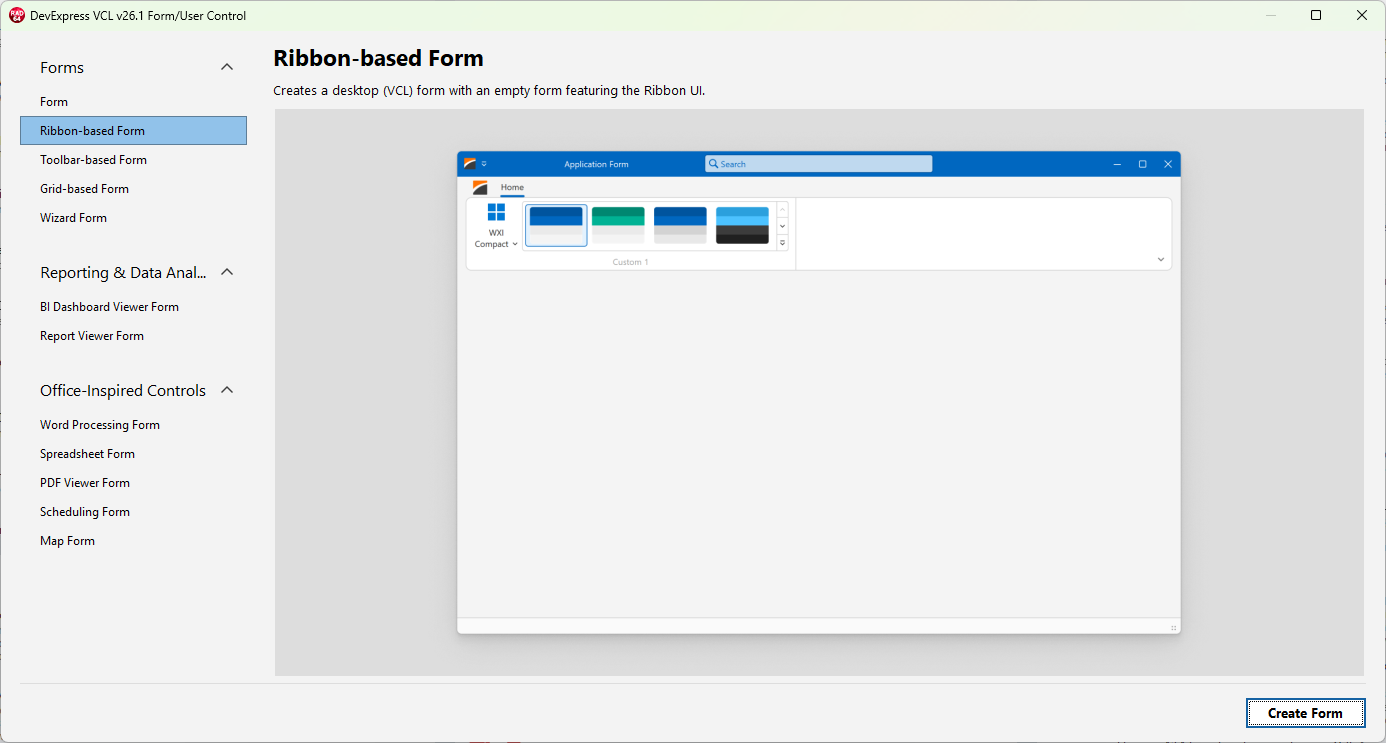
The Form/User Control Wizard lists multiple form templates designed for frequently-used scenarios – a blank form, forms with a pre-configured Ribbon/Toolbar UI and/or other DevExpress UI controls. Refer to the following help topic for details: VCL Template Kit.
Tip
Select the Form template in the Form/User Control Wizard to add a blank form (a TdxForm descendant) to an existing project.
Derive a DPI-Aware Form from TdxForm
To create a simple DevExpress form (TdxForm) manually, you need to create a new form in the RAD Studio IDE, add the dxForms unit to the uses clause, and replace TForm with TdxForm in the form class declaration as follows:
uses dxForms;  // Declares the TdxForm class
// ...
type
  TMyForm = class(TdxForm)
  private
    { Private declarations }
  public
    { Public declarations }
  end;
Main API Members
The list below outlines key members of the TdxForm class that allow you to configure a DPI-aware application form.
Common Form Settings and Methods
The following public API members are derived from the standard TForm class shipped with the VCL library:
- Caption
- Specifies the form’s caption.
- PixelsPerInch
- Specifies the base DPI value for scale factor calculations.
- ShowModal
- Displays the form as a modal dialog.
- Scaled
- Specifies if DPI awareness is enabled for the form.
- Visible | Hide | Show
- Hide or display the form.
- Width | Height | ClientWidth | ClientHeight
- Allow you to adjust form and client area dimensions.
Tip
Refer to the TForm class description for detailed information on all standard form API members.
DPI Awareness Implementation
The following API members implement DPI awareness for DevExpress forms regardless of the target Embarcadero RAD Studio® version. You do not need to interact with these API members in your code in the majority of usage scenarios. However, you can override certain methods in custom TdxCustomForm class descendants to change predefined form responses to monitor DPI changes.
- ChangeScale
- Multiplies the form’s scale factor by the specified scale factor.
- ScaleBy
- Updates the form’s scale factor.
- ScaleFactor
Returns the form’s scale factor that updates every time your application accepts the
WM_DPICHANGEDsystem message if the Scaled property is set toTrue.You can use this property to identify the current scale factor or call any of the ScaleFactor.Apply functions to apply the scale factor to custom-drawn UI elements within the form.[1]
- ScaleForPPI
- Scales the form and components within it according to the specified target DPI.
- ScaleFactorChanged
Automatically scales the form when its scale factor changes.
You can override[2] this procedure in custom
TdxFormclass descendants to execute custom code when the monitor DPI changes.- UpdateImageLists
Automatically switches between DPI-aware bitmap image lists that target different monitor DPIs if the dxAutoReplaceImageListReferencesOnDPIChanges global variable is set to
True.You can override this procedure in custom
TdxFormclass descendants to implement different image list replacement criteria.Tip
We recommend that you use only SVG images as UI element glyphs in applications that target high-resolution multi-monitor environments because SVG images are rendered in any target resolution without losses to quality.
Other DPI-Aware Form Classes
DevExpress VCL products ship with the following base form classes with support for DPI-awareness:
- TdxAlertWindow
- An alert window.
- TdxRibbonForm
- A Ribbon form class.
- TdxFluentDesignForm
- A Fluent Design application form.
- TdxSkinForm
- The base class for simple DPI-aware forms that can override global form corner and shadow settings.
Additional Information
Tip
Refer to the following help topic for general recommendations on building DPI-aware VCL applications: High DPI and Graphics.