TdxSplashFormBase.TFormattedApplicationInfo Class
A static multi-line label designed to display multiple application properties in a Splash or Wait Form.
Declaration
TFormattedApplicationInfo = class(
    TCustomApplicationInfo
)
Remarks
A static multi-line label designed to display multiple application properties using placeholder fields defined within a custom message string.

Application Version Information
TdxSplashFormBase.TApplicationProperty and TdxSplashFormBase.TFormattedApplicationInfo Splash Form widgets are designed to display version information fields stored in application resources. Individual application properties are defined as key/value pairs on the Version Info page of the Project Options dialog in the RAD Studio IDE.
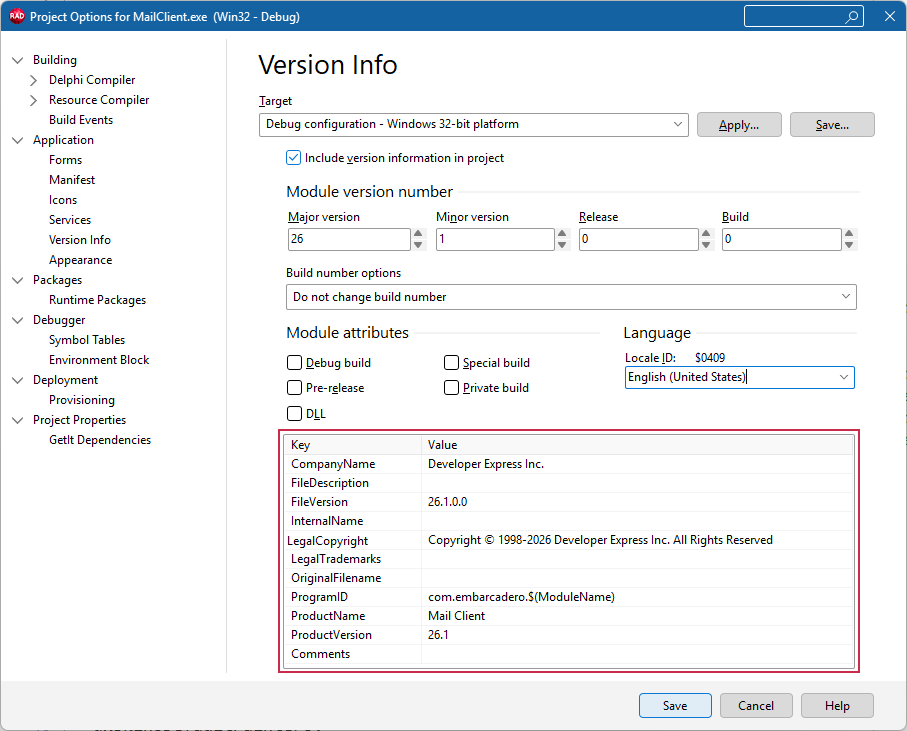
Supported Application Properties/Placeholder Fields
A string assigned to the DisplayMask property can contain multiple supported placeholder field names enclosed between % characters:
| Placeholder Field (Key) | Application Property | Description |
|---|---|---|
%CurrentYear% |
— | Displays the current year using the 'YYYY' mask (2026, for example). |
%Description% |
TProperty.FileDescription | An optional description for the application’s executable file. |
%Product% |
TProperty.ProductName | The product (application) name (Mail Client Demo, for example). |
%Version% |
TProperty.ProductVersion | The current application version number (26.1, for example). |
%Company% |
TProperty.CompanyName | The application developer/publisher name (Developer Express Inc., for example). |
%Copyright% |
TProperty.LegalCopyright | Copyright information. |
%Trademarks% |
TProperty.LegalTrademarks | Information on company trademarks. |
%Comments% |
TProperty.Comments | Optional build-related comments. |
Design Splash Forms & Manage Widgets
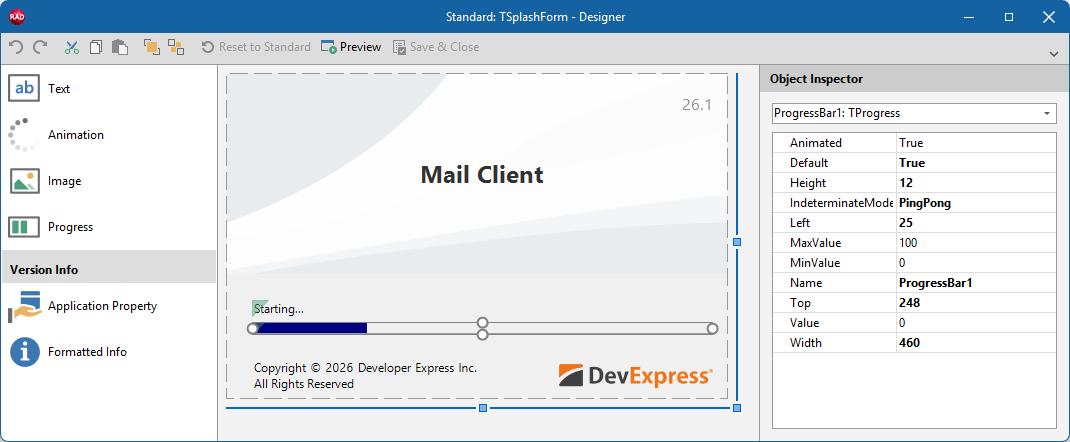
To add/remove individual widgets to/from a Splash or Wait Form, select the target form in the Application Settings dialog and click Customize… to display the Splash Form Designer dialog.
Main API Members
The list below outlines key members of the TdxSplashFormBase.TFormattedApplicationInfo class. These members allow you to configure font and content-related settings.
Appearance Settings
- Alignment
- Specifies horizontal and vertical content alignment within the widget client area.
- Bounds
- Specifies widget dimensions and position within the parent Splash or Wait Form.
- Color
- Specifies widget background color.
- Transparent
- Specifies whether the widget background is transparent.
Font/Content-Related Settings
- DisplayMask
- Specifies a custom message with placeholder fields that display corresponding application properties loaded from app resources.
- FontName | FontSize
- Specify font typeface and size for displayed content.
- FontStyle
- Specifies font attributes (bold, italic, underline, and strikeout) applied to content.
- TextColor
- Specifies text color.
- WordWrap
- Specifies if word wrap is enabled.
General-Purpose API Members
- Default
- Specifies if the current widget instance is used as default in the parent Splash or Wait Form. This setting is applicable only if the parent form includes other widgets of the same type.
- Kind
- Returns the widget’s type.
- Name
- Specifies the widget name (used to identify the widget in the parent form).
Direct TdxSplashFormBase.TFormattedApplicationInfo Class Reference
The TdxSplashFormBase.GetItem function provides access to a TFormattedApplicationInfo object if TdxSplashFormBase.TFormattedApplicationInfo is specified as the template parameter (T).
Other Splash Form Widgets
- TdxSplashFormBase.TAnimation
- An Animation/Activity Indicator Splash Form widget.
- TdxSplashFormBase.TApplicationProperty
- A static multi-line label widget designed to display an application property in a Splash or Wait Form.
- TdxSplashFormBase.TImage
- An image Splash Form Widget.
- TdxSplashFormBase.TProgress
- A progress bar Splash Form Widget.
- TdxSplashFormBase.TText
- A text/label Splash Form widget.