TdxMessageDialogHyperlinkClickDelegate Type
The procedural type for a hyperlink activation handler in a message dialog.
Declaration
TdxMessageDialogHyperlinkClickDelegate = reference to procedure(AArgs: TdxHyperlinkClickEventArgs);Parameters
| Name | Type | Description |
|---|---|---|
| AArgs | TdxHyperlinkClickEventArgs | Stores general information on a hyperlink-related event in DevExpress controls with support for BBCode-inspired text formatting markup. |
Remarks
DevExpress message dialog boxes support BBCode-inspired markup tags for content formatting:
dxMessageBox('Read the [URL=https://www.devexpress.com/VCL]DevExpress VCL Documentation[/URL]',
  'Note', MB_OK or MB_ICONINFORMATION);
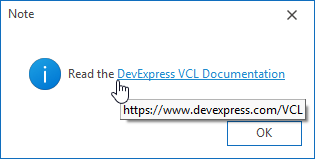
A click on a hyperlink defined within a message box using [URL] and [\URL] tags opens the default application associated with the hyperlink’s URI scheme (a web browser for HTTP/HTTPS, a mail client for MAILTO, etc.).
Usage Scenarios
You can implement a handler procedure of the TdxMessageDialogHyperlinkClickDelegate type and pass the handler to any message box creation method as the AHyperlinkClickProc parameter to modify the predefined hyperlink activation behavior. For example, you can prevent hyperlink activation under specific conditions or execute custom code in response to clicks on hyperlinks. This scenario can be useful if you define message box content at runtime.
Handler Execution Trigger
An assigned hyperlink activation handler is executed every time a user clicks a hyperlink defined within a DevExpress message dialog box.
Available Handler Parameters
The following parameters are available within a hyperlink click handler:
AArgs.Handled- Specifies if the predefined hyperlink activation behavior is disabled. Set the
AArgs.Handled parameter toTrueif you need to prevent users from activating certain hyperlinks or implement a custom hyperlink activation command. AArgs.Button- Returns the mouse button used to click the target hyperlink.
AArgs.Shift- Allows you to identify modifier keys held when a mouse button (
AArgs.Button) was clicked to activate the target hyperlink. AArgs.URI- Allows you to identify the hyperlink target URI and modify it immediately before hyperlink activation.
Refer to the TdxHyperlinkClickEventArgs class description for detailed information on all parameters available within a hyperlink click handler.
Code Examples
Prevent MAILTO Hyperlink Activation in Message Boxes
The following code example prevents users from activating a hyperlink that contains the MAILTO URL scheme:
uses
  dxMessageDialog,  // Declares the dxCreateMessageDialog global function and related types
  System.StrUtils;  // Declares the ContainsText global function
// ...

procedure TMyForm.LinkClickHandler(AArgs: TdxHyperlinkClickEventArgs);
begin
  if(ContainsText(AArgs.URI, 'mailto')) then  // If the clicked hyperlink contains the "mailto" URI scheme
    AArgs.Handled := True;  // Prevents hyperlink activation
end;

// This procedure displays a message box with dynamic content and prevents MAILTO links from being opened
procedure TMyForm.ShowMyMessage(const AMessage: string; const ALink: string);
begin
  dxCreateMessageDialog(AMessage + #13#10 + ' [URL=' + ALink + ']' + ALink + '[/URL]', LinkClickHandler);
end;
Prevent Accidental Hyperlink Activation in Message Boxes
The code example in this section demonstrates TdxMessageDialogHyperlinkClickDelegate and TdxMessageDialogShowHyperlinkHintDelegate handlers. The TdxMessageDialogHyperlinkClickDelegate handler requires a user to hold down the Ctrl key to activate a hyperlink. The TdxMessageDialogShowHyperlinkHintDelegate handler changes all hyperlink hints to prompt a user to hold the Ctrl key for hyperlink activation.
procedure TMyForm.LinkClickHandler(AArgs: TdxHyperlinkClickEventArgs);
begin
  if AArgs.Shift <> [ssCtrl] then // If the Ctrl key is not held down
    AArgs.Handled := True;  // Prevents hyperlink activation
end;

procedure TMyForm.LinkHintHandler(AArgs: TdxShowHyperlinkHintEventArgs);
var
  AHintPrefix, AHintURI: string;
begin
  AHintPrefix := 'Ctrl-click to navigate to ';
  AHintURI := AArgs.URI.Remove(0, 8);  // Removes the URI scheme from the hyperlink hint
  AArgs.Hint := AHintPrefix + AHintURI;  // Redefines the hyperlink hint
end;

// This procedure displays a message box with dynamic content and prevents MAILTO links from being opened
procedure TMyForm.ShowMyMessage(const AMessage: string; const ALink: string);
begin
  dxCreateMessageDialog(AMessage + #13#10 + ' [URL=' + ALink + ']' + ALink + '[/URL]',
    LinkClickHandler, LinkHintHandler);
end;

Direct TdxMessageDialogHyperlinkClickDelegate Type References
The following global methods reference the TdxMessageDialogHyperlinkClickDelegate procedural type as the optional AHyperlinkClickProc parameter:
dxCreateMessageDialog Overloads
- dxCreateMessageDialog(string,TMsgDlgType,TMsgDlgButtons,TdxMessageDialogHyperlinkClickDelegate,TdxMessageDialogShowHyperlinkHintDelegate,TdxMessageDialogHintedTextClickDelegate,TdxMessageDialogShowTextHintDelegate)
- Creates a message dialog box with a specified dialog type and message. Allows you to specify a set of buttons and move focus to one of the buttons.
- dxCreateMessageDialog(string,TMsgDlgType,TMsgDlgButtons,TMsgDlgBtn,TdxMessageDialogHyperlinkClickDelegate,TdxMessageDialogShowHyperlinkHintDelegate,TdxMessageDialogHintedTextClickDelegate,TdxMessageDialogShowTextHintDelegate)
- Creates a message dialog box with a specified dialog type, message, and a set of buttons.
dxMessageBox Overloads
- dxMessageBox(THandle,string,string,Integer,TdxMessageDialogHyperlinkClickDelegate,TdxMessageDialogShowHyperlinkHintDelegate,TdxMessageDialogHintedTextClickDelegate,TdxMessageDialogShowTextHintDelegate)
- Opens a message dialog box that displays a specified message, title, and buttons (configured using a combination of flags). Allows you to associate the message box with an owner window.
- dxMessageBox(string,string,Integer,TdxMessageDialogHyperlinkClickDelegate,TdxMessageDialogShowHyperlinkHintDelegate,TdxMessageDialogHintedTextClickDelegate,TdxMessageDialogShowTextHintDelegate)
- Opens a message dialog box that displays a specified message, title, and buttons (configured using a combination of flags).
dxMessageDlg Overloads
- dxMessageDlg(string,TMsgDlgType,TMsgDlgButtons,Longint,TdxMessageDialogHyperlinkClickDelegate,TdxMessageDialogShowHyperlinkHintDelegate,TdxMessageDialogHintedTextClickDelegate,TdxMessageDialogShowTextHintDelegate)
- Opens a message dialog box with a specified dialog type, message, and a set of buttons (and allows you to specify the default button).
- dxMessageDlg(string,TMsgDlgType,TMsgDlgButtons,Longint,TMsgDlgBtn,TdxMessageDialogHyperlinkClickDelegate,TdxMessageDialogShowHyperlinkHintDelegate,TdxMessageDialogHintedTextClickDelegate,TdxMessageDialogShowTextHintDelegate)
- Opens a message dialog box with a specified dialog type, message, and a set of buttons.
dxMessageDlgPos Overloads
- dxMessageDlgPos(string,TMsgDlgType,TMsgDlgButtons,Longint,Integer,Integer,TdxMessageDialogHyperlinkClickDelegate,TdxMessageDialogShowHyperlinkHintDelegate,TdxMessageDialogHintedTextClickDelegate,TdxMessageDialogShowTextHintDelegate)
- Opens a message dialog box at a specified position on the screen.
- dxMessageDlgPos(string,string,TMsgDlgType,TMsgDlgButtons,Longint,Integer,Integer,TMsgDlgBtn,TdxMessageDialogHyperlinkClickDelegate,TdxMessageDialogShowHyperlinkHintDelegate,TdxMessageDialogHintedTextClickDelegate,TdxMessageDialogShowTextHintDelegate)
- Opens a message dialog box at a specified position on the screen. Allows you to specify the default button.
dxMessageDlgPosHelp Overloads
- dxMessageDlgPosHelp(string,string,TMsgDlgType,TMsgDlgButtons,Longint,Integer,Integer,string,TMsgDlgBtn,TdxMessageDialogHyperlinkClickDelegate,TdxMessageDialogShowHyperlinkHintDelegate,TdxMessageDialogHintedTextClickDelegate,TdxMessageDialogShowTextHintDelegate)
- Opens a message dialog box associated with a help topic and positions the dialog box at specific screen coordinates.
- dxMessageDlgPosHelp(string,TMsgDlgType,TMsgDlgButtons,Longint,Integer,Integer,string,TMsgDlgBtn,TdxMessageDialogHyperlinkClickDelegate,TdxMessageDialogShowHyperlinkHintDelegate,TdxMessageDialogHintedTextClickDelegate,TdxMessageDialogShowTextHintDelegate)
- Opens a message dialog box associated with a help topic and positions the dialog box at specific screen coordinates. Allows you to specify the default button.
Miscellaneous dxShowMessage Methods
- dxShowMessage(string,TdxMessageDialogHyperlinkClickDelegate,TdxMessageDialogShowHyperlinkHintDelegate,TdxMessageDialogHintedTextClickDelegate,TdxMessageDialogShowTextHintDelegate)
- Opens a generic message dialog box with an OK button.
- dxShowMessageFmt(string,Untyped[],TdxMessageDialogHyperlinkClickDelegate,TdxMessageDialogShowHyperlinkHintDelegate,TdxMessageDialogHintedTextClickDelegate,TdxMessageDialogShowTextHintDelegate)
- Opens a generic message dialog box with a formatted message and an OK button.
- dxShowMessagePos(string,Integer,Integer,TdxMessageDialogHyperlinkClickDelegate,TdxMessageDialogShowHyperlinkHintDelegate,TdxMessageDialogHintedTextClickDelegate,TdxMessageDialogShowTextHintDelegate)
- Opens a generic message dialog box at a specified position on the screen.
Message Dialog Form
The TdxMessageDialogForm.HyperlinkClickProc property references the TdxMessageDialogHyperlinkClickDelegate procedural type. All message dialog box creation methods initialize this property using the AHyperlinkClickProc parameter value.
Related Procedural Types
- TdxMessageDialogHintedTextClickDelegate
- The procedural type for a hint-marked text click handler in a message dialog.
- TdxMessageDialogShowHyperlinkHintDelegate
- The procedural type for a hyperlink hint display handler in a message dialog.
- TdxMessageDialogShowTextHintDelegate
- The procedural type for a hint-marked text range hint display handler in a message dialog.