TdxHyperlinkClickEventArgs.Shift Property
Returns the state of modifier keys when the target hyperlink was clicked.
#Declaration
property Shift: TShiftState read;#Property Value
| Type | Description |
|---|---|
| TShift |
The state of modifier keys when the target hyperlink was clicked. |
#Remarks
Use Button and Shift properties to identify how a user clicked the target hyperlink. These properties can be useful if you need to change the predefined hyperlink activation method. For example, you can add any combination of modifier keys as a requirement to prevent accidental hyperlink activation.
#Code Example: Prevent Accidental Hyperlink Activation in Formatted Labels
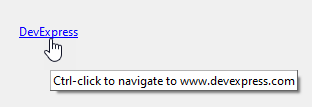
The code example in this section demonstrates handlers of OnHyperlinkClick and OnShowHyperlinkHint events. The OnHyperlinkClick event handler requires a user to hold down the Ctrl key to activate a hyperlink. The OnShowHyperlinkHint event handler changes all hyperlink hints to prompt a user to hold the Ctrl key for hyperlink activation.
procedure TMyForm.dxFormattedLabel1PropertiesHyperlinkClick(Sender: TObject;
  AArgs: TdxHyperlinkClickEventArgs);  // Requires the Ctrl key for hyperlink activation
begin
  if AArgs.Shift <> [ssCtrl] then  // If the Ctrl key is not held down
    AArgs.Handled := True;  // Prevents hyperlink activation
end;

procedure TMyForm.dxFormattedLabel1PropertiesShowHyperlinkHint(Sender: TObject;
  AArgs: TdxShowHyperlinkHintEventArgs);  // Changes all hyperlink hints
var
  AHintPrefix, AHintURI: string;
begin
  AHintPrefix := 'Ctrl-click to navigate to ';
  AHintURI := AArgs.URI.Remove(0, 8);  // Removes the URI scheme from the hyperlink hint
  AArgs.Hint := AHintPrefix + AHintURI;  // Redefines the hyperlink hint
end;