TdxMessageDialogHintedTextClickDelegate Type
The procedural type for a hint-marked text click handler in a message dialog.
Declaration
TdxMessageDialogHintedTextClickDelegate = reference to procedure(AArgs: TdxHintedTextClickEventArgs);Parameters
| Name | Type | Description |
|---|---|---|
| AArgs | TdxHintedTextClickEventArgs | Stores information on a hint-marked text click event in a DevExpress control with support for BBCode-inspired text formatting markup. |
Remarks
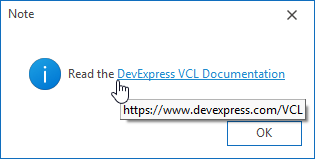
DevExpress message dialog boxes support BBCode-inspired markup tags for content formatting. A hint is displayed when a user positions the mouse pointer within a text range enclosed between [HINT] and [/HINT] tags.
dxMessageBox('Read the [URL=https://www.devexpress.com/VCL]DevExpress VCL Documentation[/URL]',
  'Note', MB_OK or MB_ICONINFORMATION);
Usage Scenarios
You can implement a handler of the TdxMessageDialogHintedTextClickDelegate type and pass the handler to any message box creation method as the AHintedTextClickProc parameter to execute custom code in response to a click on a hint-marked text range within message box content. For example, you can identify the clicked text range using AArgs.AnchorText or AArgs.HintIndex parameters.
Handler Execution Trigger
An assigned hint-marked text click handler is executed every time a user clicks a text range enclosed between [HINT] and [/HINT] tags in message box content.
Available Handler Parameters
The following parameters are avilable within a hint-marked text click handler:
AArgs.Button- Allows you to identify the clicked mouse button.
AArgs.Shift- Allows you to identify modifier keys held when a mouse button (
AArgs.Button) was clicked.
Refer to the TdxHintedTextClickEventArgs class description for detailed information on all parameters available within a hint-marked text click handler.
Code Example: Identify Clicked Hint-Marked Text Ranges in Message Boxes
The following code example displays the anchor text of the clicked hint-marked text range:
uses
  dxMessageDialog, // Declares the dxCreateMessageDialog method
// ...

procedure TMyForm.HintedTextClickHandler(AArgs: TdxHintedTextClickEventArgs);
begin
  ShowMessage('You clicked: ' + AArgs.AnchorText);  // Identifies the clicked text fragment
end;

procedure TMyForm.ShowMyMessage(const AMessage: string);
begin
  dxCreateMessageDialog(AMessage, nil, nil, HintedTextClickHandler);
end;
Direct TdxMessageDialogHintedTextClickDelegate Type References
The following global methods reference the TdxMessageDialogHintedTextClickDelegate procedural type as the AHintedTextClickProc parameter:
dxCreateMessageDialog Overloads
- dxCreateMessageDialog(string,TMsgDlgType,TMsgDlgButtons,TdxMessageDialogHyperlinkClickDelegate,TdxMessageDialogShowHyperlinkHintDelegate,TdxMessageDialogHintedTextClickDelegate,TdxMessageDialogShowTextHintDelegate)
- Creates a message dialog box with a specified dialog type and message. Allows you to specify a set of buttons and move focus to one of the buttons.
- dxCreateMessageDialog(string,TMsgDlgType,TMsgDlgButtons,TMsgDlgBtn,TdxMessageDialogHyperlinkClickDelegate,TdxMessageDialogShowHyperlinkHintDelegate,TdxMessageDialogHintedTextClickDelegate,TdxMessageDialogShowTextHintDelegate)
- Creates a message dialog box with a specified dialog type, message, and a set of buttons.
dxMessageBox Overloads
- dxMessageBox(THandle,string,string,Integer,TdxMessageDialogHyperlinkClickDelegate,TdxMessageDialogShowHyperlinkHintDelegate,TdxMessageDialogHintedTextClickDelegate,TdxMessageDialogShowTextHintDelegate)
- Opens a message dialog box that displays a specified message, title, and buttons (configured using a combination of flags). Allows you to associate the message box with an owner window.
- dxMessageBox(string,string,Integer,TdxMessageDialogHyperlinkClickDelegate,TdxMessageDialogShowHyperlinkHintDelegate,TdxMessageDialogHintedTextClickDelegate,TdxMessageDialogShowTextHintDelegate)
- Opens a message dialog box that displays a specified message, title, and buttons (configured using a combination of flags).
dxMessageDlg Overloads
- dxMessageDlg(string,TMsgDlgType,TMsgDlgButtons,Longint,TdxMessageDialogHyperlinkClickDelegate,TdxMessageDialogShowHyperlinkHintDelegate,TdxMessageDialogHintedTextClickDelegate,TdxMessageDialogShowTextHintDelegate)
- Opens a message dialog box with a specified dialog type, message, and a set of buttons (and allows you to specify the default button).
- dxMessageDlg(string,TMsgDlgType,TMsgDlgButtons,Longint,TMsgDlgBtn,TdxMessageDialogHyperlinkClickDelegate,TdxMessageDialogShowHyperlinkHintDelegate,TdxMessageDialogHintedTextClickDelegate,TdxMessageDialogShowTextHintDelegate)
- Opens a message dialog box with a specified dialog type, message, and a set of buttons.
dxMessageDlgPos Overloads
- dxMessageDlgPos(string,TMsgDlgType,TMsgDlgButtons,Longint,Integer,Integer,TdxMessageDialogHyperlinkClickDelegate,TdxMessageDialogShowHyperlinkHintDelegate,TdxMessageDialogHintedTextClickDelegate,TdxMessageDialogShowTextHintDelegate)
- Opens a message dialog box at a specified position on the screen.
- dxMessageDlgPos(string,string,TMsgDlgType,TMsgDlgButtons,Longint,Integer,Integer,TMsgDlgBtn,TdxMessageDialogHyperlinkClickDelegate,TdxMessageDialogShowHyperlinkHintDelegate,TdxMessageDialogHintedTextClickDelegate,TdxMessageDialogShowTextHintDelegate)
- Opens a message dialog box at a specified position on the screen. Allows you to specify the default button.
dxMessageDlgPosHelp Overloads
- dxMessageDlgPosHelp(string,string,TMsgDlgType,TMsgDlgButtons,Longint,Integer,Integer,string,TMsgDlgBtn,TdxMessageDialogHyperlinkClickDelegate,TdxMessageDialogShowHyperlinkHintDelegate,TdxMessageDialogHintedTextClickDelegate,TdxMessageDialogShowTextHintDelegate)
- Opens a message dialog box associated with a help topic and positions the dialog box at specific screen coordinates.
- dxMessageDlgPosHelp(string,TMsgDlgType,TMsgDlgButtons,Longint,Integer,Integer,string,TMsgDlgBtn,TdxMessageDialogHyperlinkClickDelegate,TdxMessageDialogShowHyperlinkHintDelegate,TdxMessageDialogHintedTextClickDelegate,TdxMessageDialogShowTextHintDelegate)
- Opens a message dialog box associated with a help topic and positions the dialog box at specific screen coordinates. Allows you to specify the default button.
Miscellaneous dxShowMessage Methods
- dxShowMessage(string,TdxMessageDialogHyperlinkClickDelegate,TdxMessageDialogShowHyperlinkHintDelegate,TdxMessageDialogHintedTextClickDelegate,TdxMessageDialogShowTextHintDelegate)
- Opens a generic message dialog box with an OK button.
- dxShowMessageFmt(string,Untyped[],TdxMessageDialogHyperlinkClickDelegate,TdxMessageDialogShowHyperlinkHintDelegate,TdxMessageDialogHintedTextClickDelegate,TdxMessageDialogShowTextHintDelegate)
- Opens a generic message dialog box with a formatted message and an OK button.
- dxShowMessagePos(string,Integer,Integer,TdxMessageDialogHyperlinkClickDelegate,TdxMessageDialogShowHyperlinkHintDelegate,TdxMessageDialogHintedTextClickDelegate,TdxMessageDialogShowTextHintDelegate)
- Opens a generic message dialog box at a specified position on the screen.
Message Dialog Form
The TdxMessageDialogForm.HintedTextClickProc property references the TdxMessageDialogHintedTextClickDelegate procedural type. All message dialog box creation methods initialize this property using the AHintedTextClickProc parameter value.
Related Procedural Types
- TdxMessageDialogHyperlinkClickDelegate
- The procedural type for a hyperlink activation handler in a message dialog.
- TdxMessageDialogShowHyperlinkHintDelegate
- The procedural type for a hyperlink hint display handler in a message dialog.
- TdxMessageDialogShowTextHintDelegate
- The procedural type for a hint-marked text range hint display handler in a message dialog.