dxCreateMessageDialog(string,TMsgDlgType,TMsgDlgButtons,TdxMessageDialogHyperlinkClickDelegate,TdxMessageDialogShowHyperlinkHintDelegate,TdxMessageDialogHintedTextClickDelegate,TdxMessageDialogShowTextHintDelegate) Method
Creates a message dialog box with a specified dialog type and message. Allows you to specify a set of buttons and move focus to one of the buttons.
Declaration
function dxCreateMessageDialog(const AMessage: string; ADialogType: TMsgDlgType; AButtons: TMsgDlgButtons; const AHyperlinkClickProc: TdxMessageDialogHyperlinkClickDelegate = nil; const AShowHyperlinkHintProc: TdxMessageDialogShowHyperlinkHintDelegate = nil; const AHintedTextClickProc: TdxMessageDialogHintedTextClickDelegate = nil; const AShowTextHintProc: TdxMessageDialogShowTextHintDelegate = nil): TdxMessageDialogForm;Parameters
| Name | Type | Description |
|---|---|---|
| AMessage | string | Message dialog box content. The The |
| ADialogType | TMsgDlgType | A message dialog box type that determines the predefined caption, system icon, and sound of the message dialog box. This parameter value initializes the created form’s DialogType property. |
| AButtons | TMsgDlgButtons | A set of buttons on the message dialog box form. |
| AHyperlinkClickProc | TdxMessageDialogHyperlinkClickDelegate | Optional. A procedure that handles clicks on hyperlinks in the displayed message. For example, use this procedure to identify the clicked hyperlink and prevent specific links from being activated. This parameter value initializes the HyperlinkClickProc property of the created message dialog box form. Refer to the procedural type description for detailed information and a code example: TdxMessageDialogHyperlinkClickDelegate. |
| AShowHyperlinkHintProc | TdxMessageDialogShowHyperlinkHintDelegate | Optional. A procedure that handles hyperlink hint display events. For example, use this procedure to modify the predefined hint message (the hyperlink target URI) based on conditions in your application. This parameter value initializes the ShowHyperlinkHintProc property of the created message dialog box form. Refer to the procedural type description for detailed information and a code example: TdxMessageDialogShowHyperlinkHintDelegate |
| AHintedTextClickProc | TdxMessageDialogHintedTextClickDelegate | Optional. A procedure that handles clicks on hint-marked text ranges in the displayed message. For example, use this procedure to identify the clicked text range. This parameter value initializes the HintedTextClickProc property of the created message dialog box form. Refer to the procedural type description for detailed information and a code example: TdxMessageDialogHintedTextClickDelegate. |
| AShowTextHintProc | TdxMessageDialogShowTextHintDelegate | Optional. A procedure that handles hint display events for hint-marked text ranges enclosed between [HINT] and [\HINT] tags. For example, use this procedure to modify the hint message based on conditions in your application. This parameter value initializes the ShowTextHintProc property of the created message dialog box form. Refer to the procedural type description for detailed information and a code example: TdxMessageDialogShowTextHintDelegate. |
Returns
| Type | Description |
|---|---|
| TdxMessageDialogForm | The created message dialog box form. |
Remarks
You can call the dxCreateMessageDialog function instead of the TdxMessageDialogForm constructor. The created message dialog box has the mdsMessageDlg style.
Note
The dxUseStandardMessageDialogs global variable has no effect on dxCreateMessageDialog function calls.
Code Examples
Display a Message Box and Identify the User Action
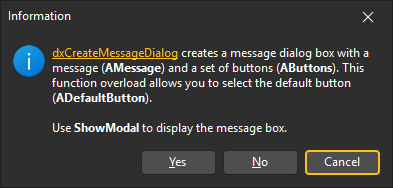
The code example in this section calls the dxCreateMessageDialog function to create a message box with Yes, No, and Cancel buttons, and moves focus to Cancel. This example displays the message box using ShowModal and identifies the action used to close the message box.
uses
  dxMessageDialog, // Declares the dxCreateMessageDialog method
  Winapi.Windows;  // Declares WinAPI constants
// ...

procedure TMyForm.DemonstrateDxCreateMessageDialog2;
var
  AMessage, AHelpURL, AShowModalURL: string;
  ADialogType: TMsgDlgType;
  AButtons: TMsgDlgButtons;
  ADefaultButton: TMsgDlgBtn;
  ADialog: TdxMessageDialogForm;
  ACloseAction: Integer;
begin
  // Define a formatted message with hyperlinks (using the BBCode-inspired markup)
  AHelpURL := 'https://docs.devexpress.com/VCL/dxMessageDialog.dxCreateMessageDialog(99472B0D)';
  AShowModalURL := 'https://docwiki.embarcadero.com/Libraries/en/Vcl.Forms.TCustomForm.ShowModal';
  AMessage :=
    '[URL=' + AHelpURL + ']dxCreateMessageDialog[/URL] creates a message dialog box ' +
    'with a message ([B]AMessage[/B]) and a set of buttons ([B]AButtons[/B]). ' +
    'This function overload allows you to select the default button ([B]ADefaultButton[/B]).' +
    sLineBreak + sLineBreak +
    'Use [URL=' + AShowModalURL + ']ShowModal[/URL] to display the message box.';

  ADialogType := mtInformation; // Defines the "Information" dialog title, icon, and sound
  AButtons := mbYesNoCancel;    // Defines a button set (Yes, No, and Cancel)
  ADefaultButton := mbCancel;   // Moves focus to the Cancel button

  // Create a message dialog form
  ADialog := dxCreateMessageDialog(AMessage, ADialogType, AButtons, ADefaultButton);
  try
    ACloseAction := ADialog.ShowModal; // Displays the form as a modal dialog
  finally
    ADialog.Free; // Releases the message dialog form once a user closes it
  end;

  // Identify the action used to close the message box
  case ACloseAction of
    IDYES:    Caption := 'Yes is clicked';
    IDNO:     Caption := 'No is clicked';
    IDCANCEL: Caption := 'Cancel is clicked';
    0:        Caption := 'Failed to create a message box';
  end;
end;
Display a Message Box with Custom Button Captions
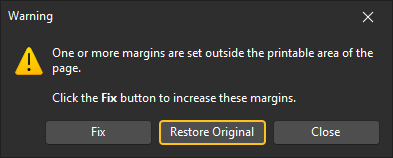
The code example in this section calls the dxCreateMessageDialog function to create a message box with three buttons,
changes their captions to Fix, Restore Original, and Close, and moves focus to Restore Original.
This example displays the message box using ShowModal and identifies the action used to close the message box.
uses
  dxMessageDialog, // Declares the dxCreateMessageDialog method
  Winapi.Windows;  // Declares WinAPI constants
// ...

procedure TMyForm.DemonstrateDxCreateMessageDialog4;
var
  ADialog: TdxMessageDialogForm;
  AMessage: string;
  ACloseAction: Integer;
begin
  AMessage := 'One or more margins are set outside the printable area of the page.' +
    sLineBreak + sLineBreak + 'Click the [B]Fix[/B] button to increase these margins.';
  ADialog := dxCreateMessageDialog(AMessage, mtWarning, mbYesNoCancel, mbNo);
  try
    ADialog.FindButton(mbYes).Caption    := 'Fix';
    ADialog.FindButton(mbNo).Caption     := 'Restore Original';
    ADialog.FindButton(mbCancel).Caption := 'Close';
    ADialog.AlignButtons;              // Recalculates the button layout
    ACloseAction := ADialog.ShowModal; // Displays the form as a modal dialog
  finally
    ADialog.Free; // Releases the message dialog form once a user closes it
  end;

  // Identify the action used to close the message box
  case ACloseAction of
    IDYES:    Caption := 'Fix is clicked';
    IDNO:     Caption := 'Restore Original is clicked';
    IDCANCEL: Caption := 'Close is clicked';
    0:        Caption := 'Failed to create a message box';
  end;
end;
Display Current Time in Text Hints
The following code example appends the current time to every hint displayed in a message box:
uses
  dxMessageDialog;  // Declares the dxCreateMessageDialog function
// ...

procedure TMyForm.ShowTextHintHandler(AArgs: TdxShowTextHintEventArgs);
begin
  AArgs.Hint := AArgs.Hint + ' (as of ' + TimeToStr(Now) + ')';
end;

procedure TMyForm.ShowMyMessage(const AMessage: string);
begin
  dxCreateMessageDialog(AMessage, nil, nil, nil, ShowTextHintHandler);
end;
Identify Clicked Hint-Marked Text Ranges in Message Boxes
The following code example displays the anchor text of the clicked hint-marked text range:
uses
  dxMessageDialog, // Declares the dxCreateMessageDialog method
// ...

procedure TMyForm.HintedTextClickHandler(AArgs: TdxHintedTextClickEventArgs);
begin
  ShowMessage('You clicked: ' + AArgs.AnchorText);  // Identifies the clicked text fragment
end;

procedure TMyForm.ShowMyMessage(const AMessage: string);
begin
  dxCreateMessageDialog(AMessage, nil, nil, HintedTextClickHandler);
end;
Identify the Action Used to Close the Message Box
ShowModal returns one of the following values that identify actions used to close the message box:
- IDOK
- A user clicked the OK button to close the message box.
- IDCANCEL
- A user clicked the Cancel or Close button, or pressed Esc to close the message box.
- IDABORT
- A user clicked the Abort button to close the message box.
- IDRETRY
- A user clicked the Retry button to close the message box.
- IDIGNORE
- A user clicked the Ignore button to close the message box.
- IDYES
- A user clicked the Yes button to close the message box.
- IDNO
- A user clicked the No button to close the message box.