GridViewBase.ShowGroupPanelColumnsAsSingleRow Property
Gets or sets whether the Group Panel displays column headers on the same level. This is a dependency property.
Namespace: DevExpress.Xpf.Grid
Assembly: DevExpress.Xpf.Grid.v26.1.dll
NuGet Package: DevExpress.Wpf.Grid.Core
Declaration
Property Value
| Type | Default | Description |
|---|---|---|
| Boolean | false |
|
Remarks
Set the ShowGroupPanelColumnsAsSingleRow property to true to display all column headers on the same level (without vertical offset).
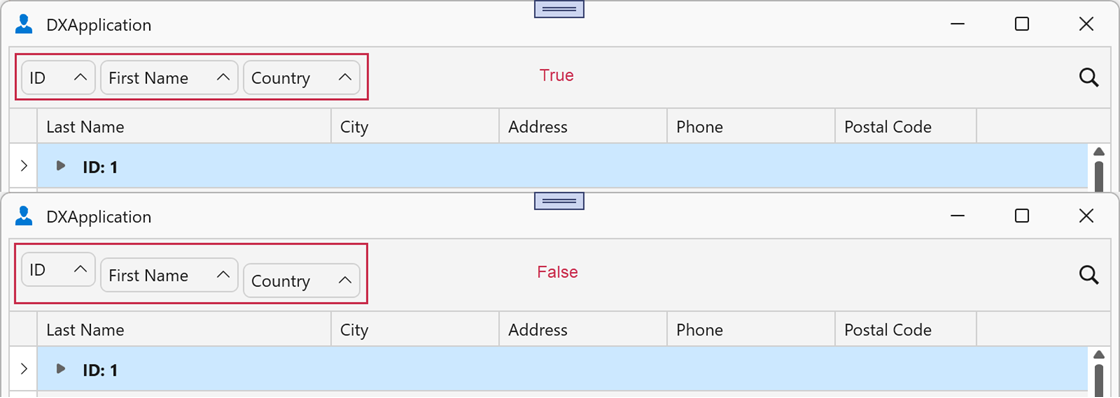
In master-detail scenarios, you can specify the ShowGroupPanelColumnsAsSingleRow property for master and detail views.
Example
The following example arranges grouped column headers in a single row:
<dx:ThemedWindow x:Class="GroupPanelExample.MainWindow"
                 xmlns="http://schemas.microsoft.com/winfx/2006/xaml/presentation"
                 xmlns:x="http://schemas.microsoft.com/winfx/2006/xaml"
                 xmlns:dx="http://schemas.devexpress.com/winfx/2008/xaml/core"
                 xmlns:dxg="http://schemas.devexpress.com/winfx/2008/xaml/grid"
                 ... >
    <dxg:GridControl ItemsSource="{Binding Items}">
        <dxg:GridControl.View>
            <dxg:TableView
                ShowGroupPanel="True"
                ShowGroupPanelColumnsAsSingleRow="True"/>
        </dxg:GridControl.View>
    </dxg:GridControl>
</dx:ThemedWindow>
See Also