TcxCustomImage.Picture Property
Provides access to the image container that stores the image displayed in the editor.
Declaration
property Picture: TPicture read; write;Property Value
| Type | Description |
|---|---|
| TPicture | Stores the image displayed in the editor. Use the Tip The Properties.GraphicClass property defines the image container type. You can use the Properties.GraphicClass property to switch between registered image container types. |
Remarks
You can use the Picture.Graphic property to access the displayed image directly.
To clear the editor, assign nil (in Delphi) or nullptr (in C++Builder) to the Picture.Graphic property.
Image Container Type
To use a TGraphic class descendant as an image container (accessible through the Picture.Graphic property),
assign the corresponding class reference to the Properties.GraphicClass property.
Tip
We recommend that you set the Properties.GraphicClass property to TdxSmartImage to ensure that the image editor supports the same image formats as all other DevExpress components.
Supported Image Formats
- BMP | EMF | GIF | JPEG | PNG | TIFF | WMF
- Support for these image formats relies on corresponding native encoders from the Windows Imaging Component (WIC).
- SVG
- DevExpress controls use our own SVG engine implementation. Refer to the following topic for detailed information on supported SVG elements and their attributes: SVG Image Support.
End-User Functionality
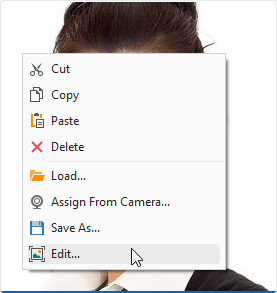
Users can execute image load, edit, save, and delete commands in the editor’s context menu. To customize the context menu, use the Properties.PopupMenuLayout property.
Empty Editor Caption
You can use the Properties.Caption property to display a custom caption in the editor when it is empty. For example, you can prompt a user to perform an action:
