TcxCustomImageProperties.PopupMenuLayout Property
Provides access to context menu layout settings.
Declaration
property PopupMenuLayout: TcxPopupMenuLayout read; write;Property Value
| Type | Description |
|---|---|
| TcxPopupMenuLayout | Stores context menu layout settings for an unbound or data-aware image editor. |
Remarks
Users can open the context menu to activate built-in image editor commands. You can use the PopupMenuLayout property to customize the context menu.
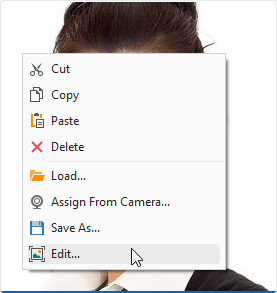
- Cut | Copy | Paste
Execute corresponding clipboard operations with images.
Alternatively, you can use standard Ctrl + X, Ctrl + C, and Ctrl + V key combinations.
- Delete
- Deletes the displayed image.
- Load
- Allows you to load a supported image from the file system.
- Assign From Camera…
- Displays the Camera Preview dialog. This option is enabled only if at least one camera is available to the camera manager.
- Save As…
- Displays the Save As… dialog.
- Edit…
- Displays the Image Editor Dialog.
You can use the PopupMenuLayout.MenuItems property to change the list of available menu items or add a custom menu item. Refer to the TcxPopupMenuLayout class description for detailed information on all available options.
See Also