ColumnBase.AllowedAggregateFilters Property
Gets or sets aggregate filters that the GridControl column supports.
Namespace: DevExpress.Xpf.Grid
Assembly: DevExpress.Xpf.Grid.v26.1.Core.dll
NuGet Package: DevExpress.Wpf.Grid.Core
Declaration
Property Value
| Type | Description |
|---|---|
| Nullable<AllowedAggregateFilters> | A list of available aggregate filters. |
Available values:
| Name | Description |
|---|---|
| None | There are no allowed aggregate filters. |
| Exists | Specifies the Exists filter criteria. |
| Count | Specifies the Count filter criteria. |
| Max | Specifies the Max filter criteria. |
| Min | Specifies the Min filter criteria. |
| Avg | Specifies the Average filter criteria. |
| Sum | Specifies the Sum filter criteria. |
| Single | Not supported |
| Custom | Not supported |
| All | All aggregate filters are allowed. |
Remarks
The Filter Editor displays all aggregate operators when you set the DataViewBase.AllowFilterEditorAggregateOperands property to Aggregate or AggregateWithCondition. Use the AllowedAggregateFilters property to customize the operator list for the column.
The following code snippet displays only Exists and Count aggregate filters for the Genres column:
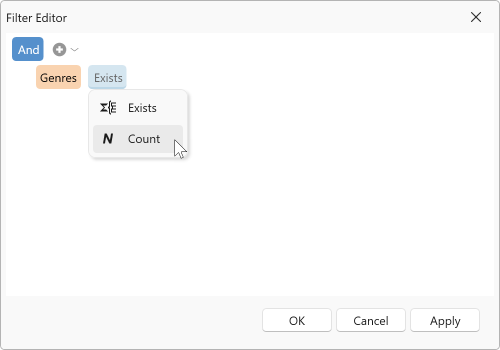
<dxg:GridColumn FieldName="Genres" AllowedAggregateFilters="Exists, Count"/>
Refer to the following help topic for more information: Aggregate Filters.