TcxCustomTrackBarProperties.Orientation Property
Specifies if the track bar layout is oriented horizontally or vertically.
Declaration
property Orientation: TcxTrackBarOrientation read; write; default tboHorizontal;Property Value
| Type | Default | Description |
|---|---|---|
| TcxTrackBarOrientation | tboHorizontal | The current track bar layout orientation. |
Remarks
AutoSize[1], Properties.AutoSize, Properties.Alignment, and Properties.Orientation properties allow you to configure UI element positioning and alignment for a track bar editor (a TcxCustomTrackBar descendant instance).
Use the Orientation property to switch between horizontal and vertical track bar layouts.
Available Options
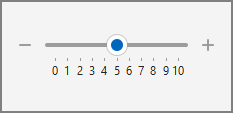
- tboHorizontal
Default. The track bar editor is oriented horizontally (the left-to-right or right-to-left scale direction depending on the ReverseDirection property value).
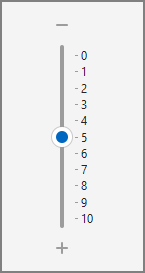
- tboVertical
The track bar editor is oriented vertically (the top-to-bottom or bottom-to-top scale direction depending on the ReverseDirection property value).
Note
The Orientation property does not affect the following keystrokes:
Page Up, Page Down, Home, End, ←, ↑, →, ↓, +, and -.
Default Value
The Orientation property’s default value is tboHorizontal.
-
Use the following properties for corresponding unbound and data-aware TcxCustomTrackBar descendants:
- TcxTrackBar.AutoSize/TcxDBTrackBar.AutoSize
- TdxRangeTrackBar.AutoSize/TdxDBRangeTrackBar
- TdxZoomTrackBar.AutoSize/TdxDBZoomTrackBar