GridDataViewBase.SearchPanelLeftContentTemplate Property
Gets or sets the template used to display additional UI elements to the left of the Search Panel. This is a dependency property.
Namespace: DevExpress.Xpf.Grid
Assembly: DevExpress.Xpf.Grid.v26.1.Core.dll
NuGet Package: DevExpress.Wpf.Grid.Core
Declaration
Property Value
| Type | Default | Description |
|---|---|---|
| DataTemplate | null | A DataTemplate that displays additional UI elements to the left of the Search Panel. |
Remarks
The SearchPanelLeftContentTemplate property allows you to add custom UI elements to the left of the Search Panel, such as a label, icon, or button.
Tip
The template’s DataContext returns the current view, so you can bind template elements directly to view properties.
Example: Display a Custom Label for the Search Panel
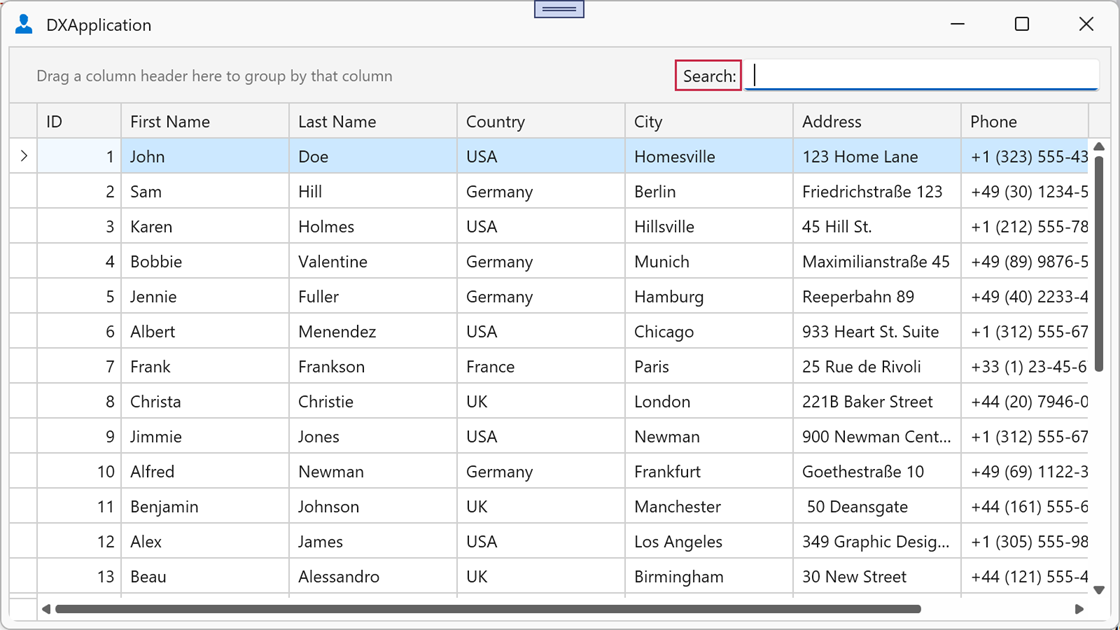
The following example adds the Search: label to the left of the Search Panel:
<dx:ThemedWindow x:Class="GroupPanelExample.MainWindow"
                 xmlns="http://schemas.microsoft.com/winfx/2006/xaml/presentation"
                 xmlns:x="http://schemas.microsoft.com/winfx/2006/xaml"
                 xmlns:dx="http://schemas.devexpress.com/winfx/2008/xaml/core"
                 xmlns:dxg="http://schemas.devexpress.com/winfx/2008/xaml/grid"
                 ... >
    <Window.Resources>
        <DataTemplate x:Key="SearchPanelLeftTemplate">
            <TextBlock Text="Search:" VerticalAlignment="Center" Margin="4,0,4,0"/>
        </DataTemplate>
    </Window.Resources>

    <dxg:GridControl ItemsSource="{Binding Items}">
        <dxg:GridControl.View>
            <dxg:TableView
                ShowSearchPanelMode="Always"
                SearchPanelLeftContentTemplate="{StaticResource SearchPanelLeftTemplate}"/>
        </dxg:GridControl.View>
    </dxg:GridControl>
</dx:ThemedWindow>
See Also