TdxChartCustomSeries.Points Property
Provides access to the series point collection.
#Declaration
property Points: TdxChartSeriesPoints read;#Property Value
| Type | Description |
|---|---|
| Tdx |
Stores a collection of series points. |
#Remarks
You can call Points.Add and Points.Insert procedures in unbound data access mode to populate the series with data points. Points.Arguments, Points.Values, Points.ArgumentDisplayTexts, and Points.ValueDisplayTexts properties provide indexed access to series point arguments, values, and the corresponding display text strings. Note that SortBy and SortOrder properties do not affect the order of series points in the collection.
Tip
You can also use a series point collection to manage series points in bound data access mode. Refer to the Tdx
#Example
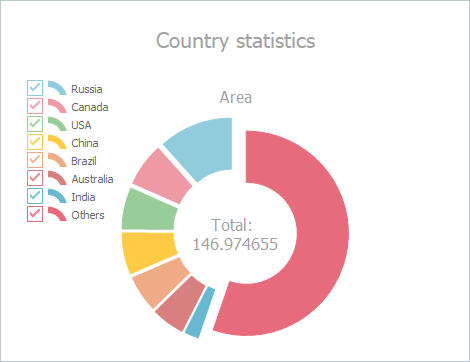
The following code example creates a simple series with the Doughnut View and populates it with data points in unbound mode:
uses cxDataStorage;  // This unit declares the TcxStringValueType class
// ...
var
  ASimpleDiagram: TdxChartSimpleDiagram;
  ASimpleSeries: TdxChartSimpleSeries;
  ADoughnutView: TdxChartSimpleSeriesDoughnutView;
  ADataBinding: TdxChartSimpleSeriesUnboundDataBinding;
begin
  dxChartControl1.BeginUpdate;  // Initiates the following batch change
  try
    ASimpleDiagram := dxChartControl1.AddDiagram<TdxChartSimpleDiagram>('Country statistics');
    ASimpleDiagram.Title.Appearance.FontOptions.Size := 16;
    ASimpleDiagram.Legend.AlignmentHorz := TdxChartLegendAlignment.Near; // Moves the legend pane
    ASimpleSeries := ASimpleDiagram.AddSeries('Area');  // Creates a simple series
    // Displays series data point arguments on the diagram legend pane
    ASimpleSeries.ShowInLegend := TdxChartSeriesShowInLegend.Diagram;
    ASimpleSeries.ViewClass := TdxChartSimpleSeriesDoughnutView;  // Selects the Doughnut series View
    // Selects the unbound data access mode
    ASimpleSeries.DataBindingClass := TdxChartSimpleSeriesUnboundDataBinding;
    ADataBinding := ASimpleSeries.DataBinding as TdxChartSimpleSeriesUnboundDataBinding;
    ADataBinding.ArgumentField.ValueTypeClass := TcxStringValueType;  // Selects the string data type
    ASimpleSeries.Title.Text := 'Area';  // Specifies the series title
    // Populates the unbound simple series with data points
    ASimpleSeries.Points.Add('Russia', 17.0752);
    ASimpleSeries.Points.Add('Canada', 9.98467);
    ASimpleSeries.Points.Add('USA', 9.63142);
    ASimpleSeries.Points.Add('China', 9.59696);
    ASimpleSeries.Points.Add('Brazil', 8.511965);
    ASimpleSeries.Points.Add('Australia', 7.68685);
    ASimpleSeries.Points.Add('India', 3.28759);
    ASimpleSeries.Points.Add('Others', 81.2);
    // Customizes appearance of the Doughnut series View
    ADoughnutView := ASimpleSeries.View as TdxChartSimpleSeriesDoughnutView;
    ADoughnutView.HoleRadius := 50;
    ADoughnutView.ExplodedValueOptions.Mode := TdxChartExplodedValueMode.All;
  finally
    dxChartControl1.EndUpdate;  // Calls EndUpdate regardless of the batch operation's success
  end;