CalculateCheckStatesValue(TcxCheckStates,IcxCheckItems,TcxCheckStatesValueFormat) Method
Calculates an edit value from specified check box item states.
Declaration
function CalculateCheckStatesValue(const ACheckStates: TcxCheckStates; AItems: IcxCheckItems; AValueFormat: TcxCheckStatesValueFormat): TcxEditValue;Parameters
| Name | Type | Description |
|---|---|---|
| ACheckStates | TcxCheckStates | The source array of check box states. |
| AItems | IcxCheckItems | Check box items of the source editor with multiple check boxes, for example, the Properties.Items property of a TcxCheckGroup editor. |
| AValueFormat | TcxCheckStatesValueFormat | The check box state value format. This parameter value specifies the required data format of the calculated edit value. |
Returns
| Type | Description |
|---|---|
| TcxEditValue | The calculated edit value. The |
Remarks
You can call CalculateCheckStates and CalculateCheckStatesValue global functions to convert a combination of individual check box states into an edit value and vice versa. These operations can be useful for scenarios that involve interaction between editors with multiple check boxes (such as check groups and check combo boxes) and dataset fields.
Code Examples
Initialize Check Combo Box States
The following code example initializes all states for three check box items in an in-place TcxCheckComboBox editor:
uses
  cxCheckBox,  // Declares the CalculateCheckStatesValue global function
  cxCheckComboBox;  // Declares the TcxCheckComboBoxProperties class
//...

procedure TMyForm.cxButton1Click(Sender: TObject);
var
  AProperties: TcxCheckComboBoxProperties;
begin
  AProperties := cxBarEditItem1.Properties as TcxCheckComboBoxProperties;
  cxBarEditItem1.EditValue := CalculateCheckStatesValue([cbsChecked, cbsUnchecked, cbsChecked],
     AProperties.Items, AProperties.EditValueFormat);
end;
Create Check Combo Box Items and Initialize Checked States
The code example in this section does the following:
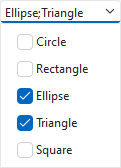
- Populates an existing TcxCheckComboBox editor with five items (Circle, Rectangle, Ellipse, Triangle, and Square).
- Calls the
CalculateCheckStatesValueglobal function to initialize checked/unchecked states for the first four editor items using the Value property. The last item (Square) remains unchecked.
uses
  cxCheckBox,  // Declares the CalculateCheckStatesValue global function
  cxCheckComboBox;  // Declares the TcxCheckComboBox class and related types
// ...

procedure TMyForm.FormCreate(Sender: TObject);
var
  AProperties: TcxCheckComboBoxProperties;
begin
  AProperties := cxCheckComboBox1.Properties;
  // Populate the check combo box with five items
  AProperties.BeginUpdate; // Initiates the following batch operation
  try
    AProperties.Items.AddCheckItem('Circle');
    AProperties.Items.AddCheckItem('Rectangle');
    AProperties.Items.AddCheckItem('Ellipse');
    AProperties.Items.AddCheckItem('Triangle');
    AProperties.Items.AddCheckItem('Square');
  finally
    AProperties.EndUpdate();  // Calls EndUpdate regardless of the batch operation's success
  end;
  cxCheckComboBox1.Value := CalculateCheckStatesValue([cbsUnchecked, cbsUnchecked,
    cbsChecked, cbsChecked], AProperties.Items, AProperties.EditValueFormat);
end;