
AxisLabel.Formatter Property
Gets or sets an object that formats axis labels.
Namespace: DevExpress.XtraCharts
Assembly: DevExpress.XtraCharts.v26.1.dll
NuGet Package: DevExpress.Charts
Declaration
Property Value
| Type | Description |
|---|---|
| IAxisLabelFormatter | An object of a class that implements the IAxisLabelFormatter interface. |
Remarks
Use the Formatter property if you need to generate text strings for axis labels based on a custom condition or change an order of magnitude of axis label values.
Formatter has higher priority than the AxisLabel.TextPattern property value. For this reason, the AxisLabel.TextPattern value is ignored if Formatter is specified.
Example
Perform the steps below to create a custom formatter for axis labels:
- Create a class that inherits the IAxisLabelFormatter interface and implement the interface’s GetAxisLabelText method.
- Assign the newly created class instance to the
AxisLabel.Formatterproperty.
How to: Format Numeric Axis Labels
This example shows how to apply a custom format to a numeric axis’s labels.
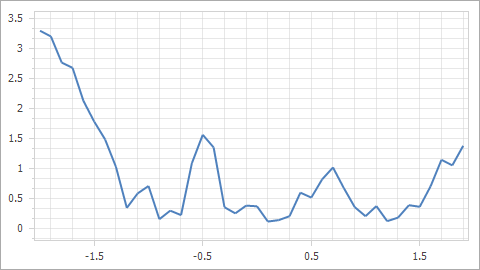
A formatter applies to axis labels:
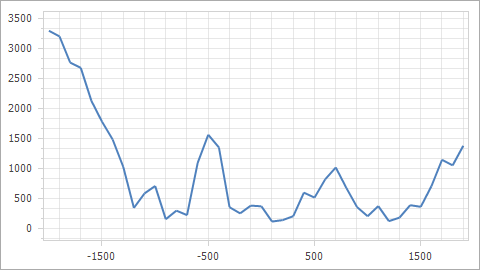
A formatter does not apply to axis labels:
private void OnFormLoad(object sender, EventArgs e) {
    XYDiagram diagram = (XYDiagram)chartControl1.Diagram;
    AxisLabelFormatter formatter = new AxisLabelFormatter();
    diagram.AxisX.Label.Formatter = formatter;
    diagram.AxisY.Label.Formatter = formatter;
}
public class AxisLabelFormatter : IAxisLabelFormatter {
    public string GetAxisLabelText(object axisValue) {
        return Convert.ToString((double)axisValue / 1000);
    }
}
How to: Format Date-Time Axis Labels
This example shows how to format the date-time axis labels as follows:
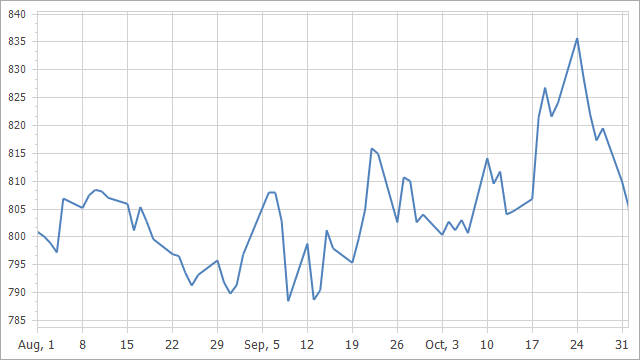
A formatter applies to the x-axis’s labels:
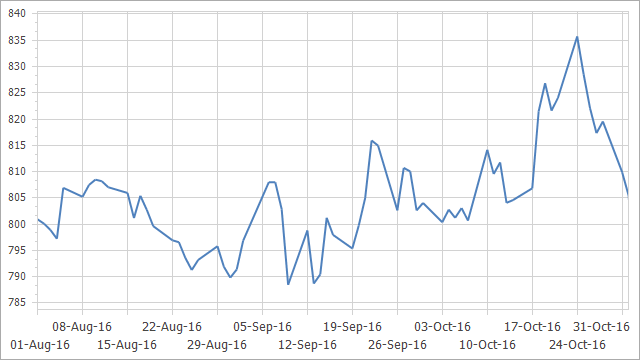
A formatter does not apply to axis labels:
private void Form1_Load(object sender, EventArgs e) {

    XYDiagram diagram = chartControl.Diagram as XYDiagram;

    // Configure scale options.
    DateTimeScaleOptions dateTimeScaleOptions = diagram.AxisX.DateTimeScaleOptions;
    dateTimeScaleOptions.ScaleMode = ScaleMode.Continuous;
    dateTimeScaleOptions.GridAlignment = DateTimeGridAlignment.Day;
    dateTimeScaleOptions.GridSpacing = 7;
    dateTimeScaleOptions.WorkdaysOnly = true;

    // Apply a custom format to axis labels.
    AxisLabel axisLabel = diagram.AxisX.Label;
    axisLabel.Formatter = new AxisLabelFormatter();

}
public class AxisLabelFormatter : IAxisLabelFormatter {
    public string GetAxisLabelText(object axisValue) {
        DateTime value = (DateTime)axisValue;
        return ((value.Day >= 1) && (value.Day <= 7)) ? $"{value.ToString("MMM, d")}" : $"{value.Day}";
    }
}