RibbonForm.NavigationControlLayoutMode Property
Gets or sets the alignment of the side navigation relative to the form’s title.
Namespace: DevExpress.XtraBars.Ribbon
Assembly: DevExpress.XtraBars.v26.1.dll
NuGet Package: DevExpress.Win.Navigation
Declaration
Property Value
| Type | Default | Description |
|---|---|---|
| RibbonFormNavigationControlLayoutMode | Default | A value that specifies the alignment of the side navigation relative to the form’s title. |
Available values:
| Name | Description |
|---|---|
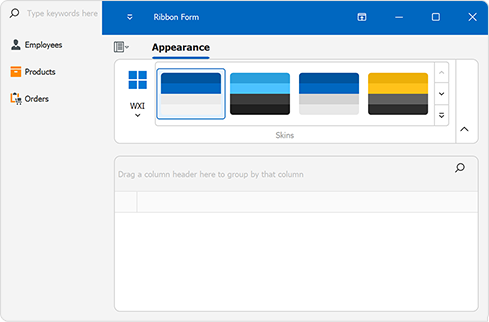
| Default | The navigation control stretches from the top to the bottom of the form (full height). |
| StretchToTop | The navigation control stretches from the top to the bottom of the form (full height). |
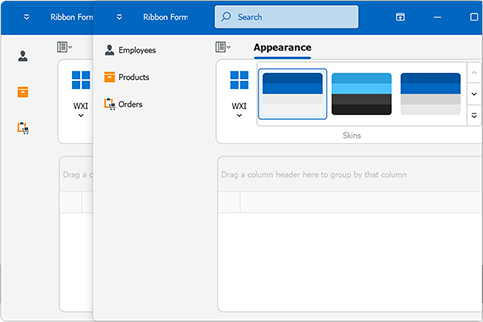
| StretchToFormTitle | The navigation control starts below the form’s title and extends to the bottom of the form. |
Remarks
The following code snippet creates a side navigation inspired by the new Microsoft Outlook:
using DevExpress.XtraBars.Navigation;
using DevExpress.XtraBars.Ribbon;
using System.Windows.Forms;

namespace DXApplication {
    public partial class Form1 : RibbonForm {
        AccordionControl accordion;
        public Form1() {
            InitializeComponent();
            accordion = new AccordionControl() { Dock = DockStyle.Left };
            this.Controls.Add(accordion);
            this.NavigationControl = accordion;
            this.NavigationControlLayoutMode = RibbonFormNavigationControlLayoutMode.StretchToFormTitle;
            CreateAccordionItems();
        }
        void CreateAccordionItems() {
            AccordionControlElement group1 = new AccordionControlElement(ElementStyle.Group) {
                Name = "group1",
                Text = "Contacts",
                Expanded = true
            };
            AccordionControlElement item1 = new AccordionControlElement(ElementStyle.Item) {
                Name = "itemCustomers",
                Text = "Customers",
            };
            AccordionControlElement item2 = new AccordionControlElement(ElementStyle.Item) {
                Name = "itemEmployees",
                Text = "Employees"
            };

            group1.Elements.AddRange(new AccordionControlElement[] { item1, item2 });
            accordion.Elements.Add(group1);
        }
    }
}
Note
Automatic layout adjustments of the RibbonStatusBar (based on the NavigationControlLayoutMode property) are applied only if the status bar is a direct child of the RibbonForm.
If the status bar is placed inside another container (for example, a Panel), it will not respond to layout changes triggered by the navigation control. To ensure correct behavior, add the RibbonStatusBar directly to the form.