TdxDBColorGallery Class
A data-aware color gallery control.
Declaration
TdxDBColorGallery = class(
    TdxCustomColorGallery
)
Remarks
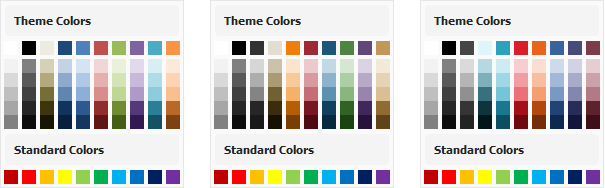
A color gallery allows users to switch between available colors. You can use ColorPalette and ColorSet properties to switch between predefined palettes. To populate the gallery with custom colors, handle the OnGetCustomColorSet event.
UI Automation/Accessibility Support
The color gallery component is mapped to a node in the UI Automation tree when the global UI Automation flag (dxUIAutomationEnabled) is enabled. When a user moves focus between color items, the gallery component exposes the corresponding hexadecimal color code to the active third-party assistive tool (such as Microsoft Narrator).
UI Automation Settings
Use Automation.Name and Automation.Description properties to specify the color gallery name and add optional information that are then used to clarify UI element purpose for users who rely on third-party assistive tools.
Refer to the TdxAutomationElementSettings class description for detailed information on all available options.
Main API Members
The list below outlines key members of the TdxDBColorGallery class.
Appearance Settings
- BorderStyle
- Specifies if the gallery control displays a border.
- ItemSize
- Specifies color item size.
- ShowItemBorders
- Specifies if color gallery items display borders.
User Interaction Options
- Automation
- Provides access to UI Automation and accessibility-related settings.
- OnChange
- Allows you to execute custom code in response to selected color changes.
- OnItemClick
- Allows you to execute custom code in response to clicks on color items.
Content-Related APIs
- ColorPalette
- Allows you to switch between Standard, Extended, and Office palette types.
- ColorSet
Allows you to switch between available themes for the Office palette.
You can set the ColorSet property to csCustom to populate the gallery with custom colors using the OnGetCustomColorSet event.
- DataBinding
- Allows you to bind the color gallery to data.
- OnGetCustomColorSet
- Allows you to populate the gallery with custom colors when the ColorSet property is set to csCustom.
General-Purpose API Members
- AutoSizeMode
- Allows you to switch between available gallery size calculation modes.
- BeginUpdate | EndUpdate
- Allow you to avoid excessive redraw operations during batch content and setting changes.
- Visible
- Specifies if the gallery control is visible.
Other Gallery Components
- TdxGalleryControl
- A gallery control.
- TdxColorGallery
- An unbound color gallery component.
- TdxRibbonBackstageViewGalleryControl
- A Ribbon Backstage View gallery.