FilteringPanelControl.ValueForeground Property
Gets or sets the foreground brush for filter values within the Filter Panel. This is a dependency property.
Namespace: DevExpress.Xpf.Core.FilteringUI
Assembly: DevExpress.Xpf.Grid.v26.1.dll
NuGet Package: DevExpress.Wpf.Grid.Core
Declaration
Property Value
| Type | Default | Description |
|---|---|---|
| Brush | null | The foreground brush applied to filter values within the Filter Panel. |
Remarks
When the ValueForeground property value is null (default), the Filter Panel applies the active theme’s foreground to all filter values.
Example: Set a Blue Foreground for Filter Values
The following example sets a blue foreground for filter values within the Filter Panel:
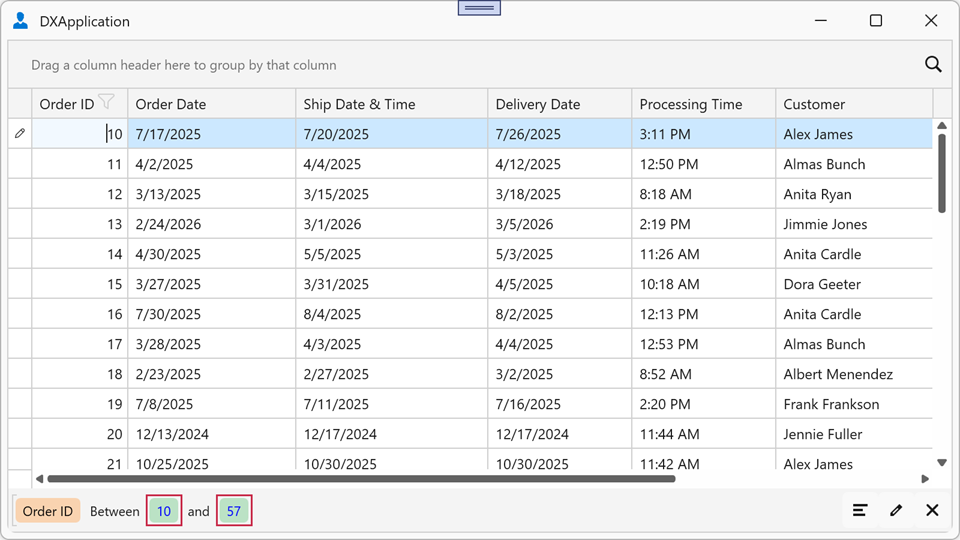
<dx:ThemedWindow x:Class="FilterPanelExample.MainWindow"
                 xmlns="http://schemas.microsoft.com/winfx/2006/xaml/presentation"
                 xmlns:x="http://schemas.microsoft.com/winfx/2006/xaml"
                 xmlns:dx="http://schemas.devexpress.com/winfx/2008/xaml/core"
                 xmlns:dxg="http://schemas.devexpress.com/winfx/2008/xaml/grid"
                 xmlns:dxfui="http://schemas.devexpress.com/winfx/2008/xaml/core/filteringui">
    <dxg:GridControl ItemsSource="{Binding Orders}">
        <dxg:GridControl.View>
            <dxg:TableView ShowFilterPanelMode="ShowAlways">
                <dxg:TableView.FilteringPanelStyle>
                    <Style TargetType="dxfui:FilteringPanelControl">
                        <Setter Property="ColorMode" Value="Default"/>
                        <Setter Property="ValueForeground" Value="Blue"/>
                    </Style>
                </dxg:TableView.FilteringPanelStyle>
            </dxg:TableView>
        </dxg:GridControl.View>
    </dxg:GridControl>
</dx:ThemedWindow>
See Also