TdxCustomReportControl.ReportName Property
Specifies the report name used as an identifier for the report template/layout definition.
Declaration
property ReportName: string read; write;Property Value
| Type | Description |
|---|---|
| string | The report name (case-sensitive). |
Remarks
The TdxReportControl component requires a specified report name to manage report layouts, generate/display report documents, and associate the main report layout with subreports. Use the ReportName property to associate a report name with the report template/layout definition specified using the Layout property.
Report Name and Scopes/Groups
All TdxReport and TdxReportControl instances initially belong to the same report name scope. All report components that share the same report name are associated with the same layout definition. Any changes made in the Report Designer are applied to all report components with the same report name.
To associate the TdxReportControl component with a dedicated report name scope, use the GroupName property. All report components with the same GroupName[1] property value belong to the same report name scope.
Report Designer: End-User Functionality
To save the current report template state during the current session, users can click the hamburger button in the Report Designer dialog and select the Save option. If the TdxCustomReportControl.ReportName property value is an empty string, the Report Designer dialog prompts a user to specify a report name:
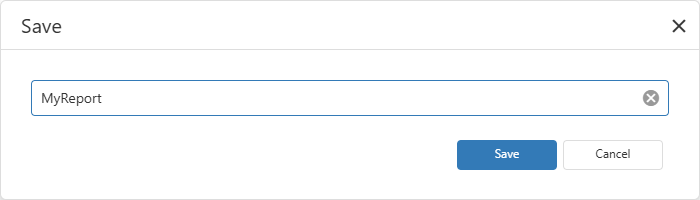
The report is saved in memory. Report Viewer and Report Designer dialogs also display the ReportName property value in the form caption.
Code Examples
Save Report Layout Changes to File on Every Change
The following code example saves the current Report layout to a file in the REPX format every time a user saves pending changes in the Report Designer dialog:
uses
  dxReport.Control;  // Declares the TdxReport class
// ...

procedure TMyForm.dxReport1LayoutChanged(ASender: TdxCustomReportControl);
begin
  ASender.Layout.SaveToFile(ASender.ReportName + '.xml');
end;
Export Report Content to PDF File
The following code example exports content of a configured TdxReportControl component to a file in the Portable Document (PDF) format using an intermediary TMemoryStream object:
uses
  dxReport.Control,  // Declares the TdxReportControl component
  dxSplashForms,     // Declares the TdxSplashFormManager class and related types
  dxShellDialogs;    // Declares the TdxSaveFileDialog component
// ...

procedure TMyForm.cxButtonExportToPDFClick(Sender: TObject);
var
  AStream: TMemoryStream;
begin
  if not dxSaveFileDialog1.Execute(Handle) then Exit;  // Displays the "Save File" dialog
  AStream := TMemoryStream.Create;       // Creates a stream as an intermediary container
  // Displays a Wait Form before the export operation
  TdxSplashFormManager.WaitForm.Show(dxReportControl1.Parent);
  try
    dxReportControl1.ExportToPDF(AStream);   // Exports content to a stream in the PDF format
    AStream.SaveToFile(dxSaveFileDialog1.FileName);    // Saves PDF stream content to a file
  finally
    AStream.Free;                        // Releases the intermediary memory stream
    TdxSplashFormManager.WaitForm.Hide;  // Hides the Wait Form once the operation is complete
  end;
end;
Default Value
The ReportName property’s default value is an empty string.
The default ReportName property value indicates that the ShowDesigner procedure displays an empty template in the Report Designer dialog, even if the Layout property contains a non-empty template. Any subsequent saved changes made in the Report Designer dialog override both ReportName and Layout property values.
Layout Definition Name Properties in Other Components
- TdxReport.ReportName
- Specifies the report name used as an identifier for the report template/layout definition.
- TdxCustomDashboardControl.DashboardName
- Specifies the name used as an identifier for the dashboard layout definition.
- TdxDashboard.Name
- Specifies the name used as an identifier for the dashboard layout definition.