TdxCustomDashboardControl.DashboardName Property
Specifies the name used as an identifier for the dashboard layout definition.
Declaration
property DashboardName: string read; write;Property Value
| Type | Description |
|---|---|
| string | The dashboard name (case-sensitive). |
Remarks
The TdxDashboardControl component requires a specified dashboard name to manage dashboard layouts and generate/display content. Use the DashboardName property to associate a dashboard name with the layout definition specified using the Layout property.
Note
All TdxDashboard/TdxDashboardControl components that share the same dashboard name, are associated with the same layout definition. Any changes made in the Dashboard Designer are applied to all dashboard components with the same layout name.
Dashboard Designer: End-User Functionality
To save the current dashboard layout state during the current session, users can click the hamburger button in the Dashboard Designer dialog and select the Save option.
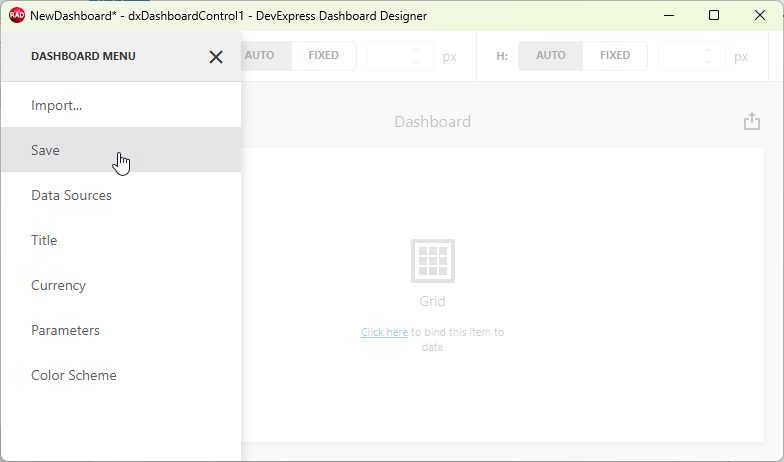
Dashboard Viewer and Dashboard Designer dialogs also display the DashboardName property value in the form caption. If the DashboardName property value is an empty string, the Dashboard Designer dialog assigns an automatically generated name ('NewDashboard').
Related API Members
The TdxDashboardControl component displays content only when both DashboardName and Layout properties are specified. To avoid redundant redraw operations, you can set the Active property to False during batch underlying data source changes. The inactive TdxDashboardControl component displays the DashboardName property value instead of content.
The ExportTo procedure returns a string (as the AFileName parameter) that consists of the DashboardName property value with the file name extension associated with the target export format.
Code Examples
Save Dashboard Layout to File on Every Change
The following code example saves the current Dashboard layout to a file in the XML format every time a user saves pending changes in the Dashboard Designer dialog:
uses
  dxDashboard.Control;  // Declares the TdxDashboardControl class
// ...

procedure TMyForm.dxDashboardControl1LayoutChanged(ASender: TdxCustomDashboardControl);
begin
  ASender.Layout.SaveToFile(ASender.DashboardName + '.xml');
end;
Save Dashboard State to File in Response to User Changes
The following code example saves the current dashboard user interaction state to a JSON file on every change:
uses
  dxDashboard.Control;  // Declares the TdxDashboardControl class
// ...

procedure TMyForm.dxDashboardControl1StateChanged(ASender: TdxCustomDashboardControl);
begin
  ASender.State.SaveToFile(ASender.DashboardName + 'State.json');
end;
Related GitHub-Hosted Sample Projects
Default Value
The DashboardName property’s default value is an empty string.
The default DashboardName property value indicates that the ShowDesigner procedure displays an empty dashboard layout, even if the Layout property contains a non-empty layout. Any subsequent saved changes made in the Dashboard Designer dialog update both DashboardName and Layout property values.
Layout Definition Name Properties in Other Components
- TdxDashboard.Name
- Specifies the name used as an identifier for the dashboard layout definition.
- TdxReport.ReportName
- Specifies the report name used as an identifier for the report template/layout definition.
- TdxCustomReportControl.ReportName
- Specifies the report name used as an identifier for the report template/layout definition.