TdxReport.Layout Property
Provides access to the report template layout (in XML).
Declaration
property Layout: TStringList read; write;Property Value
| Type | Description |
|---|---|
| TStringList | Stores an XML report template (REPX). |
Remarks
The TdxReport component generates report documents based on an XML-based report definition (template) in the REPX format. A REPX report definition contains report controls, properties, and data bindings.
Use the Layout property to load, save, and access the report template (in REPX).
Available Options
Call Layout.LoadFromFile/Layout.LoadFromStream and Layout.SaveToFile/Layout.SaveToStream procedures to import and export report templates in the REPX format.
You can use Layout.Strings and Layout.Text properties to access and modify report layout content directly (if required).
Refer to the TStringList class description for detailed information on all available options.
End-User Layout Edit Functionality
Call the ShowDesigner procedure to display the Web-based Report Designer dialog.
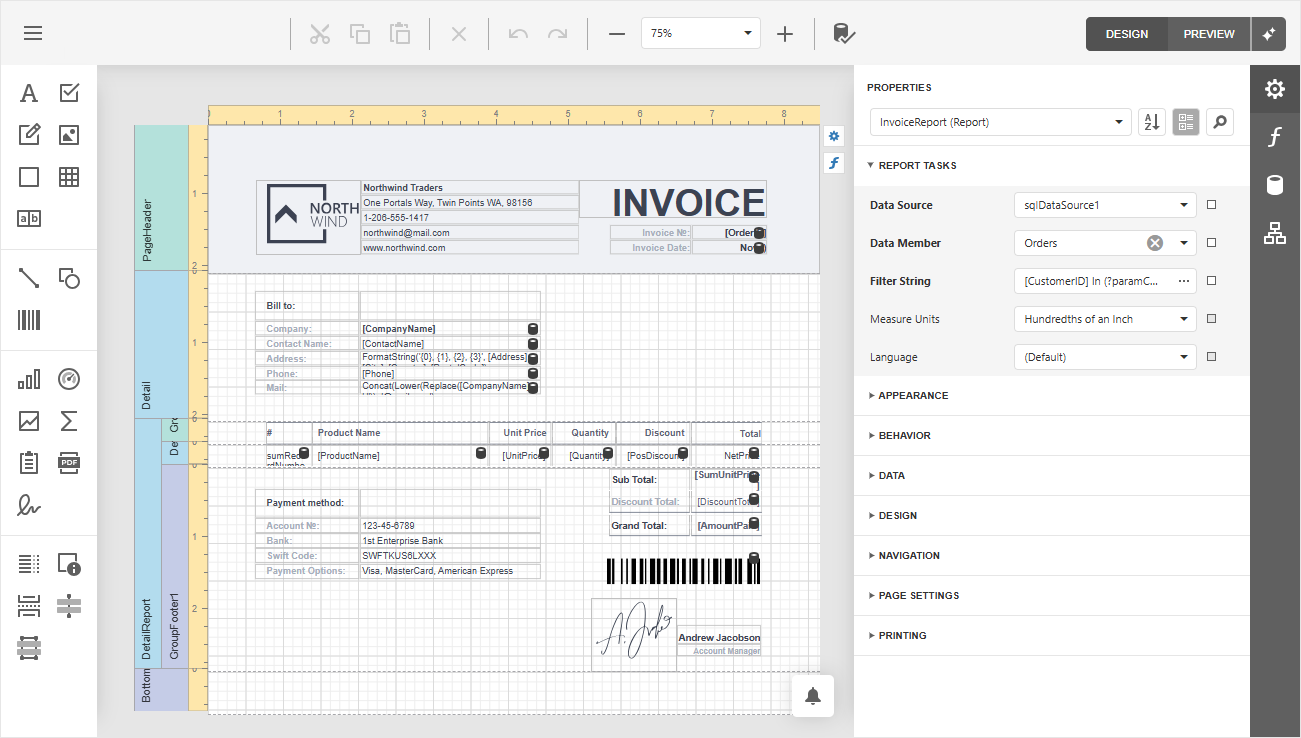
All saved changes made in this dialog update the Layout property value and raise the OnLayoutChanged event[1]. For example, you can handle this event to save report template changes to a file.
Tip
Refer to the following topic for detailed information on all tools available for report template creation: Report Designer.
Code Examples
Related GitHub-Hosted Example Projects
Load a Report Template from a File
The following code example allows a user to load a report template file and display it in the Report Designer dialog:
uses
  dxReport,  // Declares the TdxReport class
  dxShellDialogs;  // Declares the TdxOpenFileDialog class
// ...

procedure TMyForm.cxBtnLoadReportTemplateClick(Sender: TObject);
begin
  if dxOpenFileDialog1.Execute then
  begin
    dxReport1.ReportName := ChangeFileExt(ExtractFileName(dxOpenFileDialog1.FileName), '');
    dxReport1.Layout.LoadFromFile(dxOpenFileDialog1.FileName);
    dxReport1.ShowDesigner;
  end;
end;
Save Report Layout Changes to File on Every Change
The following code example saves the current report to a REPX file every time a user saves pending changes in the Report Designer dialog:
uses
  dxReport;  // Declares the TdxReport class
// ...

procedure TMyForm.dxReport1LayoutChanged(ASender: TdxReport);
begin
  ASender.Layout.SaveToFile(ASender.ReportName + '.repx');
end;
Save Report Layout to Database on Every Change
The following code example saves the current report to an existing BLOB dataset field every time a user saves pending changes in the Report Designer dialog:
uses
  dxReport, // Declares the TdxReport class
  dxmdaset;  // Declares the TdxMemData class and related types
// ...

procedure TMyForm.dxReport1LayoutChanged(ASender: TdxReport);
begin
  dxMemData1.Edit;
  dxMemData1.FieldByName('TemplateName').AsString := ASender.ReportName;
  dxMemData1.FieldByName('TemplateLayout').Assign(ASender.Layout);
  dxMemData1.Post;
end;
Load a Report Template from a Database
The following code example loads a report template layout and its name from a memory-based dataset (TdxMemData):
uses
  dxReport,  // Declares the TdxReport class
  dxmdaset;  // Declares the TdxMemData class
// ...

procedure TMyForm.cxBtnLoadReportTemplateClick(Sender: TObject);
begin
  if(dxMemData1.RecordCount = 0) and not (dxMemData1.State = dsInsert) then
  begin
    ShowMessage('The database is empty');
    Exit;
  end;
  dxReport1.ReportName := dxMemData1.FieldByName('TemplateName').AsString;
  dxReport1.Layout.Assign(dxMemData1.FieldByName('TemplateLayout'));
  dxReport1.ShowDesigner;
end;
Generate Reports Based on In-Memory Data
The following code example loads an XML-based report template (TdxReport.Layout) from a REPX file, populates the template with test data defined in a connection string, and exports the resulting report as a PNG image:
uses
  dxReport,  // Declares the TdxReport component and related types
  dxReport.ConnectionString.JSON;  // Declares the TdxReportInMemoryJSONConnection component
// ...

procedure TMyForm.Button1Click(Sender: TObject);
var
  AJSONDataConnection: TdxReportInMemoryJSONConnection;
  AReport: TdxReport;
  AFileStream: TFileStream;
begin
  AJSONDataConnection := TdxReportInMemoryJSONConnection.Create(Self);
  try
    AJSONDataConnection.Name := 'JSONData';
    // Specify in-memory report data as a connection string
    AJSONDataConnection.ConnectionString :=
      'Json=''[{"id":1, "caption":"test1"},{"id":2, "caption":"test2"}]''';
    AReport := TdxReport.Create(Self);
    try
      AReport.ReportName := 'Report';
      AReport.Layout.LoadFromFile('Report.repx');  // Loads a report template
      AFileStream := TFileStream.Create('Report.png', fmOpenReadWrite);
      try
        AReport.ExportToImage(AFileStream);  // Exports the report in the default image export format (PNG)
      finally
        AFileStream.Free;
      end;
    finally
      AReport.Free;
    end;
  finally
    AJSONDataConnection.Free;
  end;
end;
Load and Populate Report Templates from Datasets
This code example loads an XML-based report template (REPX) from a dataset, configures export settings, populates the template with data from another dataset, and displays the report preview:
uses
  dxReport,  // Declares the TdxReport component and related types
  dxReport.ConnectionString.JSON.DB;  // Declares the TdxReportDataSetJSONConnection component
// ...

procedure TMyForm.Button1Click(Sender: TObject);
var
  ADataConnection: TdxReportDataSetJSONConnection;
  AReport: TdxReport;
  ALayoutStream: TStream;
begin
  ADataConnection := TdxReportDataSetJSONConnection.Create(Self);
  try
    ADataConnection.Name := 'DataSetJSONData';
    ADataConnection.DataSets.Add('Data', FDataSet);
    AReport := TdxReport.Create(Self);
    try
      AReport.ReportName := 'Report';
      ALayoutStream := FLayoutDataSet.CreateBlobStream(FLayoutDataSet.FieldByName('Layout'), bmRead);
      try
        AReport.Layout.LoadFromStream(ALayoutStream);
      finally
        ALayoutStream.Free;
      end;
      AReport.Language := 'fr-FR';
      AReport.ExportFormats := [TdxReportExportFormat.PDF,
        TdxReportExportFormat.RTF, TdxReportExportFormat.HTML];
      AReport.FilterString := 'id = 5';
      AReport.ShowViewer;
    finally
      AReport.Free;
    end;
  finally
    ADataConnection.Free;
  end;
end;
-
The OnLayoutChanged event occurs on every
Layoutproperty value change.