TdxColorEditProperties Class
Stores color editor settings.
Declaration
TdxColorEditProperties = class(
    TdxCustomColorEditProperties
)
Remarks
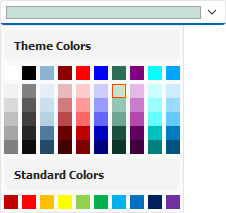
A color editor is a component designed for color selection using a palette displayed in a drop-down window.
End-User Keyboard Interaction Options
The color editor supports the following keystrokes:
- Alt + ↑ | Alt + ↓
- Display the drop-down color gallery.
- F4
- Displays or hides the drop-down window without editor value changes.
- Esc
- Hides the drop-down without changing the editor value.
- ↑ | ↓ | ← | →
- Move focus by one position in the corresponding direction when the drop-down color gallery is displayed, set the focused color as the new editor value, and close the drop-down window.
Main API Members
The list below outlines key members of the TdxColorEditProperties class.
Appearance Settings
- ButtonGlyph
- Allows you to display a custom glyph for the drop-down button.
- ItemSize
- Specifies color gallery item size.
- ShowItemBorders
- Specifies if color gallery items display borders.
User Interaction Options
- Automation
Provides access to UI Automation and accessibility-related settings.
Tip
Use the Automation.Name and Automation.Description properties, along with other API members, to specify information exposed to third-party assistive tools as UIA node properties.
- AllowDropDownWhenReadOnly
- Specifies if the editor can display the drop-down window in read-only mode.
- ClearKey
- Allows you to associate a keystroke with the clear operation.
- ReadOnly
- Specifies if the editor is in read-only mode.
Content-Related API Members
- ColorPalette
- Allows you to switch between Standard, Extended, and Office palette types.
- ColorSet
Allows you to switch between available themes for the Office palette.
You can set the ColorSet property to csCustom to populate the drop-down color gallery with custom colors using the OnGetCustomColorSet event.
- DefaultColor
- Specifies the default color for the editor (when no color is explicitly selected).
- ItemShowHint
- Specifies if hints are displayed for drop-down color gallery items.
- OnGetCustomColorSet
- Allows you to populate the drop-down gallery with custom colors when the ColorSet property is set to csCustom.
- ValidationOptions
- Specifies validation option flags.
General-Purpose API Members
- AssignedValues | RestoreDefaults
- Allow you to track the state of individual editor-specific settings and reset them.
- BeginUpdate | EndUpdate | LockUpdate | DoUpdate | Update | Changed | ChangedLocked | DataChanged
- Allow you to manage editor updates and avoid excessive redraw operations during batch changes to editor settings.
Related Compiled Demo
To see the TdxColorEdit component in action, run the Data Editors and Controls demo in the VCL Demo Center installed with compiled DevExpress VCL demos. Click the Color Editor item in the sidebar to run the corresponding demo.
Compiled DevExpress demos ship with source code installed in the Public Documents folder (%PUBLIC%) for all users (default). You can find all project and source code files for the Data Editors and Controls demo in the following folder:
%PUBLIC%\Documents\DevExpress VCL Demos\MegaDemos\Product Demos\ExpressEditors\
Tip
Project and source code files for all compiled DevExpress VCL Demos are maintained in a public repository hosted on GitHub:
Direct TdxColorEditProperties Class References
The following properties reference a TdxColorEditProperties object:
- TdxColorEdit.Properties
- Provides access to color editor settings.
- TdxDBColorEdit.Properties
- Provides access to color editor settings.
- TcxEditRepositoryColorEdit.Properties
- Provides access to stored color editor settings.