
BrickStringFormat.FormatFlags Property
Gets or sets a StringFormatFlags enumeration that contains formatting information.
Namespace: DevExpress.XtraPrinting
Assembly: DevExpress.Printing.v26.1.Core.dll
NuGet Package: DevExpress.Printing.Core
Declaration
Property Value
| Type | Description |
|---|---|
| DXStringFormatFlags | A value that defines the text layout and display behavior. |
Available values:
| Name | Description |
|---|---|
| DirectionRightToLeft | Text has the right-to-left text direction. |
| DirectionVertical | Text is vertically aligned. |
| FitBlackBox | Parts of characters are allowed to overhang the string’s layout rectangle. |
| DisplayFormatControl | Control characters such as the left-to-right mark are shown in the output with a glyph. |
| NoFontFallback | Fallback to alternate fonts for characters not supported in the requested font is disabled. Any missing characters are displayed with the font missing glyph, usually an open square. |
| MeasureTrailingSpaces | Includes the trailing space at the end of each line. |
| NoWrap | Text wrapping between lines is disabled. This flag is implied when a point is passed instead of a rectangle, or when the specified text rectangle has a zero line length. |
| LineLimit | Only entire lines are laid out in the formatting rectangle. |
| NoClip | Overhanging glyph parts and unwrapped text reaching outside the formatting rectangle are allowed to be displayed. |
Remarks
This property is not supported under the WPF and Silverlight platforms.
Example
The following code creates a new BrickStringFormat object and sets the text alignment to Center.
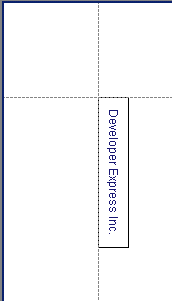
using DevExpress.XtraPrinting;
using DevExpress.Drawing;
// ...
PrintingSystemBase printingSystem1 = new PrintingSystemBase();

    VisualBrick visBrick;
    BrickGraphics brickGraph = printingSystem1.Graph;
    string s = "Developer Express Inc.";

    // Specify the string format.
    DXStringFormat dxFormat = new DXStringFormat();
    dxFormat.Alignment = DXStringAlignment.Center;
    dxFormat.LineAlignment = DXStringAlignment.Center;

    // Create a BrickStringFormat object.
    BrickStringFormat brickSFormat = new BrickStringFormat(dxFormat);

    // Measure the string according to the specified format.
    SizeF sz = brickGraph.MeasureString(s, 30, dxFormat);

    // Start the report generation.
    printingSystem1.Begin();

    // Set the brick string format
    brickGraph.StringFormat = brickSFormat;

    // Create a rectangle.
    RectangleF rect = new RectangleF(new PointF(0, 0), new SizeF(150, 30));
    // Specify a page area.
    brickGraph.Modifier = BrickModifier.Detail;
    // Add a brick to the report.
    visBrick = brickGraph.DrawString(s, Color.MidnightBlue, rect, BorderSide.All);

    // Finish the report generation.
    printingSystem1.End();

    // Preview the report.
    printingSystem1.ExportToPdf("report.pdf");