VGridOptionsRowFilter.PopupExcelFilterNumericValuesTabFilterType Property
If the current row contains numeric data, gets or sets whether to display a list of available data values or a range track bar in the ‘Values’ tab of the Excel-style Filter Dropdown.
Namespace: DevExpress.XtraVerticalGrid.Rows
Assembly: DevExpress.XtraVerticalGrid.v25.2.dll
NuGet Packages: DevExpress.Win.Navigation, DevExpress.Win.VerticalGrid
Declaration
[DefaultValue(ExcelFilterNumericValuesTabFilterType.Default)]
[XtraSerializableProperty]
public virtual ExcelFilterNumericValuesTabFilterType PopupExcelFilterNumericValuesTabFilterType { get; set; }Property Value
| Type | Default | Description |
|---|---|---|
| DevExpress.XtraVerticalGrid.ExcelFilterNumericValuesTabFilterType | Default | The value that specifies the filter control type in the ‘Values’ tab in the filter dropdown. |
Property Paths
You can access this nested property as listed below:
| Object Type | Path to PopupExcelFilterNumericValuesTabFilterType |
|---|---|
| RowProperties |
|
Remarks
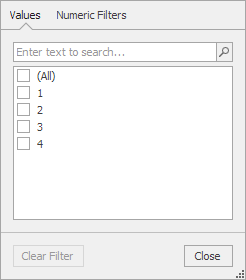
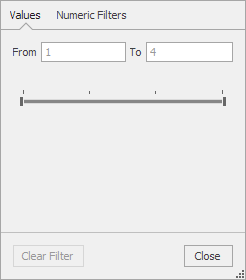
For numeric columns, the ‘Values’ tab in the Excel-style Filter Dropdown can display a list or a range track bar. You can set the PopupExcelFilterNumericValuesTabFilterType property to List or Range to explicitly apply the corresponding display mode:
| List | Range |
|---|---|
 |
 |
If PopupExcelFilterNumericValuesTabFilterType is set to Default, the filter control type depends on the following conditions:
| Condition | Filter Control |
|---|---|
| The row’s in-place editor is one of the following: ImageComboBox (RepositoryItemImageComboBox), RadioGroup (RepositoryItemRadioGroup), PopupContainerEdit (RepositoryItemPopupContainerEdit), or LookUpEdit (RepositoryItemLookUpEditBase descendants). | List |
| The row’s RowProperties.FilterMode property is set to DisplayText. | List |
| The row’s bound field is marked with the KeyAttribute (e.g., System.ComponentModel.DataAnnotations.KeyAttribute). | List |
| The row’s bound field ends with “id” (case-insensitive comparison) and is of the int, uint, long, ulong, GUID or IntPtr data type. | List |
| The row’s bound field is marked with the DevExpress.Utils.Filtering.FilterLookup attribute. | List |
| The row’s bound field is marked with the DevExpress.Utils.Filtering.FilterRange attribute | Range |
To learn more about the DevExpress.Utils.Filtering.FilterLookup and DevExpress.Utils.Filtering.FilterRange attributes, see Filtering Attributes.