Embed a Parametrized Report into a Form
- 2 minutes to read
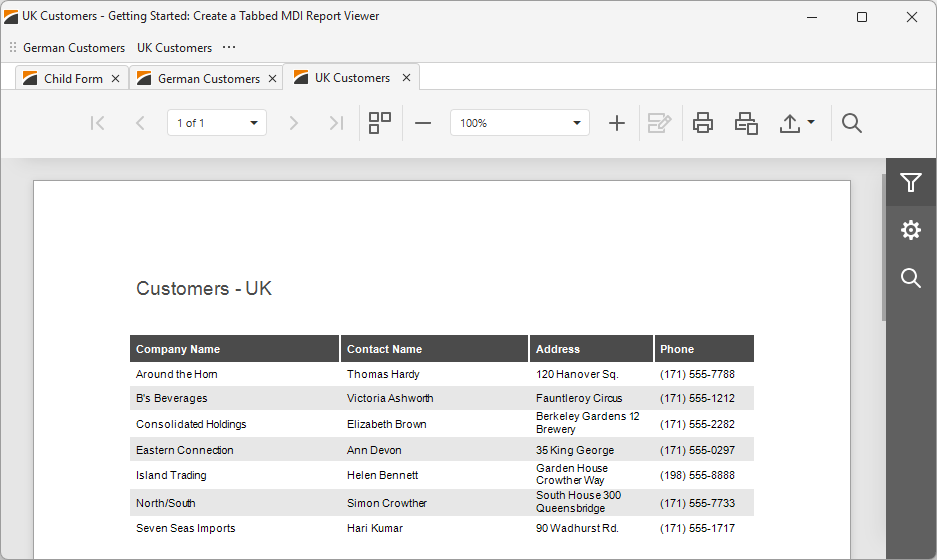
This section contains Report Viewer (TdxReportControl) tutorials on creating parameterized reports in Tabbed MDI (multiple-document interface) applications. Both tutorials create sample applications with the same UI/UX and similar performance but use different data shaping and connection techniques.
Sample SQLite Database
All tutorials listed in this section use the following SQLite database shipped with compiled DevExpress VCL demos:
%PUBLIC%\Documents\DevExpress VCL Demos\MegaDemos\Product Demos\ExpressReports\Data\nwind.db
Report Viewer MDI Tutorials
Follow this tutorial to create a Tabbed MDI (multi-document interface) Report Viewer application where different tabs allow users to display the same parametrized report layout/template populated with different data loaded from a relational SQL database using a DevExpress XPO-based data connection component.
The demonstrated solution filters data using SQL queries and report parameters at the TdxReportControl component level.
Featured Components: TdxReportControl | TdxBackendDataConnectionManager | TdxBackendDatabaseSQLConnection | TdxTabbedMDIManager | TdxBarManager
Follow this tutorial to create a Tabbed MDI (multi-document interface) Report Viewer application where different tabs display a parametrized report layout/template populated with different data loaded from a relational database using standard FireDAC components (TFDQuery and TFDConnection) shipped with the RAD Studio IDE.
The demonstrated solution filters data at the FireDAC dataset (TFDQuery) level using a SQL parameter.
Featured Components: TdxReportControl | TdxBackendDataConnectionManager | TdxBackendDataSetJSONConnection | TdxTabbedMDIManager | TdxBarManager | TFDConnection | TFDQuery | TDataSource