AlertInfo Class
Contains information to be displayed in an alert window.
Namespace: DevExpress.XtraBars.Alerter
Assembly: DevExpress.XtraEditors.v26.1.dll
NuGet Package: DevExpress.Win.Navigation
Declaration
Related API Members
The following members return AlertInfo objects:
Remarks
To show an alert window displaying a specific information, you can create an AlertInfo object with information to be displayed, and pass it to the AlertControl.Show method. An AlertInfo object’s properties allow you to specify the caption, text, and image to be displayed in alert windows. In addition, you can set custom data to the AlertInfo.Tag property. You can subsequently use this data while processing events for alert windows (AlertControl.BeforeFormShow or AlertControl.AlertClick).
Example
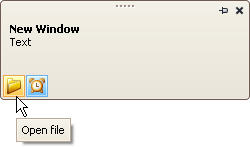
The following example adds two custom buttons to an AlertControl and handles events to process clicks on these buttons.
The first button is a regular button. A click on this button triggers the AlertControl.ButtonClick event.
The second button has checked and unchecked states (AlertButton.Style = AlertButtonStyle.CheckButton). A click on this button triggers the AlertControl.ButtonDownChanged event.
Note
alertControl1 and svgImageCollection1 were added to the form at design time.
The following image shows the resulting alert window:
using DevExpress.XtraEditors;
using DevExpress.XtraBars.Alerter;

namespace DXApplication2 {
    public partial class Form1 : XtraForm {
        public Form1() {
            InitializeComponent();
            CreateCustomButtons();
            // Subscribe to button click events
            alertControl1.ButtonClick += AlertControl1_ButtonClick;
            alertControl1.ButtonDownChanged += AlertControl1_ButtonDownChanged;

            this.Load += Form1_Load;
        }

        private void Form1_Load(object? sender, EventArgs e) {
            // Show an alert window (for demonstration purposes)
            alertControl1.Show(this, "Hello!", "You have 1 unread message.");
        }

        private void CreateCustomButtons() {
            // Create a custom regular button
            AlertButton btn1 = new AlertButton();
            btn1.Hint = "Open file";
            btn1.Name = "buttonOpen";
            btn1.ImageOptions.SvgImage = svgImageCollection1["open"];
            btn1.ImageOptions.SvgImageSize = new Size(16, 16);
            // Create a custom check button
            AlertButton btn2 = new AlertButton();
            btn2.Style = AlertButtonStyle.CheckButton;
            btn2.Down = true;
            btn2.Hint = "Alert On";
            btn2.Name = "buttonAlert";
            btn2.ImageOptions.SvgImage = svgImageCollection1["time"];
            btn2.ImageOptions.SvgImageSize = new Size(16, 16);
            // Add buttons to the AlertControl
            alertControl1.Buttons.Add(btn1);
            alertControl1.Buttons.Add(btn2);
        }

        private void AlertControl1_ButtonDownChanged(object sender, AlertButtonDownChangedEventArgs e) {
            if (e.Button.Name == "buttonAlert")
                MessageBox.Show($"The Alert button is {(e.Button.Down ? "up" : "down")}");
        }

        private void AlertControl1_ButtonClick(object sender, AlertButtonClickEventArgs e) {
            if (e.Button.Name == "buttonOpen")
                MessageBox.Show("The Open button was clicked");
        }
    }
}