AIChatControl.SetPromptSuggestions(IEnumerable<PromptSuggestion>) Method
Specifies the collection of prompt suggestions (hint bubbles).
Namespace: DevExpress.AIIntegration.WinForms.Chat
Assembly: DevExpress.AIIntegration.WinForms.Chat.v26.1.dll
NuGet Package: DevExpress.AIIntegration.WinForms.Chat
Declaration
Parameters
| Name | Type | Description |
|---|---|---|
| promptSuggestions | IEnumerable<DevExpress.AIIntegration.Blazor.Chat.WebView.PromptSuggestion> | A collection of prompt suggestions (hint bubbles). |
Remarks
To help users get started or explore new possibilities, the AI Chat Control can display prompt suggestions.
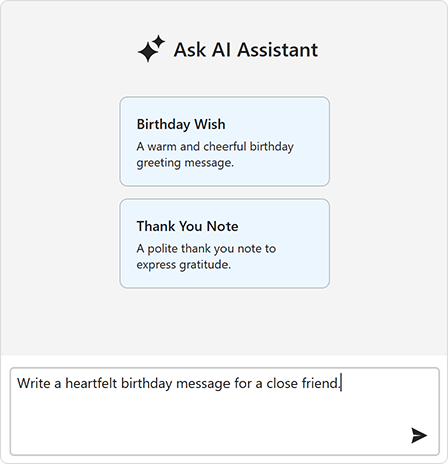
Call the SetPromptSuggestions method to supply relevant prompts:
using DevExpress.AIIntegration.Blazor.Chat.WebView;

aiChatControl1.SetPromptSuggestions(new List<PromptSuggestion>(){
    new PromptSuggestion(
        title: "Birthday Wish",
        text: "A warm and cheerful birthday greeting message.",
        prompt: "Write a heartfelt birthday message for a close friend."),

    new PromptSuggestion(
        "Thank You Note",
        "A polite thank you note to express gratitude.",
        "Compose a short thank you note to a colleague who helped with a project.")
});
The AI Chat Control inserts a selected prompt suggestion into the chat prompt box so users can edit the prompt before they send it. Activate the PromptSuggestion.SendOnClick option to send a prompt suggestion to the AI service immediately after a user clicks it.
Call the SetPromptSuggestionContentTemplate method to customize prompt suggestion content.
Refer to the following help topic for additional information: AI Chat Control
Related GitHub Examples
The following code snippet (auto-collected from DevExpress Examples) contains a reference to the SetPromptSuggestions(IEnumerable<PromptSuggestion>) method.
Note
The algorithm used to collect these code examples remains a work in progress. Accordingly, the links and snippets below may produce inaccurate results. If you encounter an issue with code examples below, please use the feedback form on this page to report the issue.