AIChatControl.SetMessageContentTemplate(RenderFragment<BlazorChatMessage>) Method
Specifies the template used to display message bubble content.
Namespace: DevExpress.AIIntegration.WinForms.Chat
Assembly: DevExpress.AIIntegration.WinForms.Chat.v26.1.dll
NuGet Package: DevExpress.AIIntegration.WinForms.Chat
Declaration
Parameters
| Name | Type | Description |
|---|---|---|
| template | RenderFragment<BlazorChatMessage> | The message content template. |
Remarks
Use the following methods to customize the chat message container (including paddings and inner content alignment) or message content:
- SetMessageTemplate
SetMessageContentTemplate
Note
- The message template takes priority over the message content template if you specify both templates.
- The
SetMessageContentTemplatemethod does not support messages when the ContentFormat property is set toMarkdown. In this case, implement Markdown rendering logic within your custom template.
Example
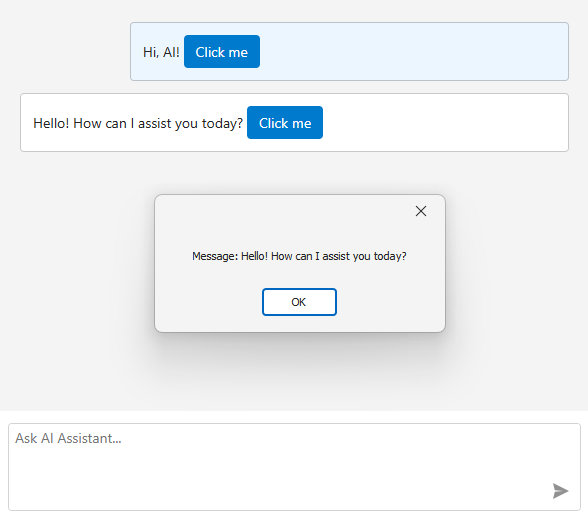
The following example displays a custom button within chat messages. When a user clicks the button, a message box appears.
using DevExpress.AIIntegration.Blazor.Chat;
using DevExpress.XtraEditors;
using Microsoft.AspNetCore.Components;

public Form1() {
    InitializeComponent();

    aiChatControl1.SetMessageContentTemplate(message => builder => {
        builder.OpenComponent<Message>(0);
        builder.AddAttribute(1, "message", message);
        builder.AddAttribute(2, "OnButtonClick", EventCallback.Factory.Create<BlazorChatMessage>(this, CustomButtonClick));
        builder.CloseComponent();
    });
}

void CustomButtonClick(BlazorChatMessage message) {
    XtraMessageBox.Show($"Message: {message.Text}");
}
The Message.razor file:
@using DevExpress.AIIntegration.Blazor.Chat
@using DevExpress.Blazor
@using DevExpress.Images.Blazor

<style>
    .example-message-buttons-container {
        margin-top: 5px;
    }
</style>

@Message.Text

@if (Message.Role == ChatMessageRole.User) {
    <div class="example-message-buttons-container">
        <DxButton Click="OnDeleteClick" IconUrl="@Icon.Delete" RenderStyleMode="ButtonRenderStyleMode.Text" />
    </div>
}

@code {
    [Parameter]
    public BlazorChatMessage Message { get; set; } = default!;

    [Parameter]
    public EventCallback<string> OnDeleteButtonClick { get; set; }

    Task OnDeleteClick() => OnDeleteButtonClick.InvokeAsync(Message.Text);
}
Refer to the following help topic for additional information: AI Chat Control
See Also