AIChatControl.SetMessageTemplate(RenderFragment<BlazorChatMessage>) Method
Specifies the template used to display chat messages.
Namespace: DevExpress.AIIntegration.WinForms.Chat
Assembly: DevExpress.AIIntegration.WinForms.Chat.v26.1.dll
NuGet Package: DevExpress.AIIntegration.WinForms.Chat
Declaration
Parameters
| Name | Type | Description |
|---|---|---|
| template | RenderFragment<BlazorChatMessage> | The message template. |
Remarks
Use the following methods to customize the chat message container (including paddings and inner content alignment) or message content:
SetMessageTemplate- SetMessageContentTemplate
Note
- The message template takes priority over the message content template if you specify both templates.
- The SetMessageContentTemplate method does not support messages when the ContentFormat property is set to
Markdown. In this case, implement Markdown rendering logic within your custom template.
Example
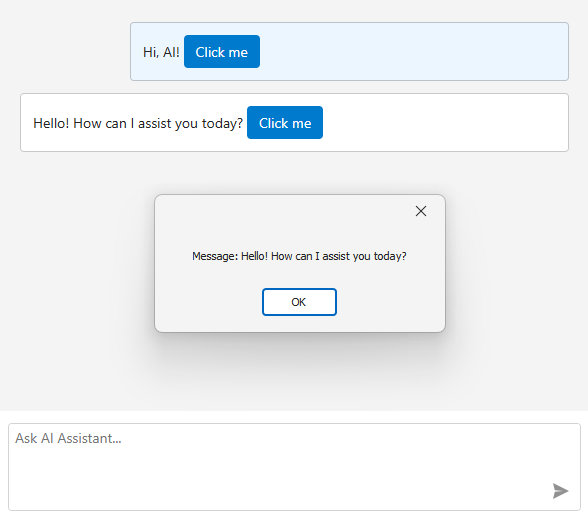
The following example displays a custom button within chat messages. When a user clicks the button, a message box appears.
using DevExpress.AIIntegration.Blazor.Chat;
using DevExpress.XtraEditors;
using Microsoft.AspNetCore.Components;

public Form1() {
    InitializeComponent();

    aiChatControl1.SetMessageTemplate(message => builder => {
        builder.OpenComponent<Message>(0);
        builder.AddAttribute(1, "message", message);
        builder.AddAttribute(2, "OnButtonClick", EventCallback.Factory.Create<BlazorChatMessage>(this, CustomButtonClick));
        builder.CloseComponent();
    });
}

void CustomButtonClick(BlazorChatMessage message) {
    XtraMessageBox.Show($"Message: {message.Text}");
}
The Message.razor file:
@using DevExpress.AIIntegration.Blazor.Chat
@using DevExpress.Blazor
@using DevExpress.Images.Blazor

<style>
    .example-message-buttons-container {
        margin-top: 5px;
    }
</style>

@Message.Text

@if (Message.Role == ChatMessageRole.User) {
    <div class="example-message-buttons-container">
        <DxButton Click="OnDeleteClick" IconUrl="@Icon.Delete" RenderStyleMode="ButtonRenderStyleMode.Text" />
    </div>
}

@code {
    [Parameter]
    public BlazorChatMessage Message { get; set; } = default!;

    [Parameter]
    public EventCallback<string> OnDeleteButtonClick { get; set; }

    Task OnDeleteClick() => OnDeleteButtonClick.InvokeAsync(Message.Text);
}
Refer to the following help topic for additional information: AI Chat Control
See Also