ArrowSettings.EndArrowheadWidth Property
Gets or sets the width of an arrowhead at the end of a connector.
Namespace: DevExpress.Spreadsheet
Assembly: DevExpress.Spreadsheet.v26.1.Core.dll
NuGet Package: DevExpress.Spreadsheet.Core
Declaration
Property Value
| Type | Description |
|---|---|
| ArrowheadSize | One of the ArrowheadSize enumeration members indicating the arrowhead’s width. |
Available values:
| Name | Description |
|---|---|
| Small | Specifies the small size. |
| Medium | Specifies the medium size. |
| Large | Specifies the large size. |
Property Paths
You can access this nested property as listed below:
| Object Type | Path to EndArrowheadWidth |
|---|---|
| ConnectorFormat |
|
Remarks
Specify the arrowhead’s length using the ArrowSettings.EndArrowheadLength property. The ArrowSettings.StartArrowheadType property defines the arrowhead’s type.
Example
The code sample below shows how to insert a shape connector, provide it with arrows, change the outline color and attach it to shapes. Both ends are connected to the third connection site of each shape.
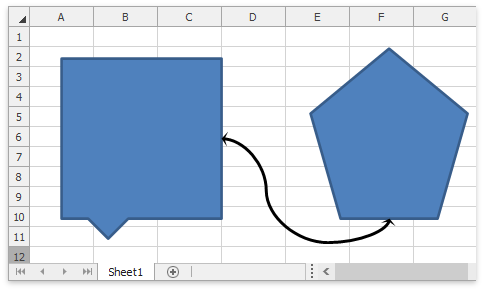
// Insert a shape connector.
Shape shapeConnector = worksheet.Shapes.AddConnector(ConnectorType.Curved, 10, 10, 100, 100);
// Adjust the connector's outline.
shapeConnector.Outline.SetSolidFill(Color.Black);
shapeConnector.Outline.Width = 2.5;

// Convert the connector's ends into arrows.
ConnectorFormat connectorFormat = shapeConnector.ConnectorFormat;
connectorFormat.Arrows.StartArrowheadType = ArrowheadType.Stealth;
connectorFormat.Arrows.StartArrowheadWidth = ArrowheadSize.Large;
connectorFormat.Arrows.StartArrowheadLength = ArrowheadSize.Large;

connectorFormat.Arrows.EndArrowheadType = ArrowheadType.Stealth;
connectorFormat.Arrows.EndArrowheadWidth = ArrowheadSize.Large;
connectorFormat.Arrows.EndArrowheadLength = ArrowheadSize.Large;

// Bind the connector to two shapes.
connectorFormat.ConnectStartPoint(shape1, 3);
connectorFormat.ConnectEndPoint(shape2, 3);