
RangeParameterEditorOptions.RegisterTimeRange(String, Func<TimeOnly>, Func<TimeOnly>) Method
Appends an item to the list of predefined time ranges with a default icon.
Namespace: DevExpress.XtraReports.Parameters
Assembly: DevExpress.Printing.v26.1.Core.dll
NuGet Package: DevExpress.Printing.Core
Declaration
public static void RegisterTimeRange(
    string name,
    Func<TimeOnly> getStart,
    Func<TimeOnly> getEnd
)Parameters
| Name | Type | Description |
|---|---|---|
| name | String | The predefined time range’s name. |
| getStart | Func<TimeOnly> | The function that returns the predefined time range’s start time. |
| getEnd | Func<TimeOnly> | The function that returns the predefined time range’s end time. |
Remarks
Use this method to append an item to the list of predefined time ranges stored in the PredefinedTimeRanges property. The appended predefined time range becomes available in the time range parameter editor in Print Preview.
If you want to specify a custom SVG icon, use the RegisterTimeRange(String, Func<TimeOnly>, Func<TimeOnly>, SvgImage) overload.
Example
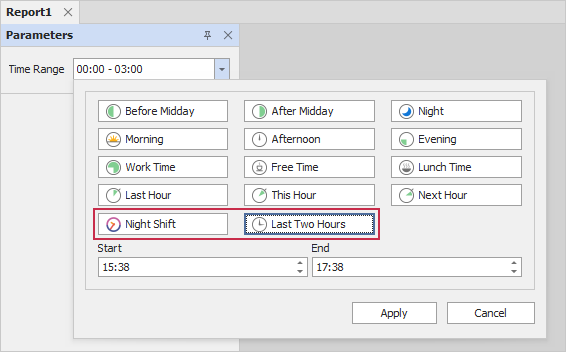
The following example modifies the available time ranges displayed in Print Preview. The code adds the NightShift and Last Two Hours predefined ranges to the parameter’s editor for a time range parameter:
using DevExpress.XtraReports.Parameters;
// ...
// Uncomment the line below if you want to clear the collection before adding new time ranges:
//RangeParameterEditorOptions.PredefinedTimeRanges.Clear();
string timeRangeNightShift = "Night Shift";
if (!RangeParameterEditorOptions.PredefinedTimeRanges.ContainsKey(timeRangeNightShift)) {
    RangeParameterEditorOptions.RegisterTimeRange(timeRangeNightShift,() => new TimeOnly(23,0),() => new TimeOnly(5,0),SvgImage.FromFile("time.svg"));
}
string timeRangeLastTwoHours = "Last Two Hours";
if (!RangeParameterEditorOptions.PredefinedTimeRanges.ContainsKey(timeRangeLastTwoHours)) {
    TimeOnly previousHour = TimeOnly.FromDateTime(DateTime.Now.AddHours(-2));
    TimeOnly currentHour = TimeOnly.FromDateTime(DateTime.Now.AddHours(0));
    RangeParameterEditorOptions.RegisterTimeRange(timeRangeLastTwoHours, () => previousHour,() => currentHour);
}