AIChatControl.FileUploadEnabled Property
Gets or sets whether users can attach files to messages.
Namespace: DevExpress.AIIntegration.WinForms.Chat
Assembly: DevExpress.AIIntegration.WinForms.Chat.v26.1.dll
NuGet Package: DevExpress.AIIntegration.WinForms.Chat
Declaration
[DefaultValue(DefaultBoolean.Default)]
public DefaultBoolean FileUploadEnabled { get; set; }Property Value
| Type | Default | Description |
|---|---|---|
| DefaultBoolean | Default |
|
Available values:
| Name | Description | Return Value |
|---|---|---|
| True | The value is true. |
|
| False | The value is false. |
|
| Default | The value is specified by a global option or a higher-level object. |
|
Remarks
Users can attach files directly to their chat messages. The AI analyzes document content (such as text files, PDFs, images) and delivers more context-aware responses.
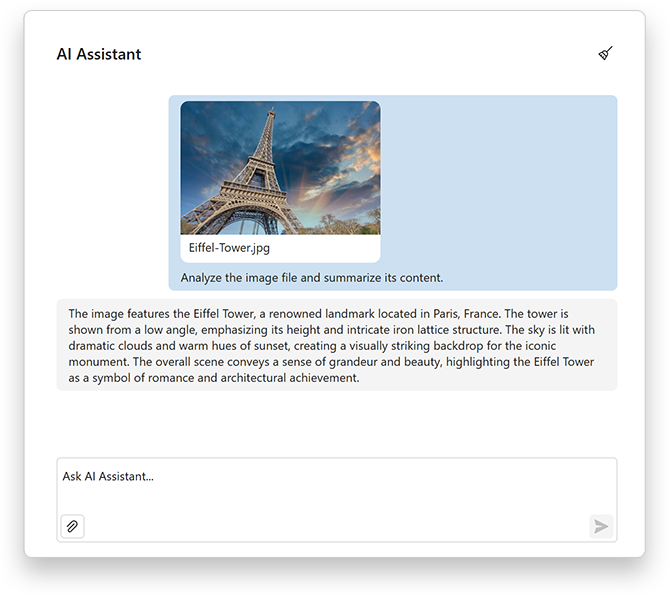
To activate file upload:
- Enable the
FileUploadEnabledproperty to allow users to attach files. - Use the OptionsFileUpload property to configure additional settings based on your project requirements, such as the maximum file size, allowed file types and extensions, and the maximum number of files users can attach to a message.
aiChatControl1.FileUploadEnabled = DevExpress.Utils.DefaultBoolean.True;
aiChatControl1.OptionsFileUpload.FileTypeFilter.AddRange(new List<string> { "text/plain", "application/pdf", "image/png" }); // Allowed MIME types.
aiChatControl1.OptionsFileUpload.AllowedFileExtensions.AddRange(new List<string> { ".txt", ".pdf", ".png" });
aiChatControl1.OptionsFileUpload.MaxFileCount = 5;
aiChatControl1.OptionsFileUpload.MaxFileSize = 5 * 1024 * 1024; // 5 MB
Call the GetFileUploadEnabled method to obtain the actual Boolean value that corresponds to the current property setting.
Refer to the following help topic for additional information: AI Chat Control