TdxBackendCustomParameter.IsMultiValueParameter Property
Declaration
property IsMultiValueParameter: Boolean read;Property Value
| Type | Default | Description |
|---|---|---|
| Boolean | False |
Remarks
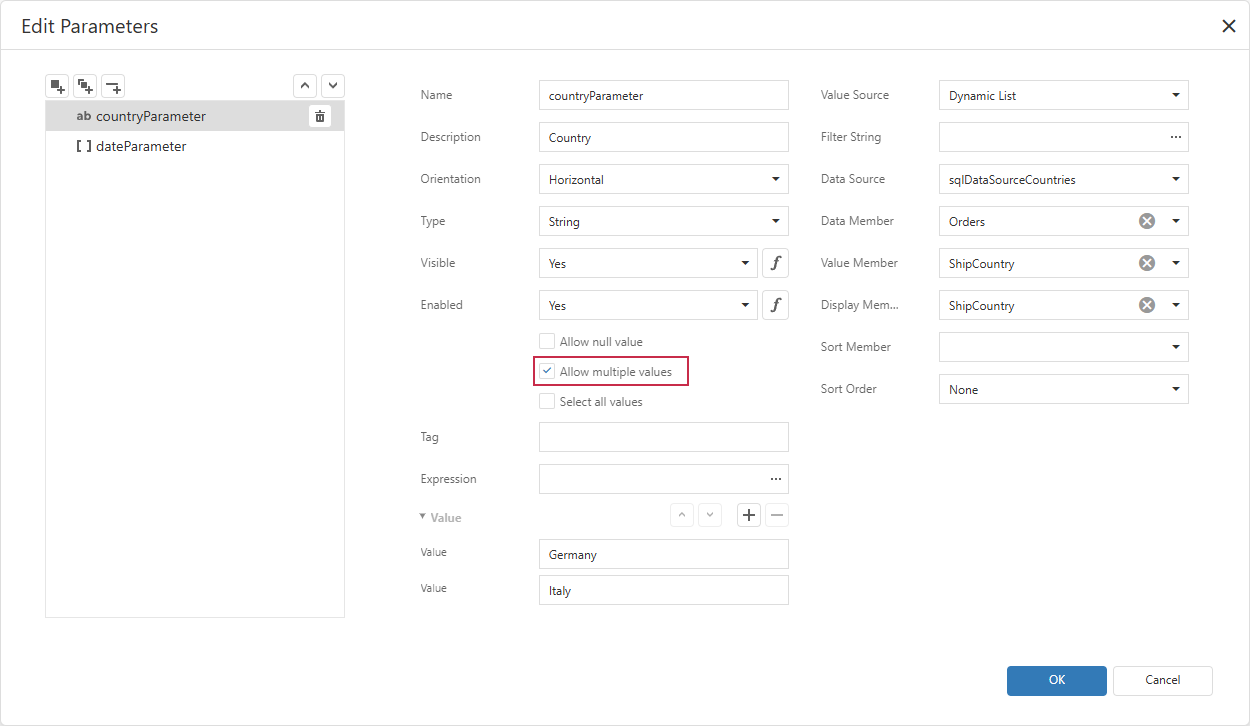
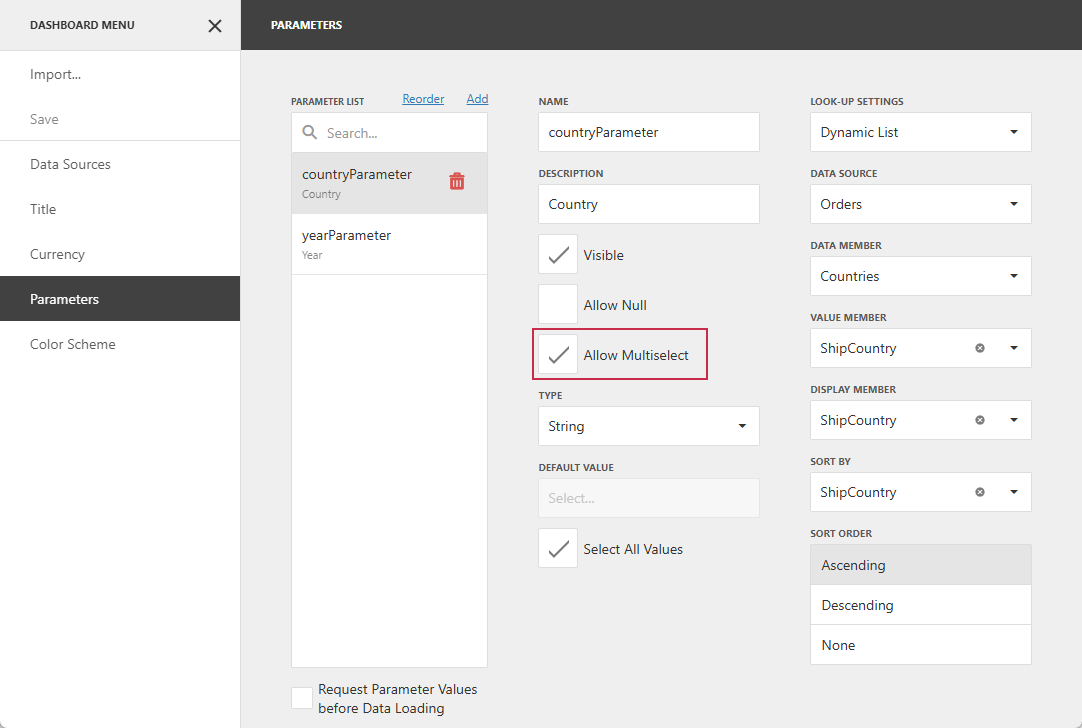
The IsMultiValueParameter property corresponds to the Allow multiple values option in the Report Designer or the Allow Multiselect option in the Dashboard Designer:
Code Examples
The following code snippets check if the report parameter is a multi-value parameter and read its default values.
Note
The IsMultiValueParameter property is common to report and dashboard parameters. These examples perform the same operation but use component-specific APIs.
Read Report Parameter Values
uses
  dxReport.Control,       // Declares the TdxReportControl class
  dxReport.Parameters,    // Declares the TdxReportParameter class
  dxBackend.Parameters,   // Declares the TdxBackendParameterValue class
  dxMessageDialog;        // Declares the TdxMessageDialogForm class

procedure TForm1.cxButton1Click(Sender: TObject);
var
  AParameter: TdxReportParameter;
  AValue: TdxBackendParameterValue;
  AResponse: TStringBuilder;
begin
  // Find the report parameter with the specified name
  AParameter := dxReportControl1.Parameters.FindParam('countryParameter');
  if AParameter <> nil then
  begin
    // Check if the parameter is a multi-value parameter
    if AParameter.IsMultiValueParameter then
    begin
      AResponse := TStringBuilder.Create;
      try
        AResponse.AppendLine('Multi-value parameter:');
        // List default parameter values
        for AValue in AParameter.Values do
          AResponse.AppendLine('- ' + VarToStr(AValue.Value));
        dxShowMessage(AResponse.ToString);
      finally
        AResponse.Free;
      end;
    end
    else
      dxShowMessage('Single-value parameter: ' + VarToStr(AParameter.Value));
  end
  else
    dxShowMessage('"countryParameter" not found.');
end;
Read Dashboard Parameter Values
uses
  dxDashboard.Control,      // Declares the TdxDashboardControl class
  dxDashboard.Parameters,   // Declares the TdxDashboardParameter class
  dxBackend.Parameters;     // Declares the TdxBackendParameterDataType enum
  dxMessageDialog;          // Declares the TdxMessageDialogForm class

procedure TForm1.cxButton1Click(Sender: TObject);
var
  AParameter: TdxDashboardParameter;
  AValue: TdxBackendParameterValue;
  AResponse: TStringBuilder;
begin
  // Find the dashboard parameter with the specified name
  AParameter := dxDashboardControl1.Parameters.FindParam('countryParameter');
  if AParameter <> nil then
  begin
    // Check if the parameter is a multi-value parameter
    if AParameter.IsMultiValueParameter then
    begin
      AResponse := TStringBuilder.Create;
      try
        AResponse.AppendLine('Multi-value parameter:');
        // List default parameter values
        for AValue in AParameter.Values do
          AResponse.AppendLine('- ' + VarToStr(AValue.Value));
        dxShowMessage(AResponse.ToString);
      finally
        AResponse.Free;
      end;
    end
    else
      dxShowMessage('Single-value parameter: ' + VarToStr(AParameter.Value));
  end
  else
    dxShowMessage('"countryParameter" not found.');
end;
Default Value
The IsMultiValueParameter property’s default value is False.
See Also