VCL Reports/Dashboards App Deployment
- 4 minutes to read
ExpressDashboards and ExpressReports components use the WebView2 Runtime as a dependency to display content. To build and deploy an application that includes any of these components, you must ship a native and architecture-specific WebView2Loader.dll file[1] with a built executable file using post-build events available as part of the RAD Studio IDE toolchain.
Prerequisites
Note
- ExpressReports will require the purchase of our VCL Subscription + OR an active VCL Subscription (regular) with any active .NET subscription that includes DevExpress Reports for ASP.NET/JavaScript (these subscriptions include: Reporting, ASP.NET & Blazor (includes DevExtreme), DXperience, or Universal).
- ExpressDashboards will also require the purchase of our VCL Subscription + OR an active VCL Subscription (regular) with an active Universal Subscription that includes DevExpress Business Intelligence (BI) Dashboard.
Ensure that your development environment meets ExpressDashboards and ExpressReports prerequisites:
- Microsoft Windows 10 or newer.
- Embarcadero RAD Studio IDE 12.3 or newer (Community Edition IDEs are not supported).
- DevExpress VCL v26.1.x.
- The EdgeView2 SDK package installed from the GetIt package manager.
Post-Build Events for WebView2 Loader DLL Deployment
To automatically copy a 32- or 64-bit WebView2Loader.dll file to the target build folder, do the following:
- Open the Project Options dialog. Select the Project → Options… item in the RAD Studio menu or press Ctrl + Shift + F11).
Select Build → Build Events in the tree view pane on the left and select the following option in the Target combo box:
'All Configurations - All Platforms'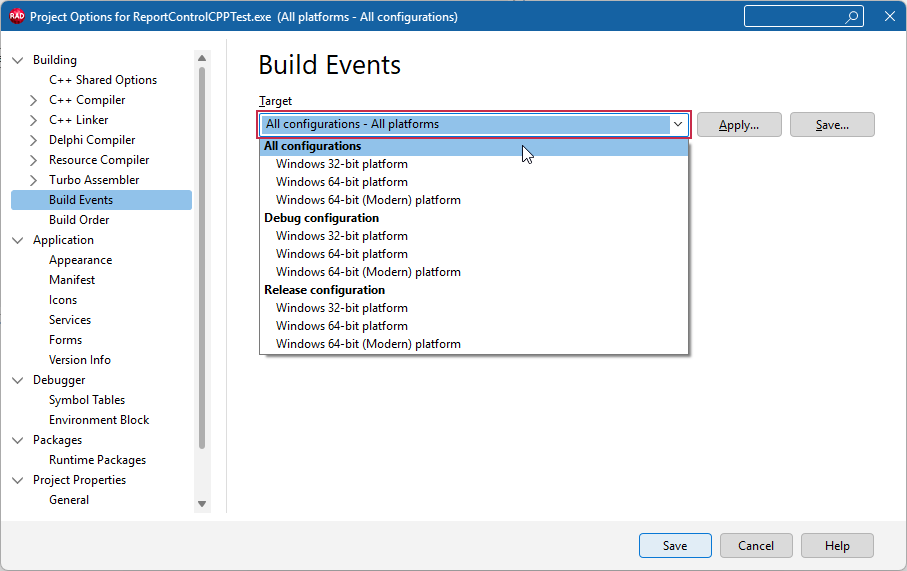
Copy the command line for the target compiler and platform:
copy /Y "$(BDS)\Redist\$(Platform)\WebView2Loader.dll" "$(OUTPUTDIR)"Paste the DLL deployment command line into the Commands box:
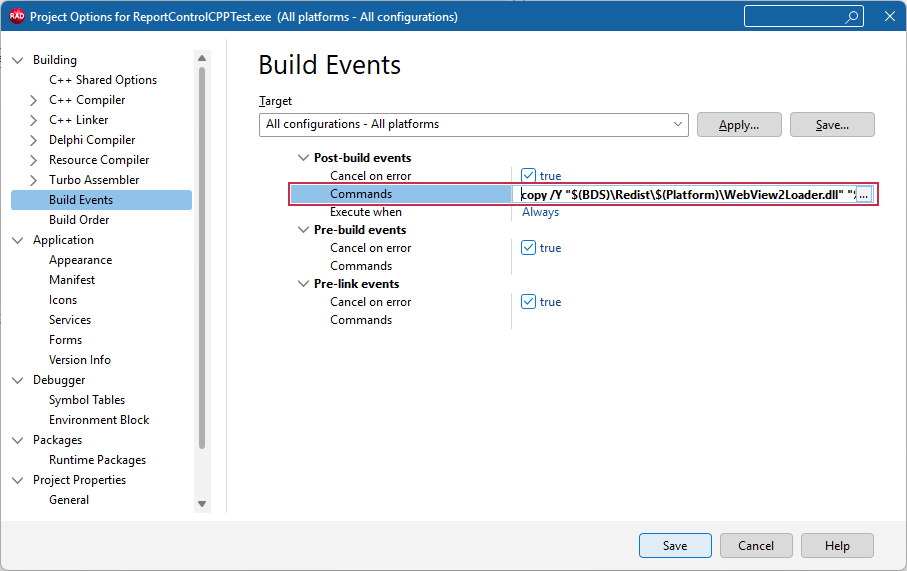
Optional. This step is required only for the Modern C++ RAD Studio compiler.
If you use Windows 64-bit (Modern) as a build target, select the Windows 64-bit (Modern) platform (1), expand the Post-build events → Commands node (2), uncheck the Inherit option (3), and paste the Modern compiler-specific command into the Commands box (4):
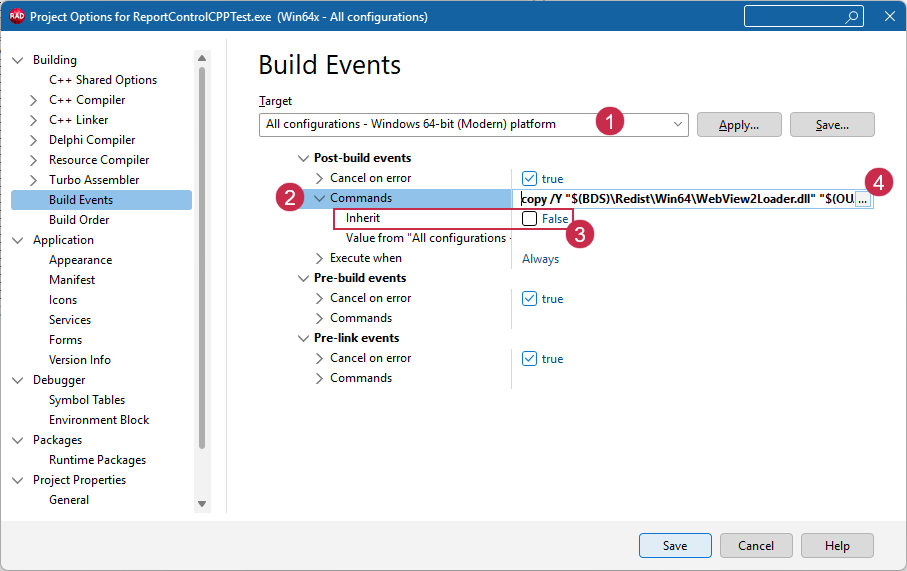
Click Save to apply pending changes and close the Project Options dialog.
Build the project. Confirm that the configured post-build event is trusted in the following dialog:
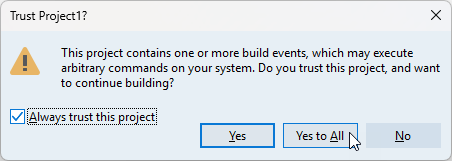
All build operations in the current RAD Studio project now ensure that the platform-specific WebView2Loader.dll file version is available in the target build folder (for both Debug and Release configurations).
Important
Ensure that you distribute the copied WebView2Loader.dll file in the same folder as the built executable file.
Deploy Additional Resources & Dependencies
Depending on your business needs and desired app functionality, you may need to deploy additional resources and dependencies with the built executable file.
Localization Resources
To localize UI elements for ExpressReports and ExpressDashboards, do the following:
Log in to the DevExpress website and use the DevExpress Localization Service to obtain localization resources for all desired languages and components.
Extract all downloaded localization resources from self-extracting archives you downloaded using links contained within the email. Each resource archive contains a json resources folder.
Example Path: C:\Downloads\DevExpressLocalizedResources_2025.1_el\json resources (where the el culture identifier corresponds to Greek, de – to German, etc.)
Create a localization subfolder in the directory where your executable app file is located and copy extracted json resources/dxreporting.xx.json files into the folder for each target culture/language.
Example Path: C:\Projects\ReportingApp\localization\dxreporting.el.json
Tip
Refer to the following help topic for detailed information: Report Viewer and Designer UI Localization.
Database Provider Assemblies
If you use the following relational database management systems (RDBMS) as data sources for ExpressReports and ExpressDashboards components, you need to deploy corresponding database provider assemblies with the built executable file:
- PostgreSQL
- PostgreSQL is an open-source database management system.
- MySQL
- MySQL is an open-source relational database management system developed by the Oracle Corporation.
- Oracle Database
- Oracle Database is a proprietary multi-model database management system developed by the Oracle Corporation.
- Firebird
- Firebird is an open-source SQL relational database management system.
Download and deploy required assemblies into a dotnet_libraries subfolder according to the steps listed in the following help topic for corresponding database engines: Supported Database Systems.
Tip
VCL Backend implementation has built-in support for Microsoft SQL, Azure SQL, and SQLite database engines.
You can use the TdxBackendDatabaseSQLConnection component to connect TdxDashboard/TdxDashboardControl and TdxReport/TdxReportControl components to these databases without additional dependencies and extra configuration.
-
If you do not display report or dashboard content in your app (for example, if you use a standalone TdxDashboard container or a TdxReport to generate and export documents), the WebView2 Runtime is not required.